- What is HBase:
- HBase is a NoSQL/non-relational answer your big data queries where relational databases can’t be as scalable as non relational ones.
- It provides random fast access to HDFS and shows data using key value pairs.
- You can use a REST service which sits on top of HBase and accomplish data access and management using CRUD operations.
- HBase Architecture:
- HBase sits on the top of HDFS and consists of region servers( region servers does not mean some physical region servers but each such feelt of servers holds specific blocks of data similarly as HDFS has on the nodes.
- There is also a fleet of ‘HBase Master’ server which holds the information about which region server is holding which data
- Also there is ZooKeeper which watches the watcher(the HBase Master, in case on of the master goes down, Zookeeper knows which master to talk to)
-
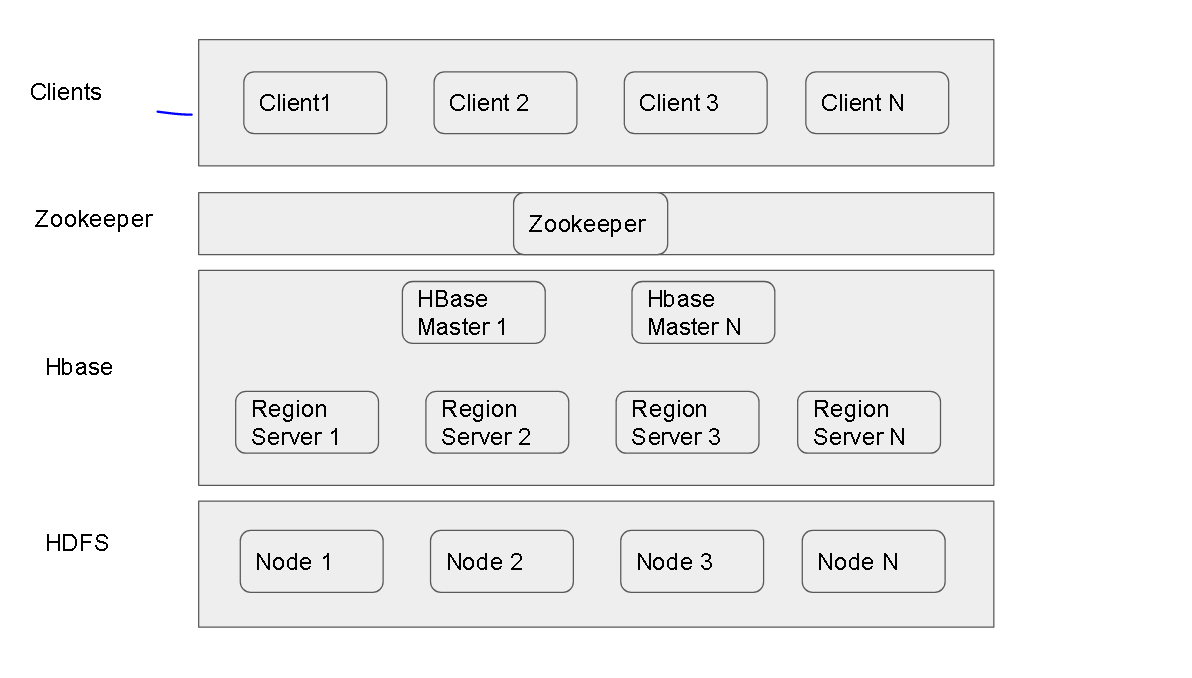
HBase Simplified Architecture
- How to use HBase:
-
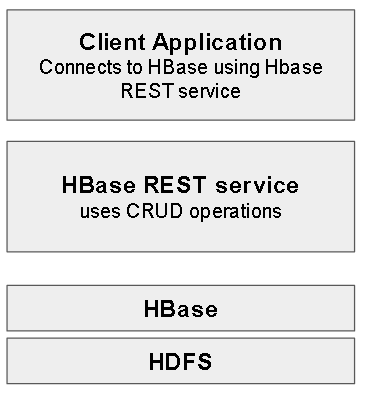
There are multiple ways to access HDFS via HBase using HBase APIs, REST service. - How to make HBase work:
- For the clients to access we also need to open port forwarding to HBase Port 8000 as below
-
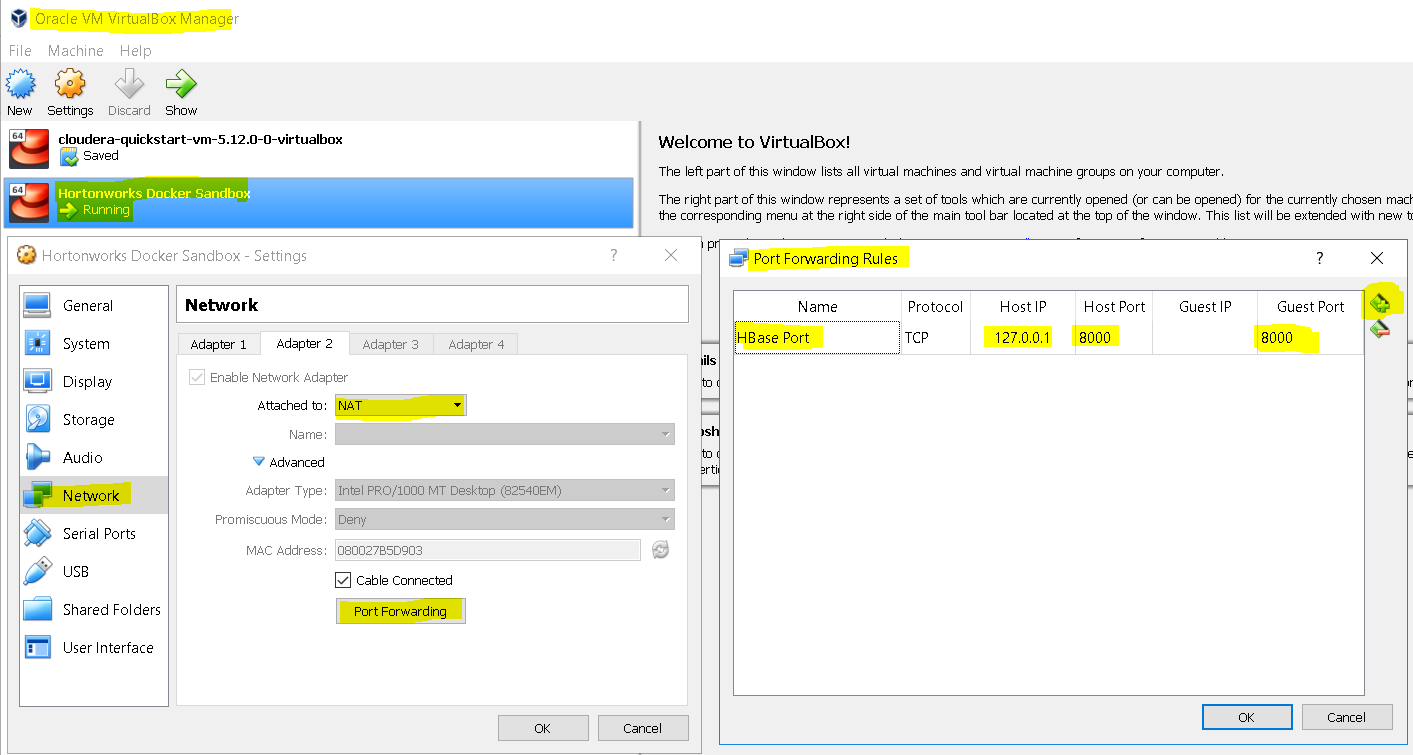
In the VM settings for Hortonwork Ambari Cluster, select ‘Network’, on the Network Adapter’s tab for NAT, select ‘Port Forwarding’ - First start the HBase service as below:
-
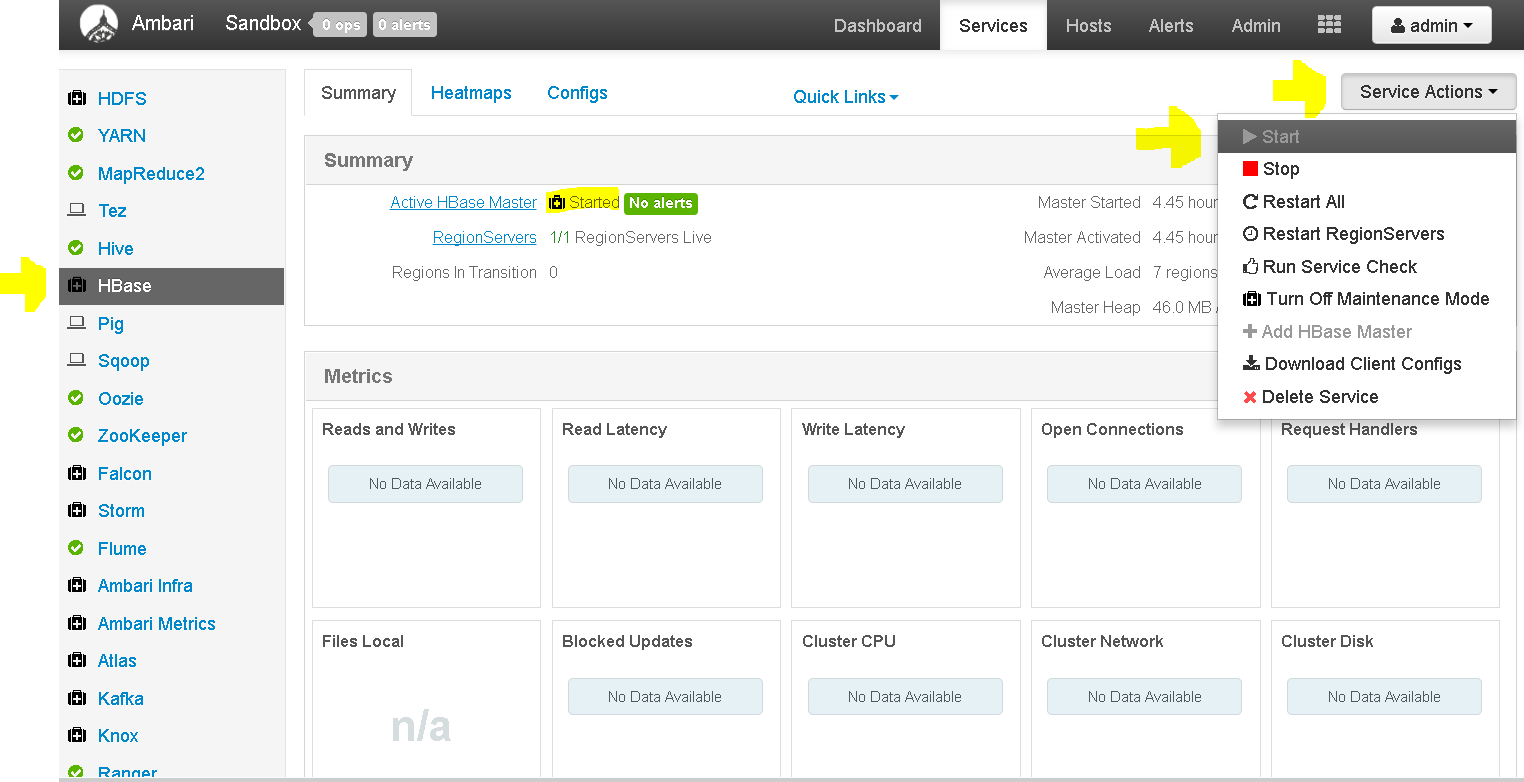
Select service HBase and from the service actions click ‘start’. - Then start the HBase REST service as below:
-

Run HBase REST service using command – /usr/hdp/current/hbase-master/bin/hbase-daemon.sh start rest -p 8000 -infoport 8001
-
- How to run the client for data access using CRUD operations:
- Please download this script on your local machine as well as the u.data file from- https://s3.amazonaws.com/testbucket786786/RatingsDataUsingHBaseREST.py as well as the u.data file from https://s3.amazonaws.com/testbucket786786/u.data
- #if not installed first install starbase in your local system using pip install starbase ( if pip is also not installed then use yum -y install python-pip or apt -y python-pip based on your distro)
from starbase import Connection
#now create a connection to the Hbase Rest Service running at port 8000 on the top of HBase
conn= Connection(“192.168.1.88″,”8000”)
print “Connected to 192.168.1.88 on port 8000\n”
#create a table ratingstest
ratingstest= conn.table(“ratingstest”)
#if ratingstest table exists then drop it
if(ratingstest.exists()):
print “Dropping existing ratingstest table\n”
ratingstest.drop()
#now create a ratings column family – Hbase stores data as key value pairs where value can be a column family
ratingstest.create(“ratings”)
#now open the source data file u.data in read mode , please remind that this file is on yr local machine, not the Ambari cluster
print “Parsing ml-100k ratings data…”
ratingsFile = open (“/home/mnaeem/Dumps/bigdata/datasets/ml-100k/u.data”, “r”)
#starbase interface not only has line commands but also batch commands – and both have CRUD methods
theBatch = ratingstest.batch()
#read the ratings local file
#batch.insert into ratingstest table using key value pair where vale is a column family holding movie id and rating for that user
for theline in ratingsFile:
(userID, movieID, rating, timestamp) = theline.split()
theBatch.insert(userID ,{‘ratings’: {movieID: rating}})
#now close the local file
ratingsFile.close()
#now commit the changes via the batch into the ratingstest tables
print “Committing ratings data to HBase via REST service\n”
theBatch.commit(finalize=True)
# retrive data from Hbase
print “Getting data back from HBase…\n”
print “Does ratingstest table exists :\n”
print ratingstest.exists()
print “Ratings for User 6 : \n”
print ratingstest.fetch(6)
print “Ratings for User 200 : \n”
print ratingstest.fetch(200)
print “Ratings for all users: \n”
print ratingstest.fetch_all_rows()
#finally drop the ratingstest table
ratingstest.drop() -
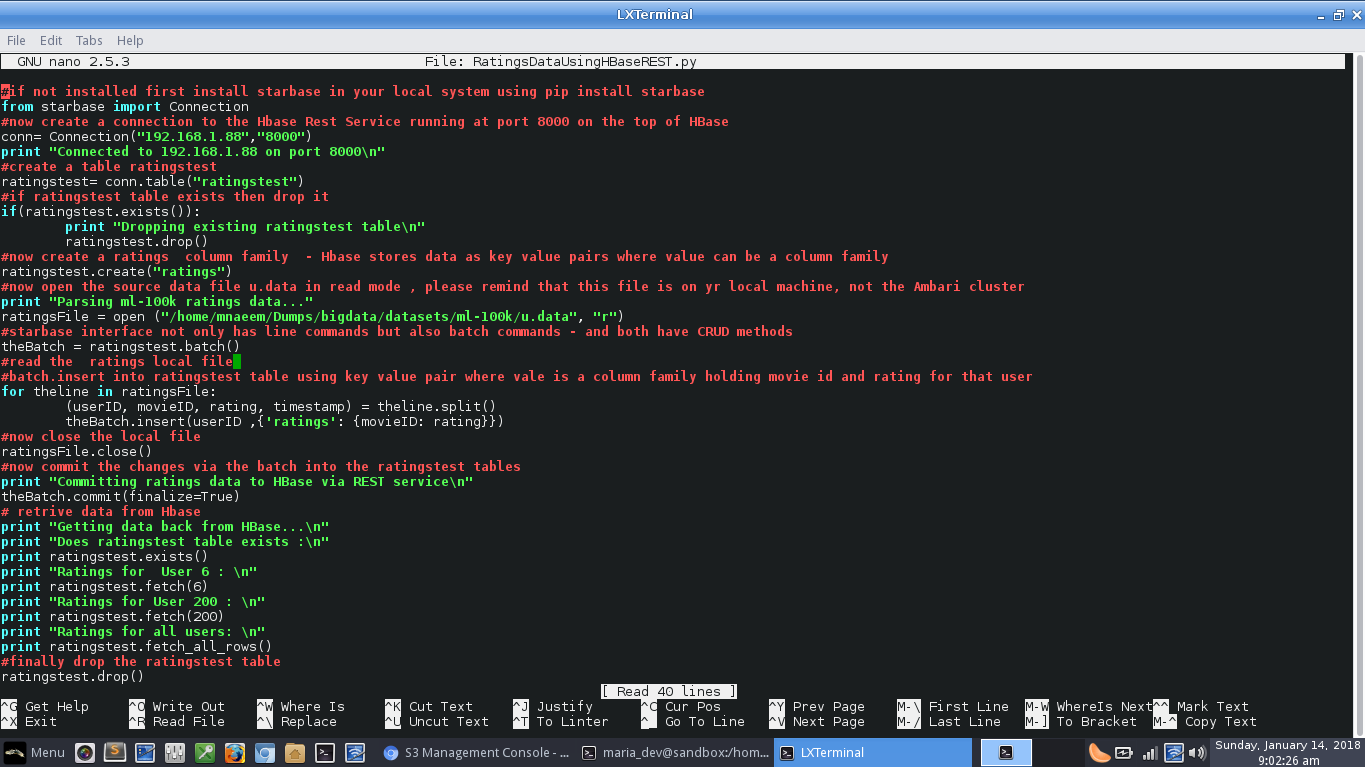
Snapshot of the script - Explanations:
- Hbase REST service allow command – from starbase import Connection – to import Connection module from ‘starbase’ wrapper
- To connect to HBase REST service, specify Host IP and Port which we configured for port forwarding – conn= Connection(“192.168.1.88″,”8000”)
- To create a table – ratingstest= conn.table(“ratingstest”)
- To check all tables which – conn.tables()
- To add a column to a table – tablename.create(“colname”) or tablename.add_column(“colname”)
- To drop a column – tablename.drop_column(“colname”) or tablename.remove(“colname”)
- To drop a table – ratingstest.drop()
- All other commands are enlisted here – https://pypi.python.org/pypi/starbase/0.3.3
- So now lets execute and see Hbase in action
-
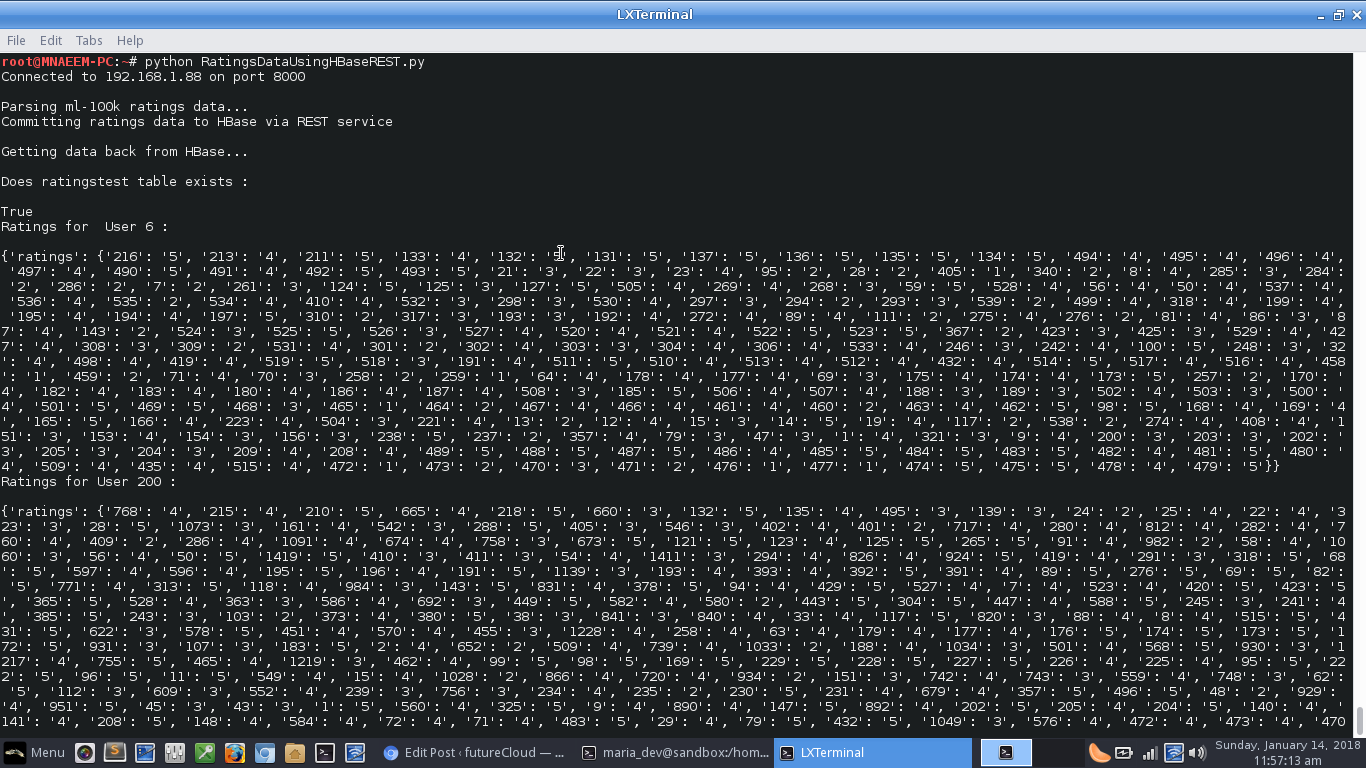
Yay!!!, we connected to HBase REST service, created a table ‘ratingstest’, then inserted the movie ratings per userID in a batch and then finally retrieved the data from HBase
How to Interact with HDFS Using HBase and Python
