
Introduction
- GraphQL enables developers to request only the data they need, optimizing performance and reducing data exchange overhead.
- Combined with Sitecore XM Cloud’s GraphQL support, this becomes a powerful tool for headless CMS architecture.
Key Benefits of GraphQL with Sitecore XM Cloud:
- Flexibility: Retrieve multiple resources in a single request.
- Efficiency: Reduce payload size by fetching only the required fields.
- Scalability: Ideal for modern applications managing dynamic content.
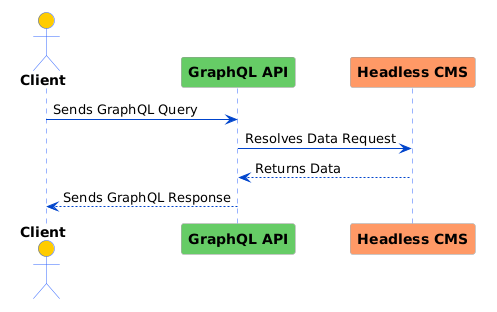
1. Setting Up GraphQL with Sitecore XM Cloud
To begin using GraphQL with Sitecore XM Cloud, follow these steps:
Environment Configuration
- Log in to your Sitecore XM Cloud environment.
- Enable GraphQL Playground:
- Access admin settings and activate the
Sitecore_GraphQL_ExposePlaygroundenvironment variable.
- Access admin settings and activate the
Accessing the GraphQL Playground
- work through to the GraphQL Playground at:
https://<your-instance>/sitecore/api/authoring/graphql/playground/ - Authenticate using your OAuth token to access secured endpoints.
Testing the Setup
Run this query to ensure everything is configured correctly:
query {
 _sitecore { context { language site { name } } }
}
Best Practices:
- Use a staging or development environment for testing.
- Store OAuth tokens securely (e.g., using environment variables).
Common Pitfalls:
- Issue: Forgetting to redeploy after enabling the Playground.
- Solution: Always test basic queries after configuration changes.
Visual Aid: A diagram showing:
- Logging into the environment.
- Enabling the Playground.
- Running a sample query.
2. Querying Content with GraphQL
GraphQL queries are a powerful way to retrieve structured content from Sitecore’s content tree.
Expanded Example Query
Retrieve multiple fields and nested items:
query {
 item(path: "/sitecore/content/home") { id name template { name } children { results { name template { name } } } }
}
Explanation:
item(path: "/sitecore/content/home"): Fetches the root-level item.children: Retrieves nested content for the specified item.
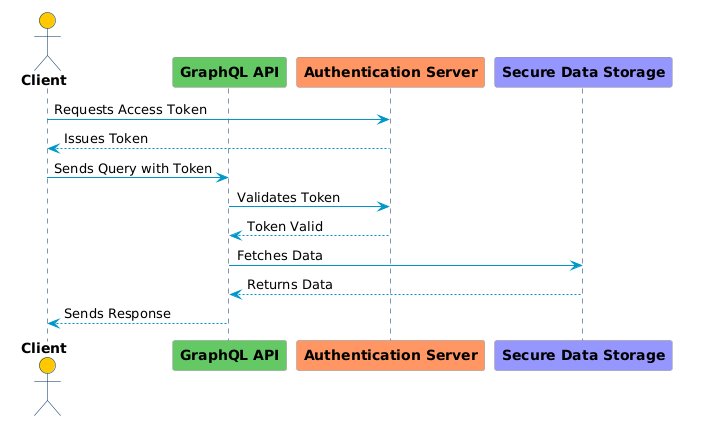
Best Practices
- Use aliases to simplify and organize GraphQL queries:
query {
 home: item(path: "/sitecore/content/home") { id name }
}
Common Pitfalls
- Issue: Querying large datasets without filters.
- Solution: Use pagination to limit results:
query {
 items(first: 10, after: "<cursor>") { edges { node { id name } } }
}
Visual Aid: A tree diagram representing Sitecore’s content structure with an example of parent-child relationships.
3. Performing Mutations
Mutations enable you to update or modify content programmatically.
Expanded Example Mutation
Update an item’s fields:
mutation {
 updateItem( id: "GUID_of_item", fields: [ { name: "Title", value: "Updated Title" }, { name: "Description", value: "Updated Description" } ] ) { id name }
}
Best Practices:
- Implement error handling for failed mutations.
- Validate that templates and field names align with the schema.
Common Pitfalls:
- Issue: Overwriting unintended fields.
- Solution: Use field-level security permissions to limit access.
Visual Aid: A flowchart illustrating the lifecycle of a mutation request and response.
4. Advanced Techniques
4.1 Content Search
Search for content with filters:
query {
 search( query: "article", filters: { field: "template", value: "Article" } ) { results { id name } }
}
Explanation: Filters allow for precise queries by specifying field conditions.
4.2 Media Management
Upload a new media item:
mutation {
 createMediaItem( parentPath: "/sitecore/media library", name: "New Image", mediaStream: "Base64_encoded_media" ) { id mediaUrl }
}
Best Practices:
- use GraphQL subscriptions for real-time content updates (if supported).
- Optimize frequent queries using caching strategies.
Common Pitfalls:
- Issue: Performance degradation from unoptimized queries.
- Solution: Analyze query complexity in the GraphQL Playground.
5. Security Considerations
OAuth Token Management
- Use short-lived tokens and rotate them regularly.
- Store sensitive information securely, e.g., in a secrets manager.
Restrict Access
- Limit the GraphQL schema to expose only necessary operations.
Monitoring
- Log all API requests for auditing.
- Set up alerts for unusual access patterns.
Best Practices:
- Use HTTPS for all API requests.
- Apply rate limiting to prevent abuse.
Common Pitfalls:
- Issue: Sensitive data leakage in error messages.
- Solution: Mask sensitive data in logs and responses.
Visual Aid: An infographic highlighting security layers, from token management to monitoring.
6. Conclusion
- GraphQL offers a flexible and efficient way to manage content in Sitecore XM Cloud, making it a critical tool for building modern, scalable web applications.
- By adhering to best practices and avoiding common pitfalls, you can use the full potential of GraphQL for content management workflows.