
- The Problem:
- We have more than 50 odd servers in production behind the F5 loadbalancer
- In a normal scenario any website uses different data retrieval techniques using different caching techniques.
- A week back we faced a production issue where the cached data was not getting cleared properly on one or two specific servers only.
- Sitecore has an out of the box “No Login Cache Page”(/Diag/NoLoginCache.aspx) to view and manage cache data
- The problem was that you will have to access each of these 50 CD( Contect Delivery) servers and check if cache was cleared properly or not.
- The Challenge:
- We wanted to develop a ‘Cache Diagnostics’ page which will be deployed on the CM(Content Management/Authoring server) which will connect to all these 50 odd CD servers to retrieve the cache information from all these servers and show that data in a tabulated matrix data.
- The Design:
- A achieve the above result, this is what we wanted to design
- expose a service end point on each of these CD servers to retentive cache information from each server
- expose a proxy service endpoint on the CM sites to communicate with these CD servers to retrieve the data data from CD servers
- develop a simple single page( using AngularJS/Ajax) which consumes the service data and shows the information from all these 50 odd servers
- A achieve the above result, this is what we wanted to design
- The Solution:
- Exposing a service end point on CD servers:
- The code is easy and self explanatory.
- Suppose you have multi language multi site Sitecore instance. E.g. You have 2 websites as website 1 and website 2 and both in 2 languages MX and CA.
- [EnableCors(origins: “*”, headers: “*”, methods: “*”)] is used to enable Cross Origin Requests from proxies and clients
- Get the lis aof languages and Websites to retrive only site and language specific caches from the full list of caches as managed by Sitecore.
- Put the info into a dictionary or any complex JSON object as per you requirement.
- I used the routing table to map and update the routes to call my service end point.
-
routeCollection.MapRoute(
name: “Gethtmlcache“,
url: “cachediagnotics/gethtmlcache/{subsidiarylist}“,
defaults: new { controller = “cachediagnotics”, action = “gethtmlcache”, subsidiarylist = UrlParameter.Optional },
namespaces: new[] { “MK.eCommerce.Web.Controllers” }); routeCollection.MapRoute(
name: “GetCachAllServers“,
url: “cachediagnotics/getcacheallservers“,
defaults: new { controller = “cachediagnotics”, action = “getcacheallservers” },
namespaces: new[] { “MK.eCommerce.Web.Controllers” }); routeCollection.MapRoute(
name: “ClearCacheData“,
url: “cachediagnotics/clearcachedata“,
defaults: new { controller = “cachediagnotics”, action = “clearcachedata” },
namespaces: new[] { “MK.eCommerce.Web.Controllers” }); - Please see that I added 3 routes – Gethtmlcache(for getting html cache from CD servers), GetCachAllServers(for the proxy service end point to get cache data from all CD servers) and ClearCacheData(to clear the cache data)
- The server list is iterated through to call the service end point Gethtmlcache and the data retrieve is is hold into a dictionary.
- I also put the data from all server under a key which the is request time, so that I can show that at what time stamp what was the cache info from all servers.
-
using System.Collections.Generic;
using System.IO;
using System.Linq;
using System.Net;
using System.Net.Http;
using System.Web;
using System.Web.Http.Cors;
using System.Web.Mvc; namespace MyProject.Web.Controllers
{
public class CacheDiagnoticsController : GlassController
{
[EnableCors(origins: “*”, headers: “*”, methods: “*”)]
public ActionResult GetHtmlCache(string subsidiaryList)
{
var log = global::Sitecore.Diagnostics.LoggerFactory.GetLogger(“LogFileAppender”);
var dictHtmlCaches = new Dictionary<string, string>();
try
{
// get list of subsidiaries for a specific region
var lstSubsidiaries = subsidiaryList.Split(new[] {‘,’}, StringSplitOptions.RemoveEmptyEntries).ToList(); // get cache from a specific server
var allCaches = Sitecore.Caching.CacheManager.GetAllCaches(); // filter Html cache only based on subsidiary
foreach (var subsidiary in lstSubsidiaries)
{
var htmlCaches = allCaches.Where(t => t.Name.Contains(“.” + subsidiary.ToLower() + “/website1[html]“) | t.Name.Contains(“.” + subsidiary.ToLower() + “/website2[html]“));
foreach (var cache in htmlCaches)
{
if (cache.Name.Contains(“.” + subsidiary.ToLower() + “/website1[html]”))
{
dictHtmlCaches.Add(subsidiary.ToLower() + “-website1“, cache.Size.ToString());
}
else if (cache.Name.Contains(“.” + subsidiary.ToLower() + “/website2[html]”))
{
dictHtmlCaches.Add(subsidiary.ToLower() + “-website2“, cache.Size.ToString());
}
}
} }
catch (Exception ex)
{
log.Info(“CacheDiagnostics.GetHtmlCache. Can’t get the required data, Error Info: ” + ex.Message);
} // serialize and return cache info from the specifc server
var jsonString = JsonConvert.SerializeObject(dictHtmlCaches, new JsonSerializerSettings { ReferenceLoopHandling = ReferenceLoopHandling.Serialize });
return this.Content(jsonString, “application/json”); }
- Exposing a proxy service end point on CM servers to communicate with CD servers :
- As you can see that I am getting the list of servers from a config file.
- GetCacheAllServers is the proxy call to internally call the Gethtmlcache end point
- ClearCacheData is used to clear the cache
-
<configuration xmlns:patch=”http://www.sitecore.net/xmlconfig/”>
<sitecore>
<!–For Cache Diagnostics settings – starts–>
<settings>
<setting name=”SubsidiaryList” value=”MX” />
<setting name=”ServersList” value=”websitehostname1,websitehostname1” />
</settings>
<!–For Cache Diagnostics settings – ends–>
</sitecore>
</configuration> -
using Glass.Mapper.Sc.Web.Mvc;
using Newtonsoft.Json;
using System;
using System.Collections.Generic;
using System.IO;
using System.Linq;
using System.Net;
using System.Net.Http;
using System.Web;
using System.Web.Http.Cors;
using System.Web.Mvc; namespace MK.eCommerce.Web.Controllers
{
public class CacheDiagnoticsController : GlassController
{
[EnableCors(origins: “*”, headers: “*”, methods: “*”)]
public ActionResult GetCacheAllServers()
{
// variable declarations
var log = global::Sitecore.Diagnostics.LoggerFactory.GetLogger(“LogFileAppender”);
var serversList = Sitecore.Configuration.Settings.GetSetting(“ServersList”);
var subsidiaryList = Sitecore.Configuration.Settings.GetSetting(“SubsidiaryList”); try
{
List<string> lstServers = new List<string>();
Dictionary<string, object> dictData = new Dictionary<string, object>(); // get te list of servers
if (!string.IsNullOrWhiteSpace(serversList))
{
var arrServers = serversList.Split(new[] { ‘,’ }, StringSplitOptions.RemoveEmptyEntries).ToList();
foreach (var server in arrServers)
{
lstServers.Add(server);
}
}
else
{
lstServers.Add(System.Environment.MachineName);
} // call the service to get cache info from the server
string result = string.Empty;
foreach (var serverName in lstServers)
{
var serviceUrl = “http://” + serverName + “/cachediagnotics/gethtmlcache/” + subsidiaryList.ToLower(); var request = (HttpWebRequest)WebRequest.Create(serviceUrl); request.Method = “GET”;
request.AutomaticDecompression = DecompressionMethods.Deflate | DecompressionMethods.GZip;
ServicePointManager.SecurityProtocol = SecurityProtocolType.Tls12; try
{
result = string.Empty; using (var response = (HttpWebResponse) request.GetResponse())
{
using (var stream = response.GetResponseStream())
{
using (var sr = new StreamReader(stream))
{
result = sr.ReadToEnd();
dictData.Add(serverName, JsonConvert.DeserializeObject<Dictionary<string, string>>(result));
}
}
}
}
catch (Exception ex)
{
dictData.Add(serverName, new Dictionary<string, object>());
log.Info(“CacheDiagnostics.GetCacheAllServers. Can’t connect to server ” + serverName + “, Error Info: ” + ex.Message);
}
} // get cache info from a cookie/session
var diagnosticCache = Session[“DiagnosticCache”] as Dictionary<string, object>; // if there is already exisiting data then add the current data else just show this data
if (diagnosticCache != null && diagnosticCache.Count > 0)
{
diagnosticCache.Add(DateTime.Now.ToString(“MM/dd/yyyy HH:mm:ss.fff tt”), dictData);
}
else
{
diagnosticCache = new Dictionary<string, object>();
diagnosticCache.Add(DateTime.Now.ToString(“MM/dd/yyyy HH:mm:ss.fff tt”), dictData);
} // write the data back into the Session
Session[“DiagnosticCache”] = diagnosticCache; // serialize and return cache info to be consumed by clients
var jsonString = JsonConvert.SerializeObject(diagnosticCache, new JsonSerializerSettings { ReferenceLoopHandling = ReferenceLoopHandling.Serialize });
return this.Content(jsonString, “application/json”);
}
catch (Exception ex)
{
log.Info(“CacheDiagnostics.GetCacheAllServers. Can’t get required data, Error Info: ” + ex.Message);
return null;
}
} [EnableCors(origins: “*”, headers: “*”, methods: “*”)]
public ActionResult ClearCacheData()
{
var log = global::Sitecore.Diagnostics.LoggerFactory.GetLogger(“LogFileAppender”);
try
{
// write blank data back into the Session
var diagnosticCache = new Dictionary<string, object>();
Session[“DiagnosticCache”] = diagnosticCache; // serialize and return cache info to be consumed by clients
var jsonString = JsonConvert.SerializeObject(diagnosticCache, new JsonSerializerSettings { ReferenceLoopHandling = ReferenceLoopHandling.Serialize });
return this.Content(jsonString, “application/json”);
}
catch (Exception ex)
{
log.Info(“CacheDiagnostics.ClearCacheData. Can’t get required data, Error Info: ” + ex.Message);
return null;
}
}
}
}
- Developing and AngularJS page on CM servers to consume and show info:
- Once you have the data in a specific format, you can use AngularJS to call and consume the proxy endpoint to get the data and show
- The angular page is very simple
- It calls – $http.get(“/cachediagnotics/getcacheallservers”) to return all CD servers cache info and then use ng-repeat expressions to iterate through the cache data.
-
<%@ Page Language=”C#” AutoEventWireup=”true” CodeBehind=”CacheDiagnostics.aspx.cs” Inherits=”MyProject.Web.Diag.CacheDiagnostics” %> <!DOCTYPE html>
<html>
<head>
<title>Cache Diagnostics</title>
https://ajax.googleapis.com/ajax/libs/angularjs/1.5.7/angular.min.js
https://ajax.googleapis.com/ajax/libs/jquery/3.1.0/jquery.min.js
<style>
body {
font-family: Helvetica, Arial, Sans-Serif, Verdana;
font-size: 12px;
} table {
width: auto;
float: left;
border-spacing: 1;
align-content: center;
} #tblDetails td, #tblDetails th {
border: 1px solid #CCC;
height: auto;
width: auto;
text-align: center;
} #tblDetails th {
background: silver;
} #tblDetails td {
background: whitesmoke;
} #tblMatrix td, #tblMatrix th {
border: 1px solid #CCC;
height: auto;
width: auto;
text-align: center;
} #tblMatrix th {
background: silver;
} #tblMatrix td {
background: whitesmoke;
} #tblMain td, #tblMain th {
border: 1px solid #CCC;
height: auto;
width: auto;
text-align: left;
} #tblMain th {
background: silver;
} #tblMain td {
background: whitesmoke;
} </style> angular.module(‘CacheDiagnosticsApp’, [])
.controller(‘GetHtmlCache’, function ($scope, $http) {
$(“#tblMain”).hide(); // get cache info
$scope.getCacheInfo = function () {
// call the proxy server method to get cache data
var dictDataMatrix = {}
$http.get(“/cachediagnotics/getcacheallservers”)
.then(function (response) {
//process dictDataMatrix to compare the last two rows and flag any mismatches
$scope.dictDataMatrix = response.data;
});
$(“#tblMain”).show();
}; // reset cache info
$scope.clearCacheInfo = function () {
$http.get(“/cachediagnotics/clearcachedata”)
.then(function (response) {
$scope.dictDataMatrix = response.data;
});
$(“#tblMain”).hide();
}; }); </head>
<body ng-app=”CacheDiagnosticsApp”>Cache Diagnostics Matrix Clear Cache Diagnostics Info
Get Cache Diagnostics InfoRequest DateTime Server Data ng-repeat=”(requesttime, serverdata) in dictDataMatrix track by requesttime”> {{requesttime | date : “short”}} {{servername}} {{cachename}} {{(cachesize.replace(‘*’,”))/1000|number}} KB </body>
</html>
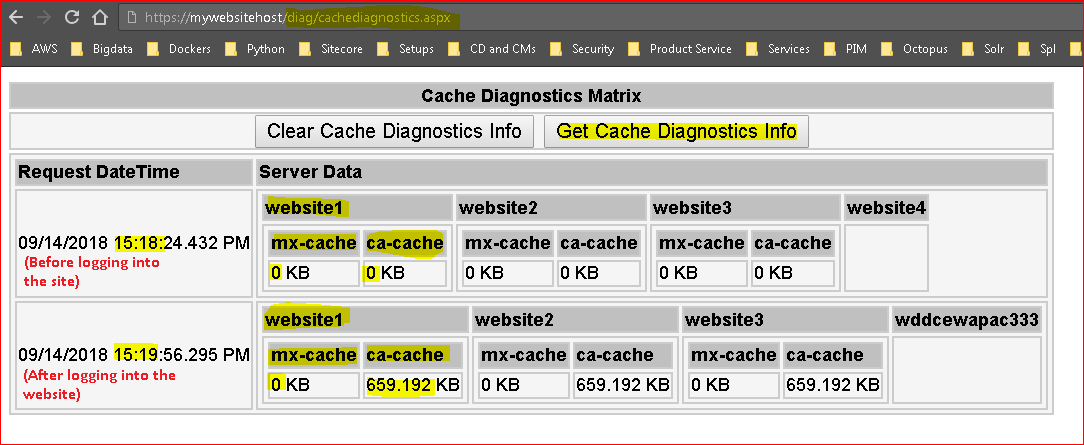
- and here you go, see the output
- You can see the cache values from 4 CD servers before logging into CD sites( all zeros). The after logging in when the websites generate cache data the values change.
- From the values you can also tell that Ca-cache is getting generated meaning that canada site is getting accessed and all 3 servers are being used behind the F5 load balancer.
- It also gives an indication that server 4 is either offline or no in the app pool mix on the load balancer.
- So this page has become a lot handy for us to see the caching behavior of our CD sites behind the load balancer.
- From the info below we can report to the DEVOps that website4 is not returning cache data so that they can investigate.
- Is that helpful for you?
- Exposing a service end point on CD servers: