Why?
- Sitecore has released a new Sitecore publishing module which is a vast improvement over its old “Sitecore Publish” option.
- It is now an independent service running in IIS with its security credentials
- Its helps-
- publish items faster, specially
- bulk publishing
- repair publish
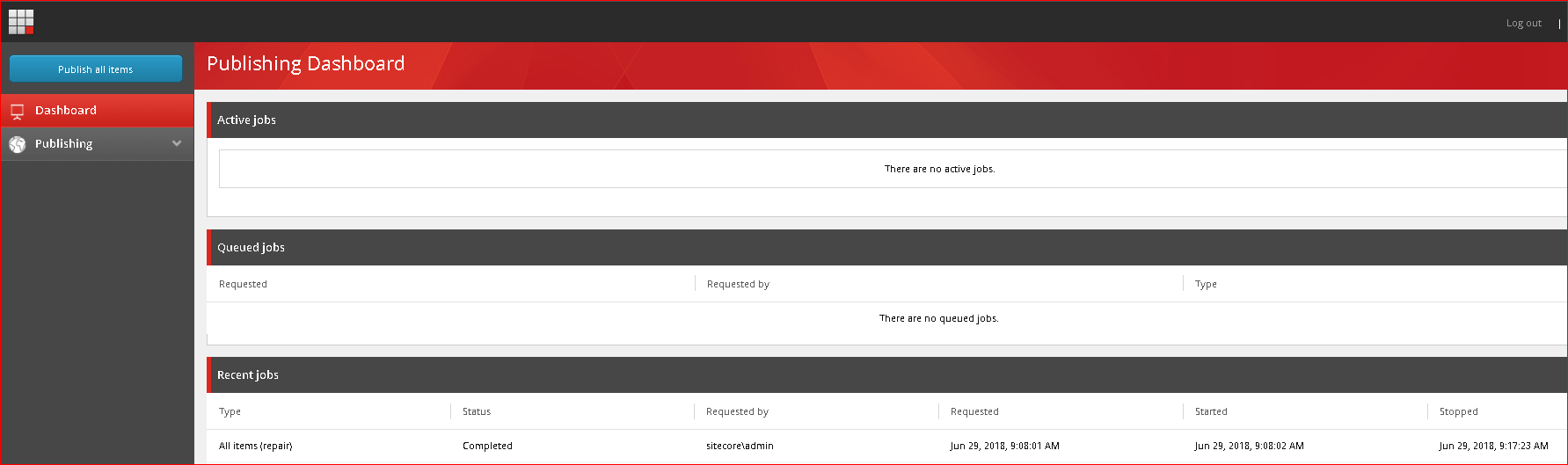
- has a better user interface and tells which publishes are complete or in queue, who ran the publish and what items are being published
- It consists of-
- Publishing Host – an independent service under IIS for publishing the items
- Publishing Module – The user interface
How to automate or setup?
- Its consists of steps which you can run manually or automate using PowerShell or any other language. I am using the automated process using a PowerShell file
- The 4 major steps in setup or automation:
- Installing DotNetCore module
- Installing Publishing Host
- Installing Publishing Module
- Setup database user permissions
- Update database schema and Add Database user
- Please download this file and save it on your local server – https://testbucket786786.s3.amazonaws.com/sitecore/Publishing%20Service%20Setup/PublishingServiceSetup.ps1
- Execute by typing .\PublishingServiceSetup.ps1
- Now run the publishing service from the Sitecore control panel
- You can see the new publishing service UI now
- The code and its explanation(inline in the code) –
-
#requires -version 4.0
#requires -RunAsAdministrator
import-module webadministration # This script must be executed after you have installed a working Sitecore Instance & {iisreset} ########################################################################################################## # Step 1 – Installation of DotNetCore module – it will install the .DotNetCore module and its prerequisites
# required prerequisites and the .DonetCore module are at the location – https://testbucket786786.s3.amazonaws.com/sitecore/Publishing%20Service%20Setup/Softs/
$theSoftwareSource=’https://testbucket786786.s3.amazonaws.com/sitecore/Publishing%20Service%20Setup/Softs’ # website Names
$sitecoreInstanceName = “TheSitecoreWebsiteName” # change the “TheSitecoreWebsiteName” to the actual website Name
$publishingWebsiteName= “ThePublishWebsiteName” # change the “ThePublishWebsiteName” to the actual publish website Name #web sites Paths
$sitecoreInstancePath = “D:\Sitecore\$sitecoreInstanceName”
$publishingWebsitePath = “D:\Sitecore\publishingWebsiteName” # app pool user names
$theWebsiteAppPoolUserName = IIS AppPool\websitename.com # this the the name of the IIS App pool website username
$thePublishWebsiteAppPoolUserName = IIS AppPool\publish.website.com # this the the name of the IIS App pool publish username function InstallPackage($theFolder, $thePackage){ $theProcess = Start-Process $thePackage -WorkingDirectory $theFolder -ArgumentList “/q /norestart” -Verb RunAs -Wait -PassThru
if ($theProcess.ExitCode -eq 0) {
Write-Host “Installation completed for package: $thePackage”
}
else {
Write-Error “An error was encountered during the installation. .NET Release after installation of package: $thePackage”
} } $theDotNetCoreHostingModule = Get-WebGlobalModule | where-object { $_.name.ToLower() -eq “aspnetcoremodule” }
if (!$theDotNetCoreHostingModule)
{
Write-Host “Installing .Net Core Module” $theDestination=’D:\PublishingDServicesSofts’
Copy-Item -Recurse -Filter *.* -path $theSoftwareSource -destination $theDestination -Force $workingDirectory = “D:\deploy\Installers\publishing service”
$theVCRedistPackage = “vc_redist.x64.exe”
$theDotNetCoreRuntimePackage = “dotnet-win-x64.1.1.2.exe”
$theDetNetCoreHostingPackage = “DotNetCore.1.0.5_1.1.2-WindowsHosting.exe” InstallPackage $workingDirectory $theVCRedistPackage
InstallPackage $workingDirectory $theDetNetCoreHostingPackage }
else {
Write-Host “.DontNetCore installation successful”
} ########################################################################################################## # Step 2 – Installation of Publishing service Host RemovePublishingServiceWebsite
CreatePublishingServiceWebsite “admin” “b” # this would be a non admin/b credentials for non default/local instances
DeployPublishingServiceFiles function RemovePublishingServiceWebsite() {
$SitecoreWebsiteInstanceName = $sitecoreInstanceName
# removing web site from IIS
if (test-path “IIS:\Sites\$SitecoreWebsiteInstanceName”) {
write-host “Removing Website $SitecoreWebsiteInstanceName”
& “$($env:windir)\system32\inetsrv\AppCmd.exe” Stop Site “`”$SitecoreWebsiteInstanceName`””
remove-website -name “$SitecoreWebsiteInstanceName”
} # removing app pool from IIS
if (test-path “IIS:\AppPools\$SitecoreWebsiteInstanceName”) {
write-host “Removing AppPool $SitecoreWebsiteInstanceName”
& “$($env:windir)\system32\inetsrv\AppCmd.exe” Stop AppPool “`”$SitecoreWebsiteInstanceName`””
remove-webapppool -name “$SitecoreWebsiteInstanceName”
} & {iisreset}
} function DeployPublishingServiceFiles() {
$sitecoreInstanceRoot = sitecoreInstancePath
if (!(test-path $sitecoreInstanceRoot)) {
unzip $($theSoftwareSource\\Sitecore Publishing Service 2.1.0 rev. 171009.zip) $sitecoreInstanceRoot
unzip $($theSoftwareSource\\Sitecore Publishing Module 2.1.0 rev. 171009.update) $sitecoreInstanceRoot
}
} function CleanPublishingServiceBindings() {
$SitecoreWebsiteInstanceName = sitecoreInstanceName
$website = get-website |? { $_.name -eq $SitecoreWebsiteInstanceName -and $_.bindings.collection.count -ne 0 }
if ($website) { get-webbinding -name $SitecoreWebsiteInstanceName | remove-webbinding }
} function UpdatePublishingServiceBindings([hashtable] $config) {
$sitecoreInstanceRoot = sitecoreInstancePath
$SitecoreWebsiteInstanceName = sitecoreInstanceName
$hostNames = sitecoreInstanceName & “$($env:windir)\system32\inetsrv\AppCmd.exe” Stop Site “`”$SitecoreWebsiteInstanceName`”” # remove bindings
CleanPublishingServiceBindings # create bindings
write-host “Creating bindings for $SitecoreWebsiteInstanceName”
new-webbinding -name $SitecoreWebsiteInstanceName -protocol http -port 80 -ipaddress “*” -hostheader $config.hostNames[0] & “$($env:windir)\system32\inetsrv\AppCmd.exe” Start Site “`”$SitecoreWebsiteInstanceName`””
#start-website $SitecoreWebsiteInstanceName
}
function CreatePublishingServiceWebsite([string] $theWebsiteAppPoolUserName, [string] $runtimeAccountPassword) {
$sitecoreInstanceRoot = sitecoreInstancePath
$SitecoreWebsiteInstanceName = sitecoreInstanceName # remove existing site if it exists
RemovePublishingServiceWebsite # create app pool
write-host “Creating app pool for $SitecoreWebsiteInstanceName” $appPool = “IIS:\AppPools\$SitecoreWebsiteInstanceName”
new-webAppPool -name “$SitecoreWebsiteInstanceName” $pool = get-item $appPool
$pool.startMode = ‘AlwaysRunning’
set-item $appPool $pool set-itemProperty -Path $appPool -Name managedRuntimeVersion -value “”
set-itemProperty -Path $appPool -Name recycling.disallowOverlappingRotation -Value $true
set-itemProperty -Path $appPool -Name processModel.idleTimeout -value ([TimeSpan]::FromMinutes(0))
set-itemProperty -Path $appPool -Name recycling.periodicrestart.time -value ([TimeSpan]::FromMinutes(0)) # set the app pool identity
if ([string]::IsNullOrEmpty($theWebsiteAppPoolUserName) -or [string]::IsNullOrEmpty($runtimeAccountPassword)) {
set-itemProperty -path $appPool -Name processModel.identityType -Value 4 # AppPoolIdentity
} else {
set-itemProperty -Path $appPool -Name processModel.identityType -Value 3 # Specific User
set-itemProperty -Path $appPool -Name processModel.userName -Value $theWebsiteAppPoolUserName
set-itemProperty -Path $appPool -Name processModel.password -Value $runtimeAccountPassword
} # create web site
write-host “Creating website $SitecoreWebsiteInstanceName”
$id = (dir iis:\sites | foreach {$_.id} | sort -Descending | select -first 1) + 1
new-webSite -name $SitecoreWebsiteInstanceName -physicalpath “$sitecoresitecoreInstanceRoot” -port 80 -applicationpool $SitecoreWebsiteInstanceName -Id $id # update bindings
UpdatePublishingServiceBindings
} ########################################################################################################## # Step 3 – Add Database users $dbInstance = “.” # referes to the current default local instance, for non-local instances, give actual name of the named db instance
$dbServer = new-object Microsoft.SqlServer.Management.Smo.Server($sqlConfig.server) AddDatabaseUser $dbServer core $thePublishWebsiteAppPoolUserName
AddDatabaseUser $dbServer master $thePublishWebsiteAppPoolUserName
AddDatabaseUser $dbServer web $thePublishWebsiteAppPoolUserName
AddDatabaseUser $dbServer preview $thePublishWebsiteAppPoolUserName
AddDatabaseUser $dbServer reporting $thePublishWebsiteAppPoolUserName function AddDatabaseUser($databaseServer, $databaseName, $userName)
{
if (test-database $databaseServer $databaseName) {
# if login doesn exist at the database level the create it
if (!(($databaseServer.logins).Name -contains $userName)) {
write-host “Adding database user $userName”
$login = new-object Microsoft.SqlServer.Management.Smo.Login($databaseServer,$userName)
$login.loginType = ‘WindowsUser’
$login.create()
} # add the user to the database
$db = $databaseServer.databases[$databaseName]
if (!(($db.users).Name -contains $userName)) {
write-host “Adding $userName to database $databaseName”
$user = new-object Microsoft.SqlServer.Management.Smo.User($db,$userName)
$user.login = $userName
$user.create() # grant db_owner permissions
write-host “Adding db_owner permission for $userName to database $databaseName”
$db.roles[‘db_owner’].addMember($userName)
}
} else {
write-warning “$databaseName does not exist”
}
} ########################################################################################################## # Step 4 – Update Database schema
if(test-path $publishingWebsitePath) {
write-host “Updating Schema by executing $publishingWebsitePath\Sitecore.Framework.Publishing.Host.exe schema upgrade –force”
Invoke-Expression “$publishingWebsitePath\Sitecore.Framework.Publishing.Host.exe schema upgrade –force”
& {iisreset}
} ##########################################################################################################
# Step 5 – Update Publishing service UI
$thePublishingServiceFilesSource=’$theSoftwareSource/Sitecore_PublishingService_files.7z’
if ((test-path “$sitecoreInstancePath\website”)) {
write-host “Copying Publishing service files to $sitecoreInstancePath\website”
unzip $thePublishingServiceFilesSource “$sitecoreInstancePath\website”
} & {iisreset} ##########################################################################################################
-