- Requirement:
- Setup Apache and NGinx server using docker
- Strategy:
- First of all create source folders and html files for Apache and NGinx on the host drive so that it is used as mount/volume for the Apache and NGinx containers respectively
- Use docker run command with -v and -p options to specify the volume and port mapping
- Test the containers
- Solution:
- If you have not installed docker on your system then first do that
-
#Use the below baseURL for your specific distro in the docker.repo file below
CentOS6/RHEL6: https://yum.dockerproject.org/repo/main/centos/6
CentOS7/RHEL7: https://yum.dockerproject.org/repo/main/centos/7
Fedora20: https://yum.dockerproject.org/repo/main/fedora/20
Fedora21: https://yum.dockerproject.org/repo/main/fedora/21
Fedora22: https://yum.dockerproject.org/repo/main/fedora/22 cat >/etc/yum.repos.d/docker.repo <<-EOF
[dockerrepo]
name=Docker Repository
baseurl=https://yum.dockerproject.org/repo/main/centos/7
enabled=1
gpgcheck=1
gpgkey=https://yum.dockerproject.org/gpg
EOF yum -y update && yum -y install docker-engine sudo usermod -aG docker $USER
cat /etc/group | grep docker sudo chown “$USER”:”$USER” /home/”$USER”/.docker -R
sudo chmod g+rwx “/home/$USER/.docker” -R
-
- Create source folders and html files for Apache and NGinx on the host
-
rootPath=$(pwd)
hostNginxPath=”$rootPath/docker/www/nginx”
containerNginxPath=”/usr/share/nginx/html”
hostNginxHtml=”$rootPath/docker/www/nginx/index.html”
hostHttpdPath=”$rootPath/docker/www/httpd”
hostHttpdHtml=”$rootPath/docker/www/httpd/index.html”
containerHttpdPath=”/usr/local/apache2/htdocs” test -d $hostNginxPath && echo “$hostNginxPath exists, continuing…” || echo “$hostNginxPath does not exist, creating…” && mkdir -p $hostNginxPath
echo ”
<html>
<head>
<title>Custom test page – My NGinx Server… </title>
</head>
<body>
<hr/>
<h1>This is a custom test page from My NGinx Server…</h1>
<hr/>
</body>
</html>
” > $hostNginxHtml
cat $hostNginxHtml test -d $hostHttpdPath && echo “$hostHttpdPath exists, continuing…” || echo “$hostHttpdPath does not exist, creating…” && mkdir -p $hostHttpdPath
echo ”
<html>
<head>
<title>Custom test page – My Httpd Server… </title>
</head>
<body>
<hr/>
<h1>This is a custom test page from My Httpd Server…</h1>
<hr/>
</body>
</html>
” > $hostHttpdHtml
cat $hostHttpdHtml
-
- Use docker run command with -v and -p options
-
docker stop $(docker ps -a -q)
docker rm $(docker ps -a -q)
docker rmi $(docker images -q)
docker run -d –name mynginxserver -p 8080:80 -v $hostNginxPath:$containerNginxPath nginx:latest
docker exec mynginxserver cat $containerNginxPath/index.html
docker run -d –name myhttpdserver -p 8090:80 -v $hostHttpdPath:$containerHttpdPath httpd:latest
docker exec myhttpdserver cat $containerHttpdPath/index.html
-
- Test the containers
-
curl http://localhost:8080
curl http://localhost:8090 docker images
docker ps -a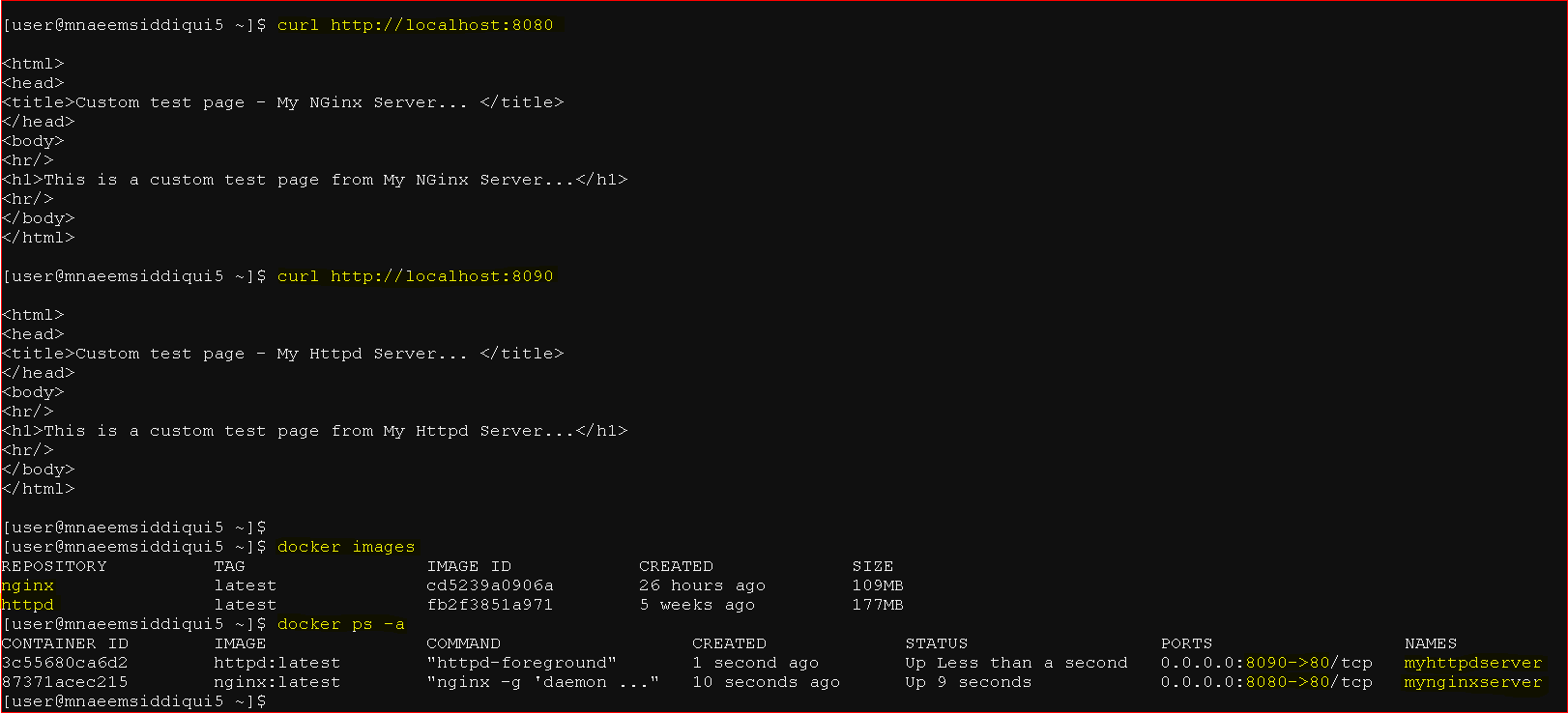
-
- If you have not installed docker on your system then first do that
Dockers 101 – Series 9 of N – How to Setup Apache and NGINX Server Using Docker
