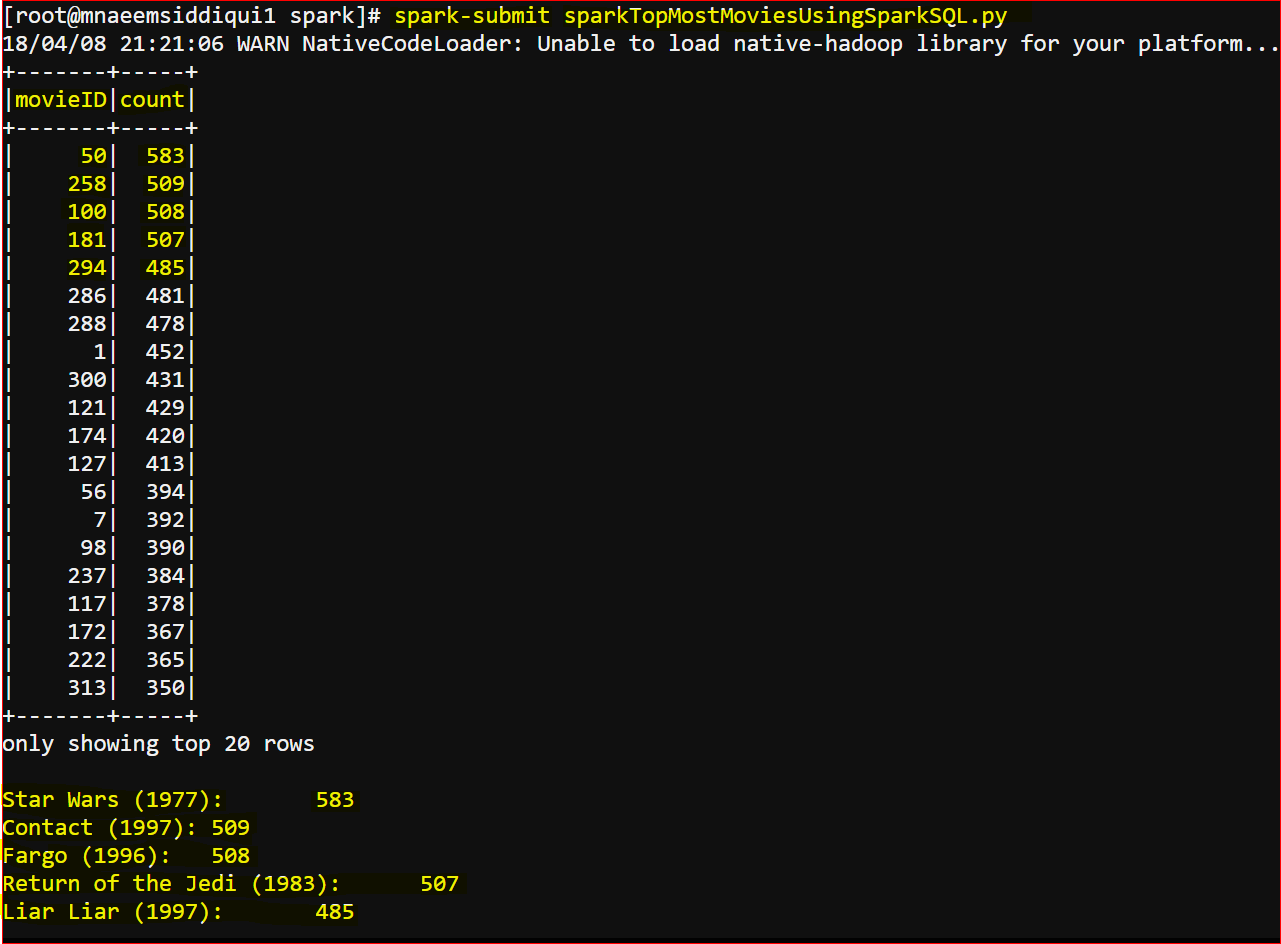
Problem:
- Analyse the Most Popular Movie in a more optimized way:
- Spark Core has efficient mapper, reducer and event functions to analyse a complex data BUT
- to get the output we used to a lot of logic to create key value pairs,
- lot of lambda operations to aggregate the data etc
- we were using data not in a structured format which can be used to optimize the queries as well as exporting or importing to and fro other databases would get a lot easier
- Spark Core has efficient mapper, reducer and event functions to analyse a complex data BUT
Strategy:
- In addition to Spark Core we will use SparkSQL
- to give a structure to the data we use SparkSQL
- We will use two terms a lot – Dataframes and Datasets
- DataFrame –
- schema view of an RDD.
- In RDD each row is a Key value pair
- In DataFrame each is a Row Object
- DataSet –
- object(OOPS) view of an RDD.
- In DataSet each is a Named Row object
- means a Dataset is a named DataFrame as a type object
- Advantages of using Spark SQL
- abstracts the internal intricacies of a RDD by exposing APIs to handle the data
- can be extended by using user defined functions
- If each line is a Row object you can use the power of SQL like querying to process data across a cluster as if it was a single database
- export import data using JDBC, JSON etc
Solution:
- Explanation of the code
- Row Object: See how instead of returning a key-value pair its is returning a Row Object where column name is movieID. So this RDD will hold one column where it stores movie IDs
-
# python function to return a Ratings Row Object
def processRatings(line):fields = line.split()
mvID = int(fields[1])
return Row(movieID = mvID)
-
- DataFrame: See how a Row based RDD is converted to a DataFrame
-
ratingsDataset = session.createDataFrame(ratings)
-
- Processing DataFrame: see in one line we are applying SQL like logic to process the data by using functions like group By, count, orderBy etc
-
topMostMovieIDs = ratingsDataset.groupBy(“movieID”).count().orderBy(“count”, ascending=False).cache()
-
- Spark SQL like statements:
-
ratings.createOrReplaceTempView(“tblRatings”)
-
spark.sql(“SELECT top 5 movieID, count(movieID) FROM tblRatings groupby movieID order by count”)
-
- Row Object: See how instead of returning a key-value pair its is returning a Row Object where column name is movieID. So this RDD will hold one column where it stores movie IDs
- Please down the code from either of these locations:
- wget https://testbucket786786.s3.amazonaws.com/spark/sparkTopMostMoviesUsingSparkSQL.py
- wget https://testbucket786786.s3.amazonaws.com/spark/sparkTopMostMoviesUsingSparkSQLQuery.py
- OR
- git clone https://gist.github.com/naeemmohd/1d645ccdef3cbb0d564fe4cb483810af
- OR
-
# import SparkSession, Row and functions from puspark.sql module
from pyspark.sql import SparkSession
from pyspark.sql import Row
from pyspark.sql import functions # python function to return a Movie Dictionary
def processMovies():movies = {}
with open(“/home/user/bigdata/datasets/ml-100k/u.item”) as mfile:for line in mfile:
fields = line.split(“|”)
movieID = int(fields[0])
movieName= fields[1]
movies[movieID]= movieNamereturn movies
# python function to return a Ratings Row Object
def processRatings(line):fields = line.split()
mvID = int(fields[1])
return Row(movieID = mvID)#python function to print results
def printResults(results):for result in results:
print(“\n%s:\t%d ” %(moviesDictionary[result[0]], result[1]))
# create a SparkSession
session = SparkSession.builder.appName(“MostPopularMovies”).getOrCreate() # load the movies
moviesDictionary = processMovies() # load the ratings Row Objects
rawData = session.sparkContext.textFile(“/home/user/bigdata/datasets/ml-100k/u.data”) # conevert the ratings to an RDD of Row objects
ratings = rawData.map(processRatings) # convert the ratings Row Objects into an RDD
ratingsDataset = session.createDataFrame(ratings) # process the Dataframe
topMostMovieIDs = ratingsDataset.groupBy(“movieID”).count().orderBy(“count”, ascending=False).cache() # show all topMostMovieIDs
topMostMovieIDs.show() # collect and display results for topmost 25 movies
topMost5MovieIDs = topMostMovieIDs.take(5) # print the Movie Names with ratins count
printResults(topMost5MovieIDs) # close the spark sessions
session.stop()
The Output: