
What is Docker?
- As per the docker documentation –
- Docker:
- is a platform to develop, deploy and run application using a concept called as containerization.
- Containerization:
- uses images and containers which Scalable, Portable, Flexible, Lightweight, Stackable, Interchangeable making software development, deployment(CI-CD i.e. Continuous Integration and Continuous Delivery) and execution of application seamless
- Images:
- are executable packages which contains the everything to run an application – the code, run-time, libraries or dependencies, configuration files, environmental variables.
- Containers:
- are the run-time instances of the image which runs in a docker environment.
- It means that containers have a state and they run in memory while images are the blueprints. The analogy can be similar to a class and its objects.
- If use the ps command – docker ps – you can see a container running as a process on the docker host.
- Docker:
Docker Vs Virtual Machines(VMs)
- Please see this image snapshot to understand difference between docker and VM:
- Virtual Machines(VMs):
- They use a full blown VM OS which uses resources more than it might need as each VM will have a definite defined memory, hard disk, network etc
- It uses a technology Hypervisor to abstract or simulate the host machines resources as memory, storage, CPU etc, that is why they VMs are slower to setup.
- Dockers:
- The container share the resources assigned to docker on the OS, so no container will use more resources than needed.
- Its lightweight as it does not use a fully blown OS.
- Faster to setup
- Below is a snapshot clarify
What dockers can do for us?
- Scanario 1 – Imagine you have to deploy a highly scalable and highly available website behind a load balancer with a fleet of multiple web servers , applications servers and database server. Imagine you have do the following
- Manually Install all that is required:
- install the guest OS first e.g Linux, then Apache the web server, MySQL the database server, PHP or Python etc to process the application code.
- Imagine if you have to manually to do this on 100s or 1000s of server????????
- Automate using script
- write shell scripts to install Linux, Apache, MySQL, PHP or Python etc
- copy these scripts to the specific servers to execute on boot up.
- Imagine if you have to use scripts to do this on 100s or 1000s of server????????
- Use an Orchestrator tool like Docker, Kubernetes etc to do this for using a orchestration file. So now installing software, dependencies to run an application is not a tedious error prone activity but it has been now limited to the orchestration file. In Docker terms its is called a Dockerfile.
- Manually Install all that is required:
- Scanario 2 – Now imagine you are constantly doing lot of changes and you have constantly deploy it to servers from scratch, you will have to download, install and configure everything from Linux, Apache, MySQL, PHP/Python. How will you manage if your company can’t afford large down times also it will take lot of time
- In Docker world, docker uses images and containers and also uses caching and layered approach.
- It first searches for an image locally or from cache, if it does not find it then only it downloads it from repository(called a dockerhub)
- You can first pull the base image first (say for Linux), then build over it as containers where 1 container will hold 1 responsibility e.g a container will have database, another one the Apache, the third one your application code if we think of a 3 tier application.
- An image downloaded once is cached and can be used by multiple containers
- You can use orchestration tools like docker-compose, kubernetes to orchesrtate development, deployment and running of your application.
Features and Architecture of Docker:
- Features:
- Immutability – the images are immutable, they don’t change unless you make changes and build and deploy another image
- Disposibility – images are disposable so that you can create another one after disposing curret one
- SRP(Single Responsibility Principle) – each image holds a single responsibility e.g. in a three tier application, it would be ideal to have 3 images to represent the front end , business layer and database layer
- Architecture:
- docker is essentially a client server architecture called as Docker Engine, where client and server can run on same machine or different machines
- Below is the snapshot of a Docker Engine:
-
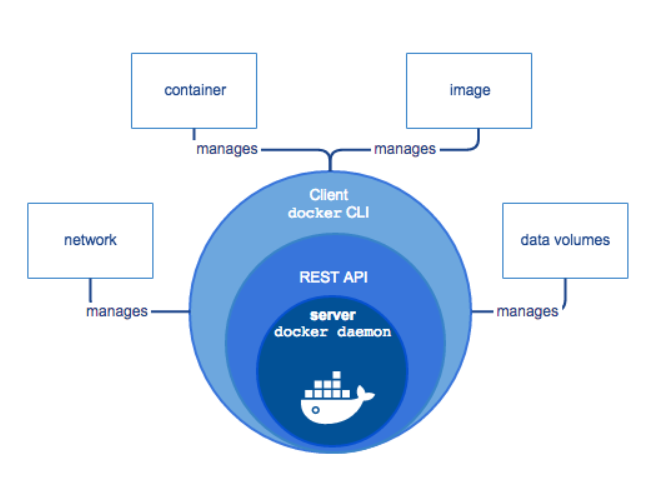
Source: https://docs.docker.com/engine/docker-overview/#docker-engine - Docker client –
- the client interacts with server to help execute the docker commands exposed by docker APIs
- E.g docker pull, docker pull, docker run etc
- Docker Daemon(server) –
- manages the docker objects – images and containers
- Docker registry(placeholder for repository)
- holds the images.
- Docker Hub and Docker Cloud are public docker registries
- As per docker documentation website – the below is the architecture of docker
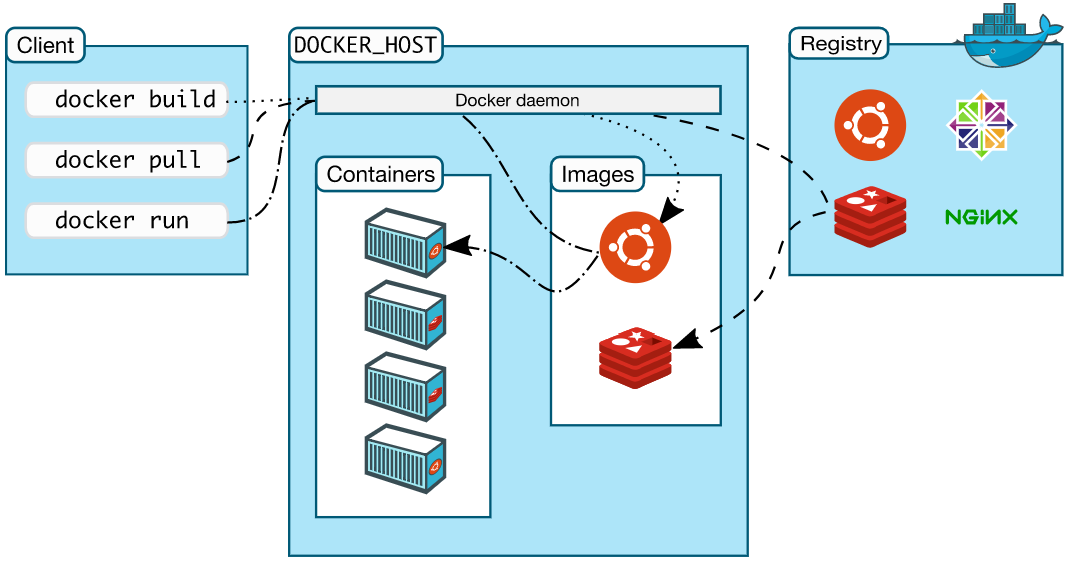
Source: https://docs.docker.com/engine/docker-overview/#docker-architecture
- Docker client –
Docker Installation:
- Docker supports a community edition(Docker CE) and an enterprise edition(Docker EE) and supports platforms like Linux, Mac, Windows
- Steps for Docker Installation:
- Login to your host(I am using CentOS Linux server as my host)
- Step 1 : Installation of pre-requisite packages:
- Docker needs yum-utils, device-mapper-persistent-data and lvm2 as prerequisites.
- sudo yum install -y yum-utils device-mapper-persistent-data lvm2

- Step 2 : Setting up Docker yum repository and install docker:
- sudo yum-config-manager –add-repo https://download.docker.com/linux/centos/docker-ce.repo
- sudo yum -y install docker-ce

- Step 3 : Start Docker :
- sudo systemctl start docker
- sudo systemctl enable docker
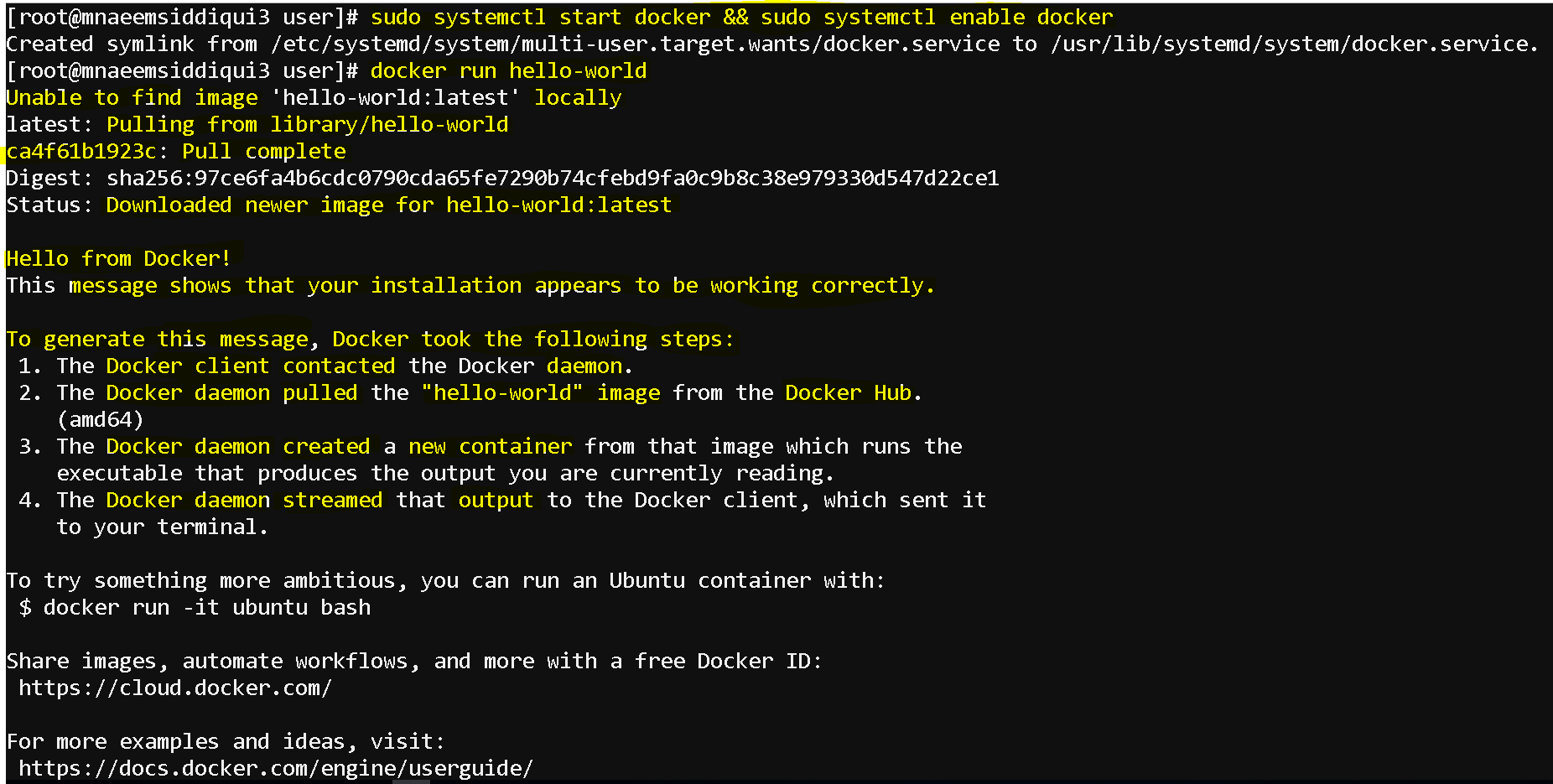
- Step 4 : Run Hello world to test docker installation
- sudo docker run hello-world
- Steps for Docker Uninstall:
- sudo yum remove docker-ce # uninstalls docker
- sudo rm -rf /var/lib/docker # removes dicker folder
Docker Commands:
- To check docker version(detailed client server info) : docker version
- To check docker info(short info) : docker –version
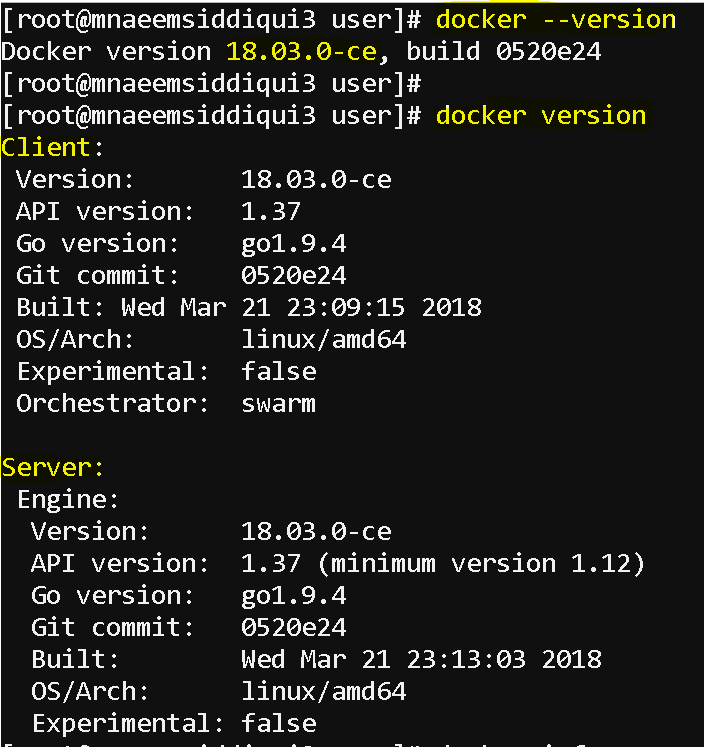
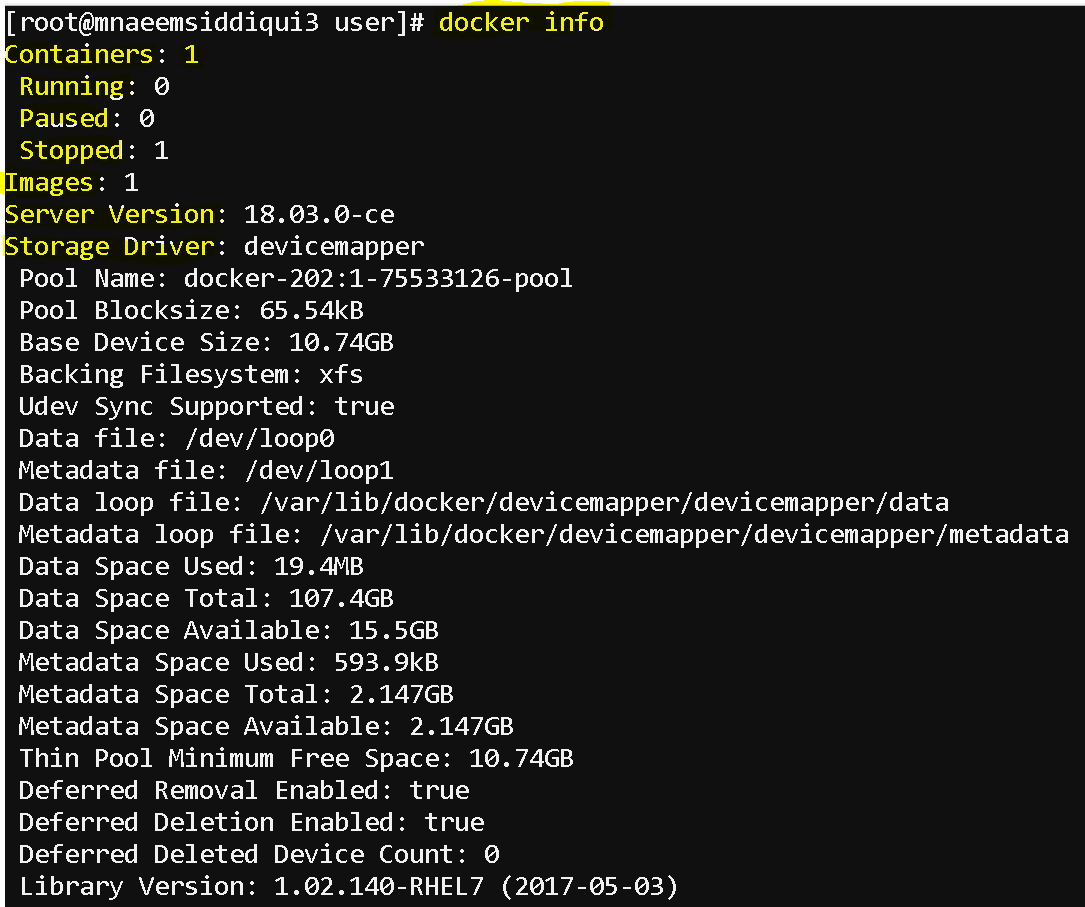
- To check docker info(detailed docker metadata info) : docker info
- To pull an image from Docker Hub:
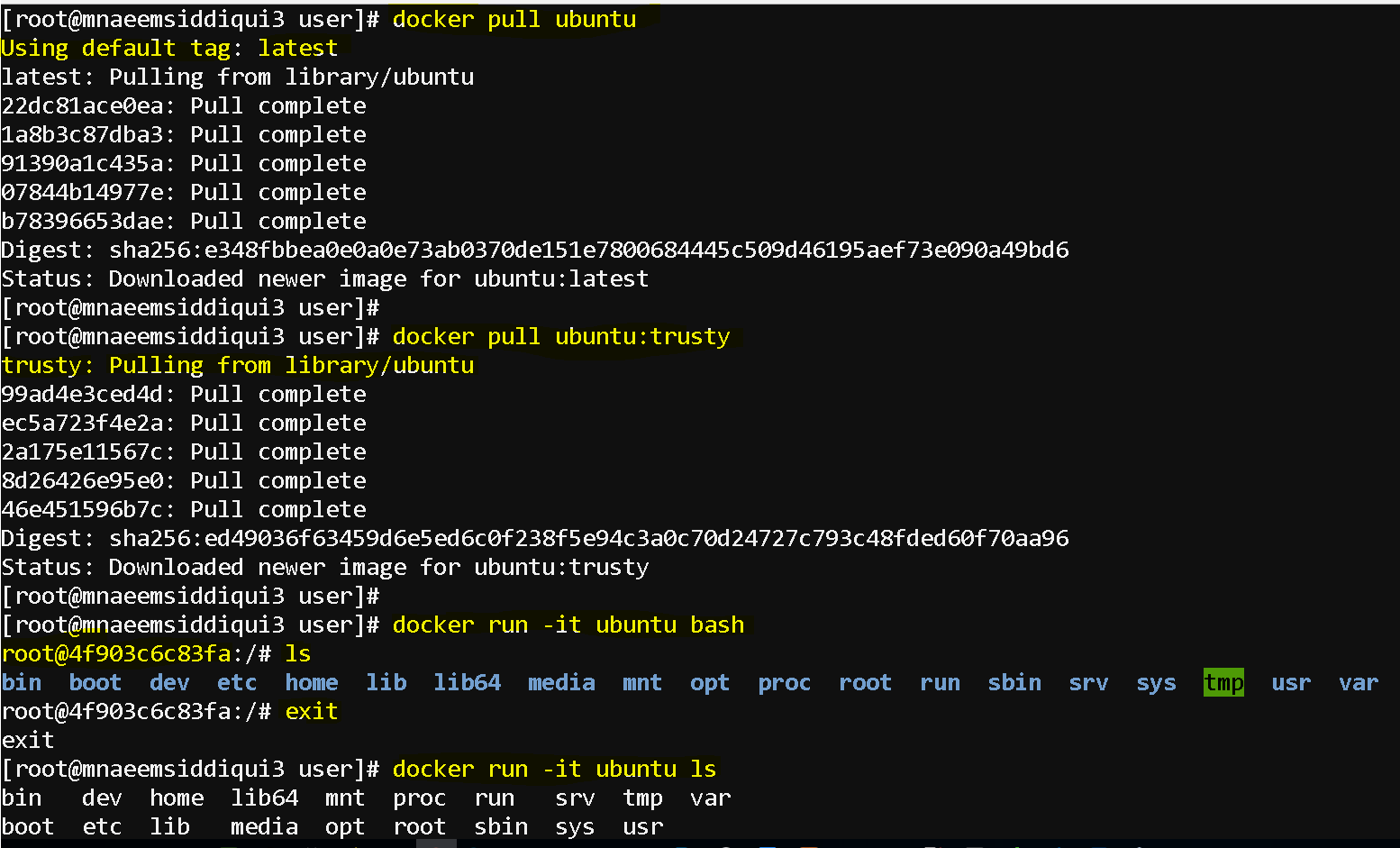
- pull the latest image :
- to pull latest Ubuntu – docker pull ubuntu
- to pull latest CentOS – docker pull centos
- pull the tagged image:
- to pull tagged Ubuntu – docker pull ubuntu:trusty
- to pull tagged CentOS – docker pull centos:7
- pull the latest image :
- To create and run a container:
- To run the container in interactive mode:
- in interactive mode you are running the container in foreground
- its kind of sshing(not actually though)
- use exit to exit out of the container
- docker run -it ubuntu bash
- docker run -it ubuntu ls
- bash , ls are commands for the container
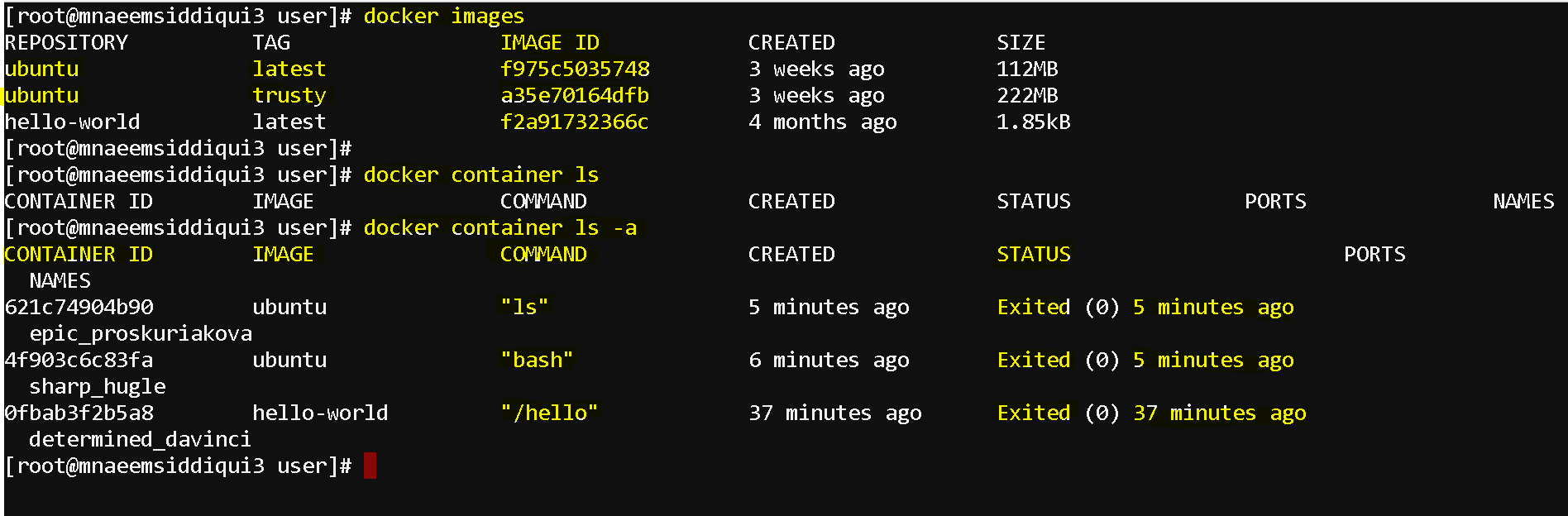
- To list all images – docker images
- To list all containers (active)– docker container ls
- In snapshot below it returns no results as there is no active container running.
- When we will run ubuntu in detached mode, we will try this command again to see if it shows an active container
- To list all containers (container ID not truncated )– docker container ls –no-trunc
- To list all containers (container ID only)– docker container ls -q
- Filter containers – docker container ls -a filter <filtercondition>
- docker container ls -a filter “excited=0”
- docker container ls -a filter “excited=1”
- To attach a container – docker container attach <container-ID>
- it similar to running a container in interactive mode.
- To list all containers (active and stopped)– docker container ls -a
- it lists all containers including active and stopped once
- to check the differential(delta of changes) between the original and modified container – docker container diff <container-id>
- to check image history – docker image history <image>
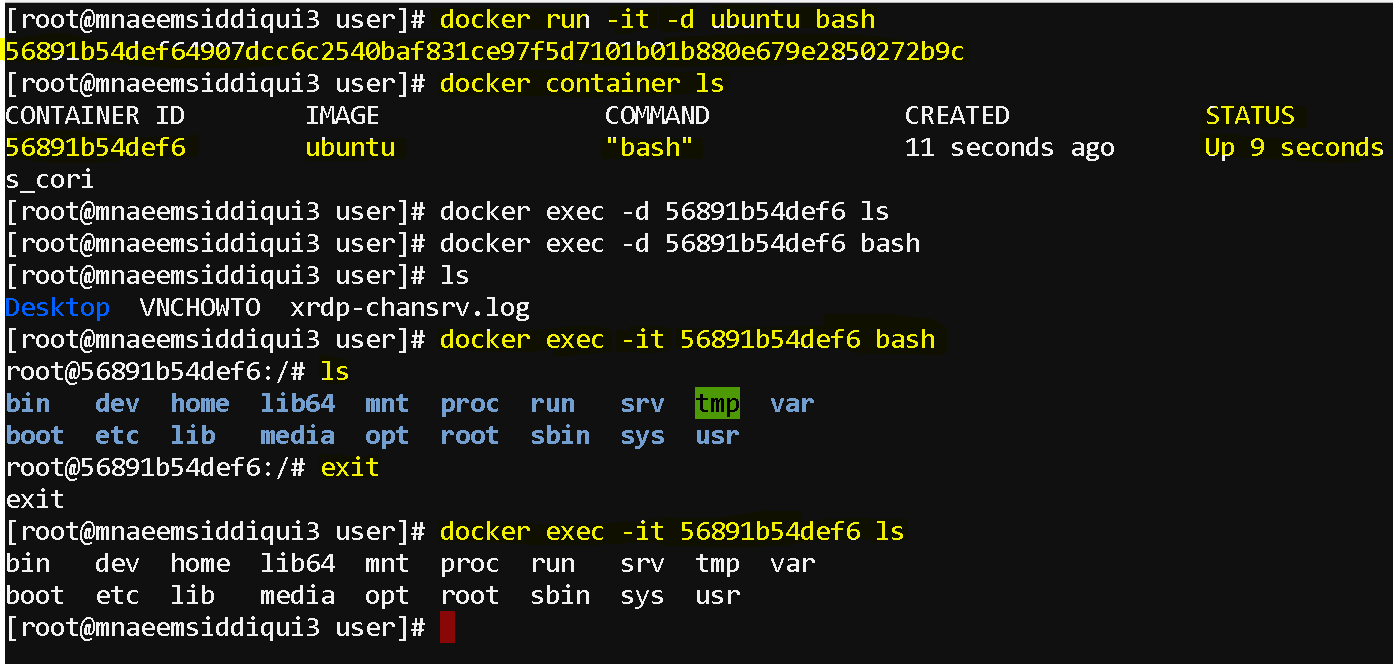
- To run the container in detached(background) mode:
- in detached mode you are running the container in background
- extra switch -d for detached mode
- docker run -it -d ubuntu bash
- docker run -it -d ubuntu ls
- bash , ls are commands for the container
- you will then use docker exec command to run the command on the active container
- first lets see if there is an active container running – docker container ls
- now run the container and command
- docker exec -it <container-id-or-name> <command>
- This script from here – https://testbucket786786.s3.amazonaws.com/docker/docker-installer.sh will also install docker and docker-compose( to be used later) on a host
- wget https://testbucket786786.s3.amazonaws.com/docker/docker-installer.sh
- chmod +x docker-installer.sh
- ./docker-installer.sh
- To run the container in interactive mode: