- If you have used social apps like Facebook, Twitter etc, you might have noticed that as users we have a network of friends, then friends of friends etc.
- There is always a degree of separation between you and self(degree of separation is 0), your direct friends(degree of separation is 1), your friend’s friend(degree of separation is 2)
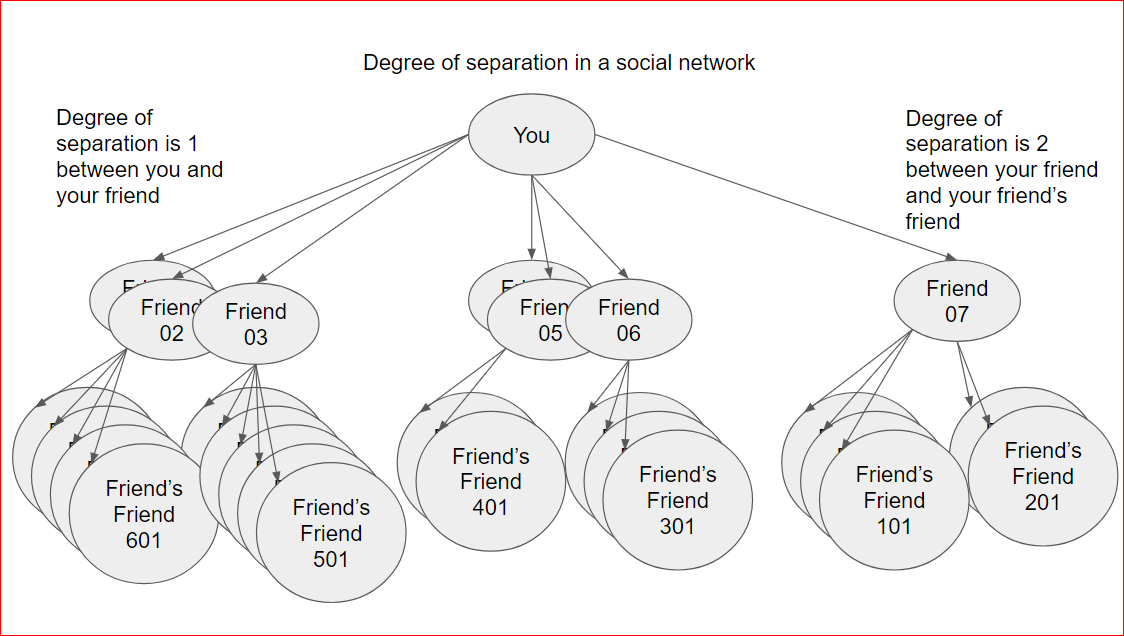
- Based on the the degree of separation and the count of friends we can conclude as if who is most popular, who has most friends , who has max friends of friends etc
- In the example below we will try to find out the “Most Popular Super Hero”.
- Marvel Network maintains a list of such super heroes and their network.
- Similar algorithm can be applied to any social network
- There are 2 source files for the exercise:
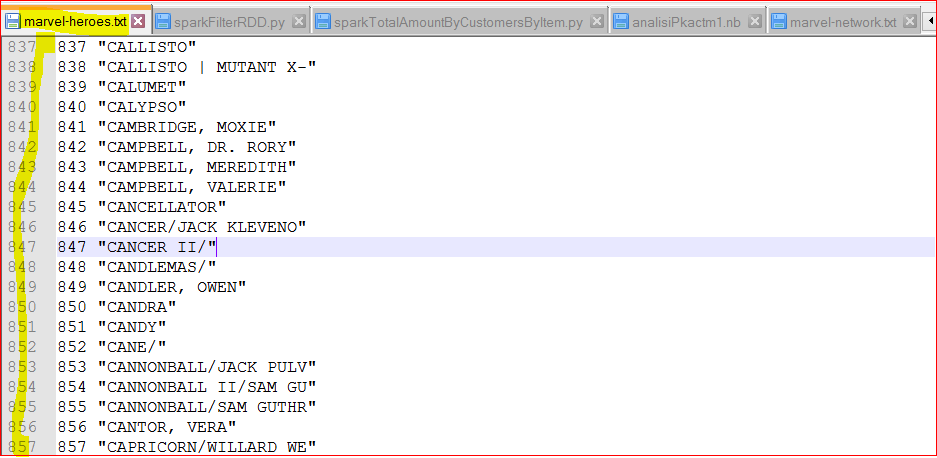
- marvel-heroes.txt – holds information about the super heroes as their ID and Name. Download this file – https://testbucket786786.s3.amazonaws.com/spark/data/Otherdata/marvel-heroes.txt
- marvel-network.txt – holds information about the super heroes network as which superhero has appeared with which one. Download this file – https://testbucket786786.s3.amazonaws.com/spark/data/Otherdata/marvel-network.txt
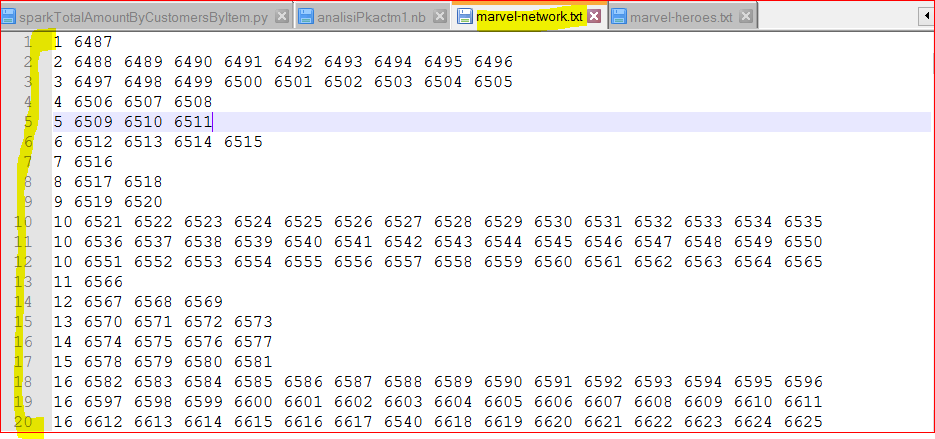
- As you can see that 1st column is the hero id and rest of the columns per line are hero id of heroes with whom it appeared together.
- We will thus find a count of such occurrences per line for that hero and also reduceByKey because for a particular hero id there can be multiple lines
- finally we can get the max count to find out who is most popular.
- Lets check out the exercise 1
- Here is the Python script , download it- https://testbucket786786.s3.amazonaws.com/spark/sparkMostPopularHero.py
- Here is the source code
-
- # First import SparkConf and SparkContext from pyspark module
from pyspark import SparkConf, SparkContext # Then, set SparkConf by setting up master as local(means stanalone local) and app Name
sConf = SparkConf().setMaster(“local”).setAppName(“MostPopularHero”) # Then, set SparkContext based on the SparkConf
sContext = SparkContext(conf = sConf) # python function to return a key value pair to get heroes
def processHeros(line):
fields=line.split(‘\”‘)
heroID=int(fields[0])
heroName=fields[1].encode(“utf8”)
return (heroID, heroName) # python function to return a count of occurrences per line for a hero
def processHeroCounts(line):
fields=line.split()
heroID=int(fields[0])
occuranceCount=len(fields) – 1
return (heroID, occuranceCount) # read the data file from the marvel heroes file
heroData = sContext.textFile(“/home/user/bigdata/datasets/Otherdata/marvel-heroes.txt”)
# map the data to create a key value pair
herosRdd = heroData.map(processHeros) # read the data file from the marvel networks file
networkData = sContext.textFile(“/home/user/bigdata/datasets/Otherdata/marvel-network.txt”)
# map the data to create a key value pair
networks = networkData.map(processHeroCounts)
# now reduce by Key to get a sum of all occurrences
networksByKey = networks.reduceByKey(lambda x, y : x + y)
# now flip the rdd to make count as key and get max from that
mostpopularHeroId = networksByKey.map(lambda x, y : y, x).max() mostpopularHeroName = herosRdd.lookup(mostpopularHeroId[1])[0] print(“The most popular hero is %s with %d as number of friends” %(mostpopularHeroName, str(mostpopularHeroId[0]) ))
- # First import SparkConf and SparkContext from pyspark module
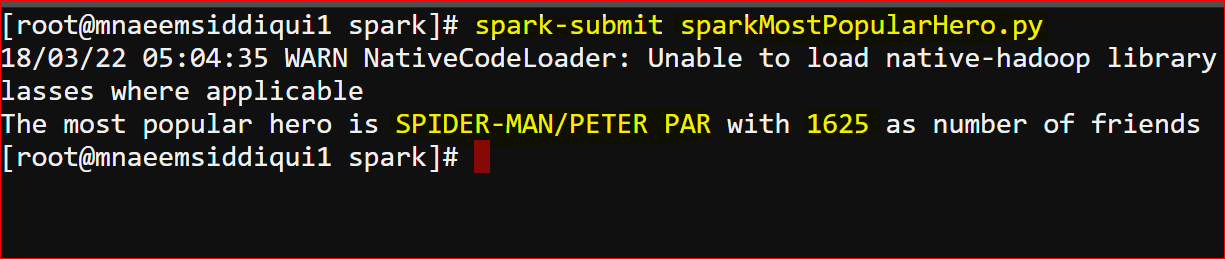
- Here is the output
- execute – spark-submit sparkMostPopularHero.py
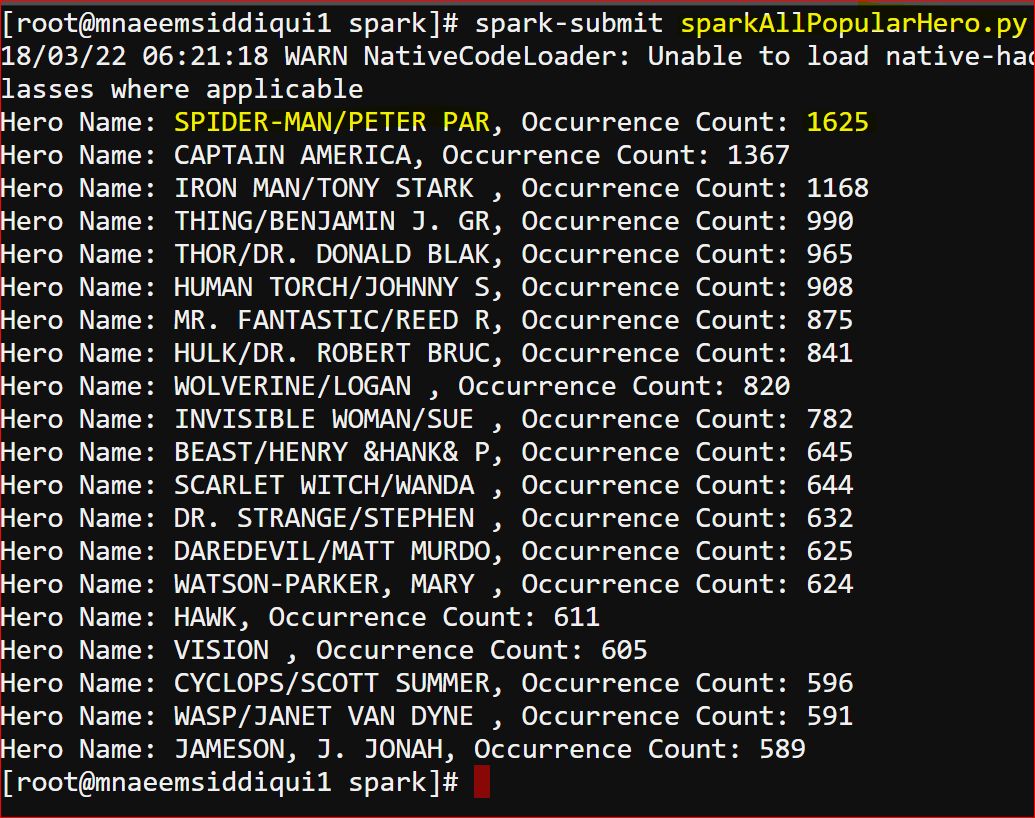
- lets checkout exercise 2 – which just extends exercise 1 as it shows all heros and their occurrence count
- Download this – https://testbucket786786.s3.amazonaws.com/spark/sparkAllPopularHero.py
- Here is the code –
-
# First import SparkConf and SparkContext from pyspark module
from pyspark import SparkConf, SparkContext # Then, set SparkConf by setting up master as local(means stanalone local) and app Name
sConf = SparkConf().setMaster(“local”).setAppName(“MostPopularHero”) # Then, set SparkContext based on the SparkConf
sContext = SparkContext(conf = sConf) # python function to return a key value pair got heroes
def loadHeros():
heroes={}
with open(“/home/user/bigdata/datasets/Otherdata/marvel-heroes.txt”) as heroFile:
for line in heroFile:
fields = line.split(‘\”‘)
heroes[int(fields[0])] = fields[1]
return heroes # python function to return a count of occurrences per line for a hero
def processHeroCounts(line):
fields=line.split()
heroID=int(fields[0])
occuranceCount=len(fields) – 1
return (heroID, occuranceCount) # python function to print the RDD
def printRDD(results):
for hero in results:
heroName = str(hero[0])
occurrenceCount = int(hero[1])
print(“Hero Name: %s, Occurrence Count: %d” %(heroName, occurrenceCount)) # broadcast the hero dictionary
heroesDict= sContext.broadcast(loadHeros()) # read the data file from the marvel networks file
networkData = sContext.textFile(“/home/user/bigdata/datasets/Otherdata/marvel-network.txt”)
# map the data to create a key value pair
networks = networkData.map(processHeroCounts)
# now reduce by Key to get a sum of all occurrences
networksByKey = networks.reduceByKey(lambda x, y : (x + y)) #lets sort networksByCountAsKey and print all
networksByKeySorted = networksByKey.map(lambda (x, y) :(heroesDict.value[x], y))
printRDD(networksByKeySorted.top(25, key= lambda x : x[1])) - The output is here –
Apache Spark – A Deep Dive – Series 6 of N – Analysis a Super Heroes Social Network Graph
