
Why Broadcasting?
- To understand broadcasting let’s first do an exercise:
- Exercise – Find the list of most popular movies from Movielens data files
- Download the file – https://testbucket786786.s3.amazonaws.com/spark/sparkMostPopularMovies.py
- Here is the source code
-
# First import SparkConf and SparkContext from pyspark module
from pyspark import SparkConf, SparkContext # Then, set SparkConf by setting up master as local(means stanalone local) and app Name
sConf = SparkConf().setMaster(“local”).setAppName(“MostPopularMoviesApp”)
# Then, set SparkContext based on the SparkConf
sContext = SparkContext(conf = sConf) # python function to process each line
def processLines(line):
fields=line.split()
movieID=int(fields[1])
rating=int(fields[2])
return (movieID, rating) # python function to print the RDD
def printRDD(results):
for movie in results.collect():
movieID = movie[0]
avgRating = movie[1][0]
ratingCount = movie[1][1]
print(“Movie ID: %d, Average Rating: %.2f, Rating Count: %d” %(movieID, avgRating, ratingCount)) # read the data file from the linux source folder
fileData = sContext.textFile(“/home/user/bigdata/datasets/ml-100k/u.data”) # apply mapper to get movie count and then reduce by key to add the rating counts
moviesRDD = fileData.map(processLines).mapValues(lambda x: (x, 1)).reduceByKey(lambda x, y: (x[0] + y[0], x[1] + y[1]))
moviesAggrSortedRDD = moviesRDD.mapValues(lambda x: ((float(x[0])/x[1]), x[1])).sortBy(lambda x : x[1][1], False) # user the iterator to print the results
printRDD(moviesAggrSortedRDD) - Execute the script and view the results:
- Movielens data file u.data – holds the user id, movie id, rating and timestamp. Delimiter is ‘\t’
- Movielens data file u.item- holds the movie id, movie name rating and timestamp. Delimiter is ‘|’
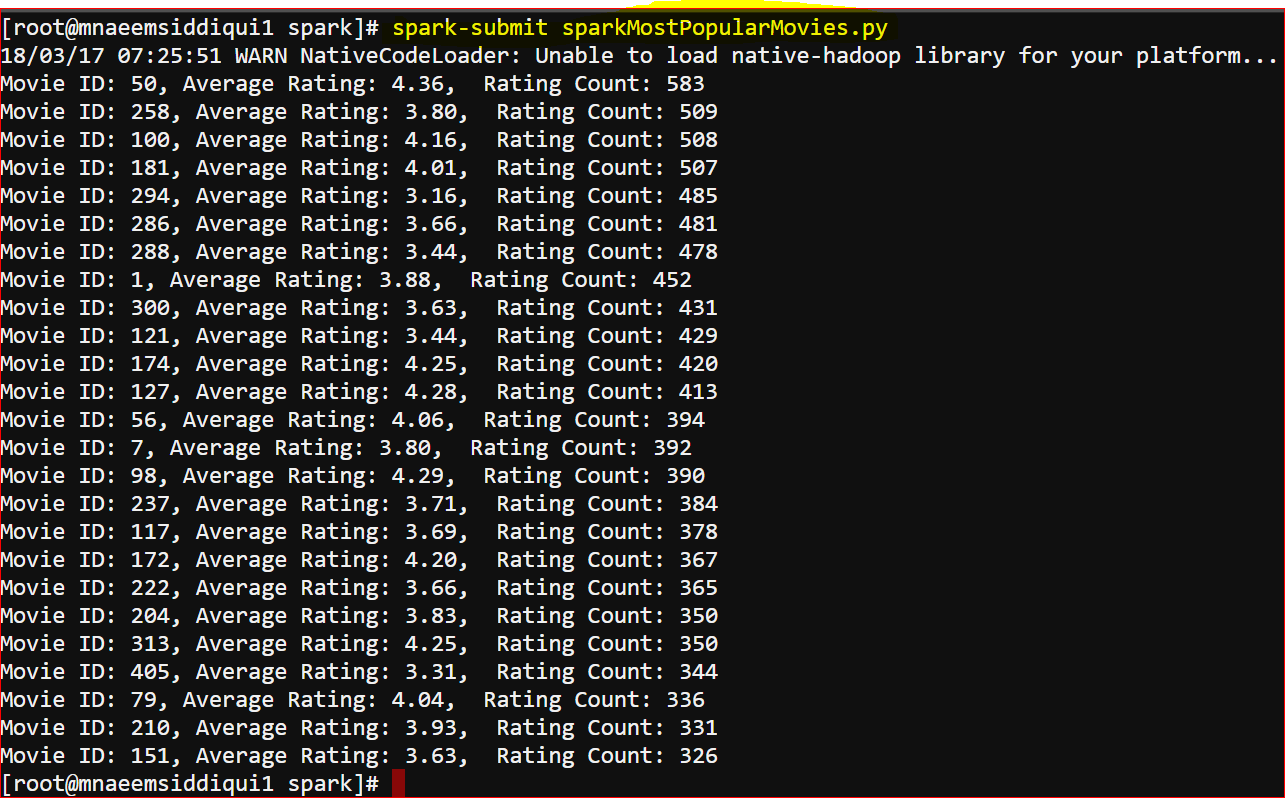
- Do you see anything wrong in the output?
- Yes,
- From the output we know thatMovie ID 50 has a avg rating of 4.36 and total rating count of 583
- But which movie is 50?
- What should we do now?
- One way is to load the movieNames RDD from u.item data file
- But it would be heavy if we load this list in the all executors in the spark cluster
- We use broadcast variables which is shared and used by all the executors in the spark cluster.
- This is called broadcasting.
- To broad cast a variable we use sc.broadcast command : res= sc.broadcast(method or variable name)
- To use the broadcast-ed value we use .value command – res.value[key/id]
- An exercise with broadcast:
- We will modify the existing above script to use broadcasting
- Download this file – https://testbucket786786.s3.amazonaws.com/spark/sparkMostPopularMoviesWithBroadcast.py
- Here is the source code –
-
# First import SparkConf and SparkContext from pyspark module
from pyspark import SparkConf, SparkContext # Then, set SparkConf by setting up master as local(means stanalone local) and app Name
sConf = SparkConf().setMaster(“local”).setAppName(“MostPopularMoviesApp”)
# Then, set SparkContext based on the SparkConf
sContext = SparkContext(conf = sConf) # python function to load movie names
def loadMovies():
movies={} # movie dictionary
with open(“/home/user/bigdata/datasets/ml-100k/u.item”) as mvFile:
for line in mvFile:
fields = line.split(‘|’)
movies[int(fields[0])] = fields[1]
return movies # movie dictionary # python function to process each line
def processLines(line):
fields=line.split()
movieID=int(fields[1])
rating=int(fields[2])
return (movieID, rating) # python function to print the RDD
def printRDD(results):
for movie in results:
movieName = movie[0]
avgRating = movie[1][0]
ratingCount = movie[1][1]
print(“Movie Name: %s, Average Rating: %.2f, Rating Count: %d” %(movieName, avgRating, ratingCount)) # broadcast the movie dictionary to the cluster
movieDict= sContext.broadcast(loadMovies()) # read the data file from the linux source folder
fileData = sContext.textFile(“/home/user/bigdata/datasets/ml-100k/u.data”) # apply mapper to get movie count and then reduce by key to add the rating counts
moviesRDD = fileData.map(processLines).mapValues(lambda x: (x, 1)).reduceByKey(lambda x, y: (x[0] + y[0], x[1] + y[1]))
moviesAggrSortedRDD = moviesRDD.mapValues(lambda x: ((float(x[0])/x[1]), x[1])).sortBy(lambda x : x[1][1], False)
movieNamesAggrSortedRDD = moviesAggrSortedRDD.map(lambda (movieID, (avgRating, ratingCount)) : (movieDict.value[movieID], (avgRating, ratingCount)))
results = movieNamesAggrSortedRDD.top(25, key= lambda x : x[1][1])
# user the iterator to print the results
printRDD(results) - Here is the output:
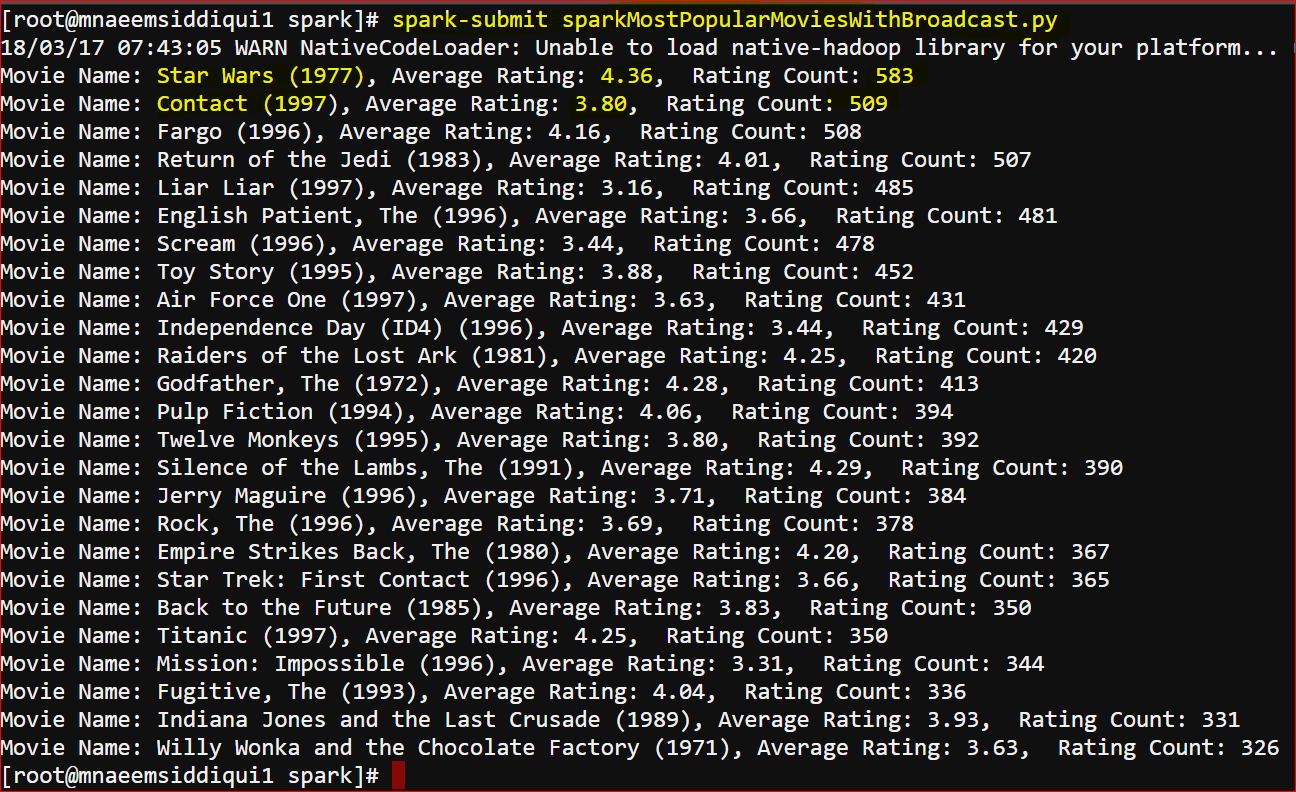
- Now you can see that the output has Movie Name instead of movieID