
Key Value based RDDs:
- In series 1 of N we process an RDD which had only one value – movie rating – then we applied “countbyValue” to get rating count by rating.
- In this example, we will use Key Value Based RDDs
- While processing each line we will return a key value pair:
- See the below Python function to read each line, split the data by delimiter and return a key-value pair
- Also see the return statement, it is most important line to return a Key Value Pair to setup Key Value RDD
- def processLines(line):
lineFields = line.split()
movieId = lineFields[1]
rating = int(lineFields[2])
return (movieId, rating)
- Then calling the mapper function to return a key value pairs to setup or Key-Value RDD
- movieRatingsKeyValueRDD = rddAllLines.map(processLines)
- You can execute many operations on a KeyValue based RDD:
- reduceByKey – its helps to aggregate values based on the key
# e.g – keyValueRDD.reduceByKey(lambda x,y: x+y) will add the values by key - groupByKey – its helps to group values based on the key
e.g – keyValueRDD.groupByKey(lambda x:x) will group the values by key - sortByKey – its helps to sort values based on the key
e.g – keyValueRDD.sortByKey() will add the values by key
- reduceByKey – its helps to aggregate values based on the key
- Important:
- use flatMapValues() instead of flatMap() if key is not going to be modified
- use mapValues() instead of map() if key is not going to be modified
- Now that we have a RDD we can apply the mapper and reduce functions on it:
- movieRatingsbyCountRDD = movieRatingsKeyValueRDD.mapValues(lambda x: (x,1)).reduceByKey(lambda x, y: (x[0] + y[0], x[1] + y[1]))
- First of all we are mapping the values by key mapValues(lambda x: (x,1))
- This will give us a tuple (x,1) where x is the movie rating and 1 is 1 count of a rating.
- The reducer function is : reduceByKey(lambda x, y: (x[0] + y[0], x[1] + y[1]))
- In the reducer function we are aggregating the sum of all ratings – x[0] + y[0] and sum of all ratingscounts – x[1] + y[1]
- Now, apply filtering if needed, e.g filter movies which have at least rated by 10 people
- movieRatingsbyCountFiltered = movieRatingsbyCountRDD.filter(lambda x : x[1][1] >= 10)
- Now, get average movie ratings
- averageMovieRatingsRDD = movieRatingsbyCountFiltered.mapValues(lambda x : x[0]/x[1])
-
Then, sort movie ratings – False means descending
-
sortedMovieRatings = averageMovieRatingsRDD.sortBy(lambda x : x[1], False)
-
-
Then get top 20 – based on the ratings column
-
sortedMovieRatingsTop = sortedMovieRatings.top(20, lambda x: x[1])
-
- Finally output the ratings – Top 20 movies by ratings
- for item in sortedMovieRatingsTop:
print(item)
- for item in sortedMovieRatingsTop:
- Here is the output –
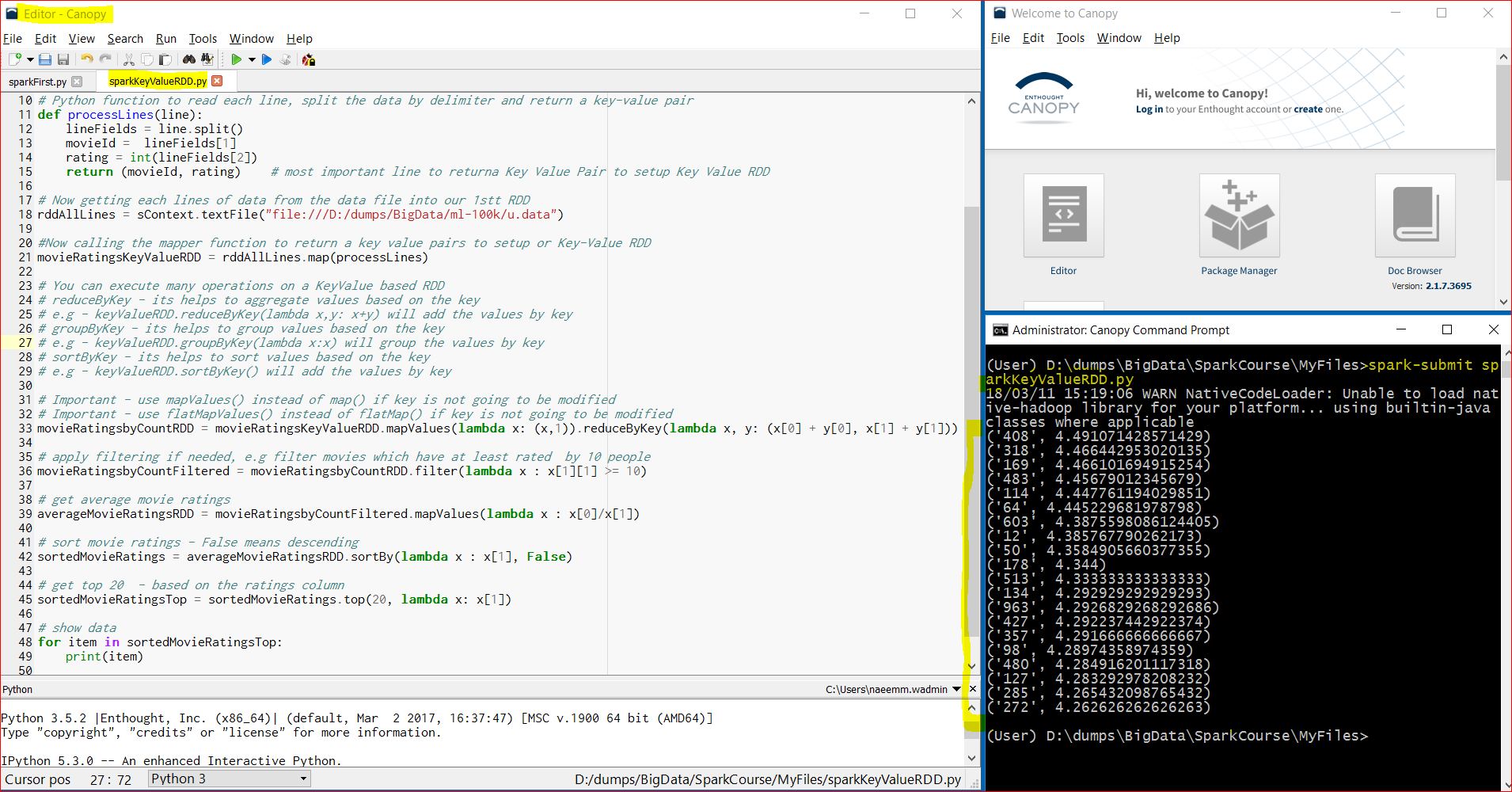
- Link to download the code – https://testbucket786786.s3.amazonaws.com/spark/sparkKeyValueRDD.py
- The complete code is below –
-
- # import SparkConf and SparkContextfrom pyspark import SparkConf, SparkContext # setup SparkConf for local setup wit Appname as KeyValueRDDApp sConf = SparkConf().setMaster(“local”).setAppName(“KeyValueRDDApp”) # setup SparkContext with the above sConf SparkConf object sContext = SparkContext(conf = sConf) # Python function to read each line, split the data by delimiter and return a key-value pair def processLines(line): lineFields = line.split() movieId = lineFields[1] rating = int(lineFields[2]) return (movieId, rating) # most important line to returna Key Value Pair to setup Key Value RDD # Now getting each lines of data from the data file into our 1stt RDD rddAllLines = sContext.textFile(“file:///D:/dumps/BigData/ml-100k/u.data”) #Now calling the mapper function to return a key value pairs to setup or Key-Value RDD movieRatingsKeyValueRDD = rddAllLines.map(processLines) # You can execute many operations on a KeyValue based RDD # reduceByKey – its helps to aggregate values based on the key # e.g – keyValueRDD.reduceByKey(lambda x,y: x+y) will add the values by key # groupByKey – its helps to group values based on the key # e.g – keyValueRDD.groupByKey(lambda x:x) will group the values by key # sortByKey – its helps to sort values based on the key # e.g – keyValueRDD.sortByKey() will add the values by key # Important – use mapValues() instead of map() if key is not going to be modified # Important – use flatMapValues() instead of flatMap() if key is not going to be modified movieRatingsbyCountRDD = movieRatingsKeyValueRDD.mapValues(lambda x: (x,1)).reduceByKey(lambda x, y: (x[0] + y[0], x[1] + y[1])) # apply filtering if needed, e.g filter movies which have at least rated by 10 people movieRatingsbyCountFiltered = movieRatingsbyCountRDD.filter(lambda x : x[1][1] >= 10) # get average movie ratings averageMovieRatingsRDD = movieRatingsbyCountFiltered.mapValues(lambda x : x[0]/x[1]) # sort movie ratings – False means descending sortedMovieRatings = averageMovieRatingsRDD.sortBy(lambda x : x[1], False) # get top 20 – based on the ratings column sortedMovieRatingsTop = sortedMovieRatings.top(20, lambda x: x[1]) # show data for item in sortedMovieRatingsTop: print(item)
- Another example
- This example retrieves the customers by the order amount.
- The data file has three columns – cusotmer id, item id and order amount
- Lets download the files
- download the script at below location(you can use yr own location)-
- cd /home/user/bigdata/src/spark
- wget https://testbucket786786.s3.amazonaws.com/spark/sparkTotalAmountByCustomers.py
- download the data file at below location(you can use yr own location) –
- cd /home/user/bigdata/datasets/Otherdata
- wget https://testbucket786786.s3.amazonaws.com/spark/data/Otherdata/customer-orders.csv
- The code is as follows:
-
# First import SparkConf and SparkContext from pyspark module
from pyspark import SparkConf, SparkContext
# Then, set SparkConf by setting up master as local(means stanalone local) and app Name
sConf = SparkConf().setMaster(“local”).setAppName(“TotalAmountByCustomersRDDApp”)
# Then, set SparkContext based on the SparkConf
sContext = SparkContext(conf = sConf)
# python function to return a tuple holding customer ID and Customer Amt as (custID, custAmt)
def processLines(line):
fields=line.split(‘,’)
custID=int(fields[0])
custAmt=float(fields[2])
return (custID, custAmt)
# python function to print the RDD
def printRDD(results):
for customer in results:
custID = customer[0]
custAmt = customer[1]
print(“CustID: %d, CustAmt: %0.2f” %(custID, custAmt))
# read the data file from the linux source folder
fileData = sContext.textFile(“/home/user/bigdata/datasets/Otherdata/customer-orders.csv”)
# first user the mapper function to process each line,
# then apply the reducer to aggregate(sum) the Cust Amount by key custID
# then sort data by custAmt in descending order
customersRDD = fileData.map(processLines).reduceByKey(lambda x,y : x + y).sortBy(lambda x : x[1], False)
# now apply the collect event to hold the results into a python object
results = customersRDD.collect()
# user the iterator to print the customer ID and Amount
printRDD(results) - Here is the output:
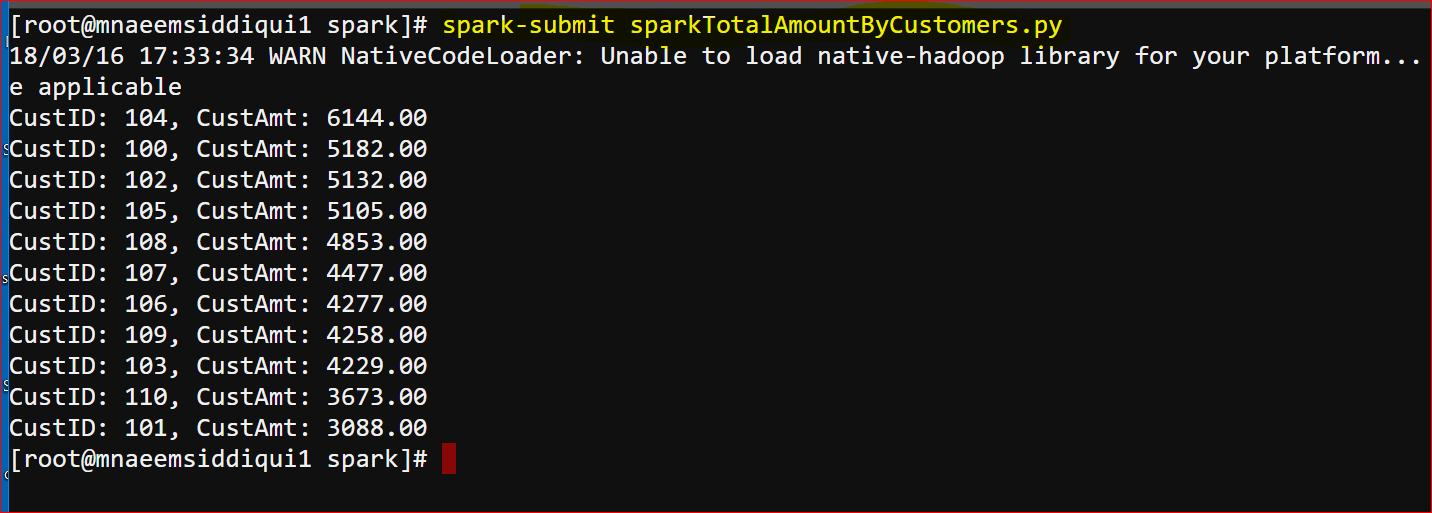
- download the script at below location(you can use yr own location)-
- Another example 2
- This example retrieves the customers by the order amount along with item count.
- The data file has three columns – cusotmer id, item id and order amount
- Lets download the files
- download the script at below location(you can use yr own location)-
- cd /home/user/bigdata/src/spark
- wget https://testbucket786786.s3.amazonaws.com/spark/sparkTotalAmountByCustomersByItem.py
- download the data file at below location(you can use yr own location) –
- cd /home/user/bigdata/datasets/Otherdata
- wget https://testbucket786786.s3.amazonaws.com/spark/data/Otherdata/customer-orders.csv
- The code is as follows:
-
# First import SparkConf and SparkContext from pyspark module
from pyspark import SparkConf, SparkContext # Then, set SparkConf by setting up master as local(means stanalone local) and app Name
sConf = SparkConf().setMaster(“local”).setAppName(“TotalAmountByCustomersRDDApp”) # Then, set SparkContext based on the SparkConf
sContext = SparkContext(conf = sConf) # python function to return a tuple holding customer ID and Customer Amt and Item ID as (custID,(itemID, custAmt))
def processLines(line):
fields=line.split(‘,’)
custID=int(fields[0])
itemID=int(“1”)
custAmt=float(fields[2])
return (custID, (itemID, custAmt)) # python function to print the RDD
def printRDD(results):
for customer in results:
custID = customer[0]
itemCount = customer[1][0]
custAmt = customer[1][1]
print(“Customer ID: %d, Item Count: %d, Order Amt.: %0.2f” %(custID, itemCount, custAmt)) # read the data file from the linux source folder
fileData = sContext.textFile(“/home/user/bigdata/datasets/Otherdata/customer-orders.csv”) # first user the mapper function to process each line,
# then apply the reducer to aggregate(sum) the Cust Amount by key custID
# then sort data by custAmt in descending order
customersRDD= fileData.map(processLines).reduceByKey(lambda x, y: (x[0] + y[0], x[1] + y[1])).sortBy(lambda x : x[1][1], False) # now apply the collect event to hold the results into a python object
results = customersRDD.collect() # user the iterator to print the customer ID and Amount
printRDD(results) - Here is the output:
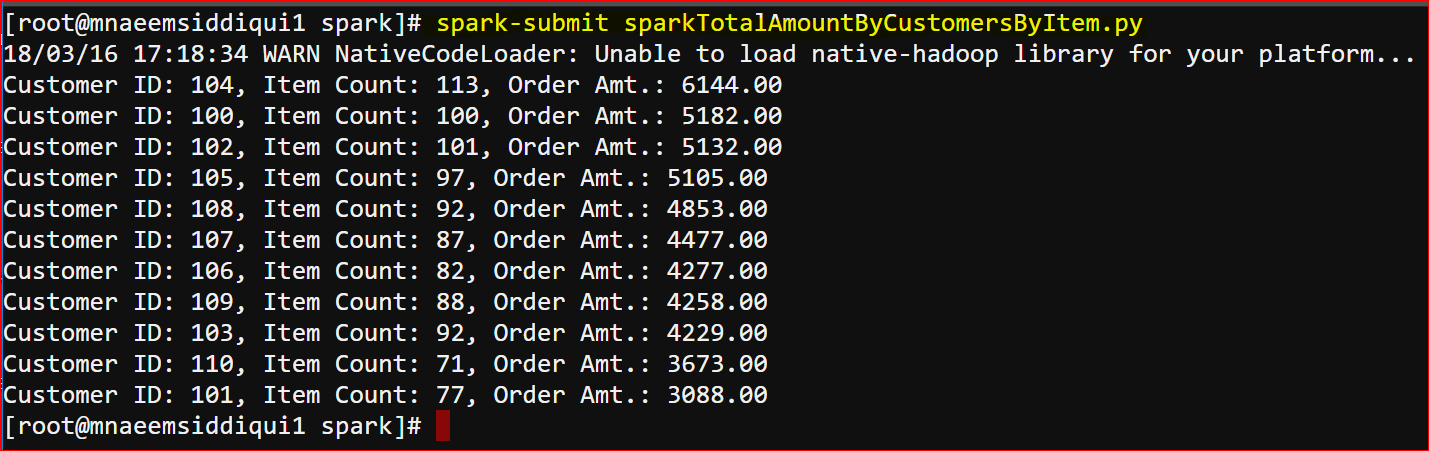
- download the script at below location(you can use yr own location)-