What is Apache Spark:
- a data processing engine much faster than Map-Reduce
- uses DAG(Directed Acyclic Graphs) to optimize the workflows.
How does Apache Spark work:
- You will have a driver program which holds the SparkContext
- That initiates a Cluster manager( Sparks own in-built OR YARN if there is a Hadoop cluster).
- The Cluster manager then initiates multiple Executors(ideally one per CPU core)
What is Apache Spark Architecture:
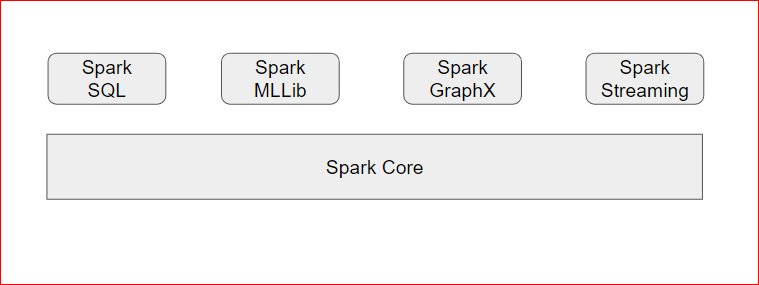
- On the base we have Spark Core
- On the top of that we can have Spark Streaming, Spark MLLib, GraphX, Spark SQL
- Sparks works on the concept of RDDs(Resilient Distributed Data-sets)
- RDDs can be created from lot of input sources – (sc is SparkContext)
- rdd= sc.textFile(“/user/maria_dev/ml-1m/ratings.dat”)
- can also created from Cassandra, JDBC, Elastic Search, S3N, JSON, CSV etc connectors and formats
- Spark transformation methods:
- map
- flatmap
- filter
- collect
- distinct
- sample
- union, intersect, cartesian, subtract
- Sparks Action methods:
- collect
- count
- countByValue
- take
- top
- reduce
A simple example in Apache Spark:
- Any Spark program begins with a standard import statement to get SparkConf and SparkContext, additionally you can also import collections to retrieve collection objects like tuple, dictionary etc
- from pyspark import SparkConf, SparkContext
- import collections
- Then you setup a SparkConf object and use this SparkConf to instantiate SparkContext :
- sConf = SparkConf().setMaster(“local”).setAppName(“RatingsRDDApp”)
sContext = SparkContext(conf = sConf ) - setMaster(“local”) mean that you are setting up the cluster on local machine with single thread and CPU.
- sConf = SparkConf().setMaster(“local”).setAppName(“RatingsRDDApp”)
- Once the SparkContext is ready, you can read the data file
- In windows
- it can be your local drive file
- alllinesRDD = sContext.textFile(“file:///d:/bigdata/datasets/ml-100k/u.data”)
- it can be your network drive file
- alllinesRDD = sContext.textFile(“file:///SparkDrive/bigdata/datasets/ml-100k/u.data”)
- it can be your local drive file
- In Linux/Mac
- it can be your local drive file
- alllinesRDD = sContext.textFile(“\usr\bigdata\datasets\ml-100k\u.data”)
- it can be your local drive file
- Now as you have read the file you can map into a RDD and perform actions on the data
- allratingsRDD = alllinesRDD.map(lambda x: x.split()[2])
- in the above line you are using Pythons Map function to apply on each line of the dataset.
- Inside the map function you are using a lambda function to split each line and get the 3rd index element
- myResult= allratingsRDD.countByValue()
- you are counting each item on 3rd index by Value to group that data
- sortedData = collections.OrderedDict(sorted(myResult.items()))
- sorting the data in an OrderedDict
- finally showing the values
- for myKey, myValue in sortedData.items():
print(“%s %i” % (myKey, myValue))
- for myKey, myValue in sortedData.items():
- allratingsRDD = alllinesRDD.map(lambda x: x.split()[2])
- In windows
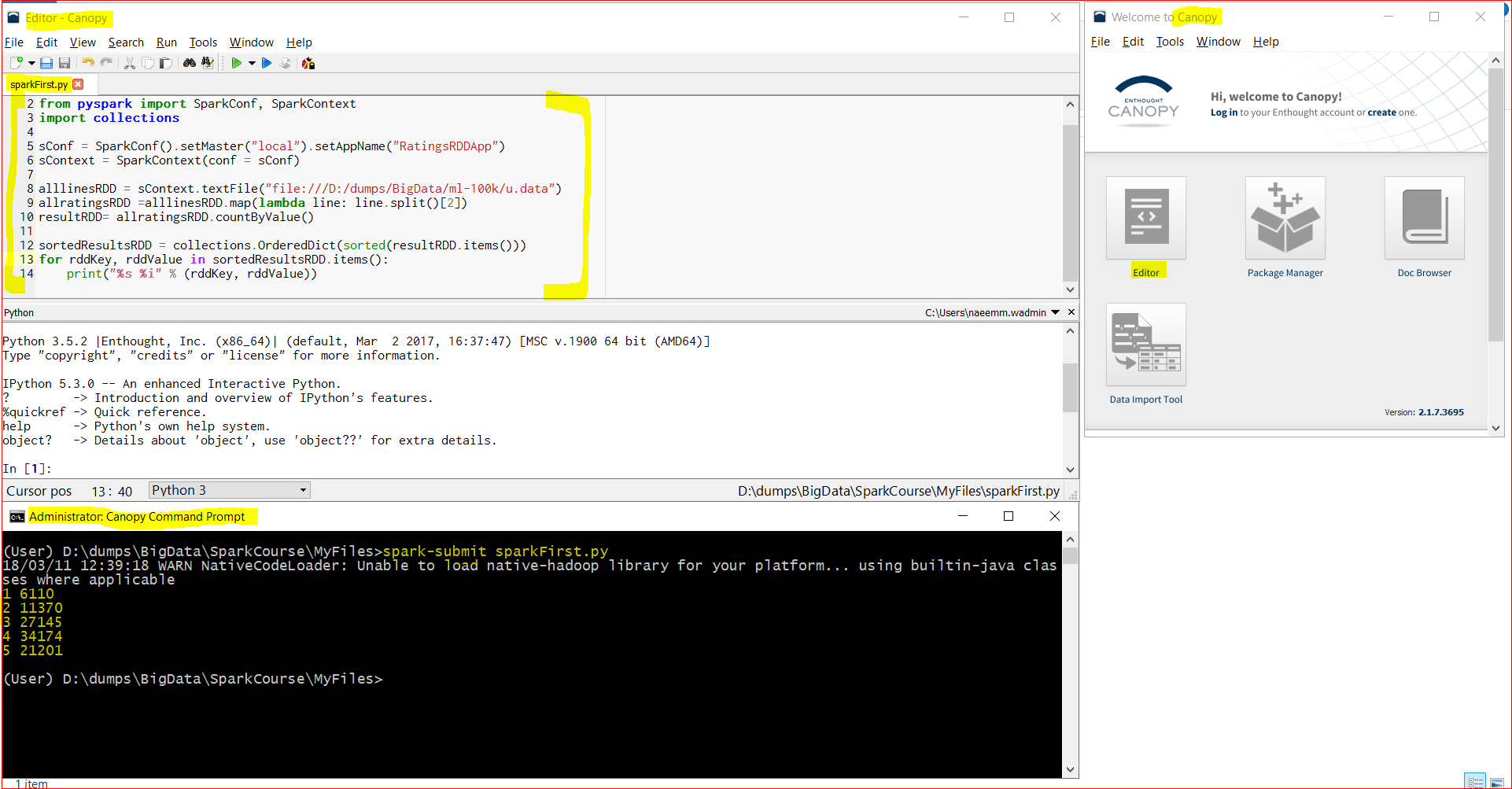
- A complete code is below: ( you can download from here too – https://testbucket786786.s3.amazonaws.com/spark/sparkFirst.py )
-
from pyspark import SparkConf, SparkContext
import collections sConf = SparkConf().setMaster(“local”).setAppName(“RatingsRDDApp”)
sContext = SparkContext(conf = sConf ) alllinesRDD = sContext.textFile(“file:///d:/bigdata/datasets/ml-100k/u.data”)
allratingsRDD =alllinesRDD.map(lambda line: line.split()[2])
myresult= allratingsRDD.countByValue() sortedData = collections.OrderedDict(sorted(myresult.items()))
for myKey, myValue in sortedData.items():
print(“%s %i” % (myKey, myValue)) - Now lets open Canopy and run this program from the Canopy Command Prompt.
- We can see that we got the ratings count by rating – 34174 customers rated the movies “4” and only a handful 6110 rated the movie “1”.