
Why process big data in real time?
- Big data is really huge, so if we still use batch processing ( E.g. running batch jobs every 10 minutes or so, we will have scalability issues. What if the data is more then can handles by that job.
- Big data never stops, it keeps flowing. Imagine how much of sensor data is received from IoT devices, user behavior data from big social web sites.
- So Big data can not only be streamed live but also be processed live.
- Technologies like Apache Spark Streaming and Apache Storm are answer to this issue.
Spark Streaming Architecture:
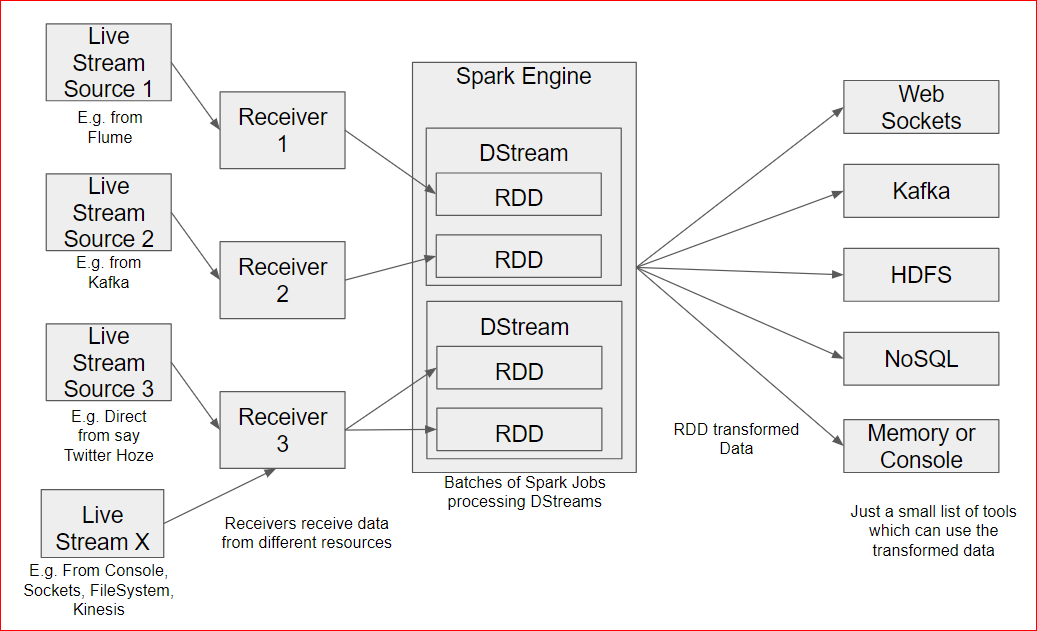
- Spark stream is almost real time ( not exact real time though) processing engine.
- The Spark Receivers receive live data stream from multitude of sources( it can be simple sources like a console tailed web server log, a file system, exact live stream like a twitter hose, streaming data from Kafka etc.
- The data is then partitioned as RDD. It means that the dataset is partitioned to be processed by Spark Engine as batch jobs(incremental to a time stamp).
- The transformed data is then consumed by multitude of tools from HDFS to NoSQL tools to SQL tools, Web Sockets, Console or Memory output etc.
- So you can imagine that lots of Mapper and Reducer transformation occur.
- It supports something called as “Windowed Transformations“.
- While processing data you can maintain state of few things.
- E.g. most trending tweets or re-tweets over the last hour – so you will processes the data coming from twitter hose may be in a DStreamed batches of 1s but but would like to hold the data for max number of tweets or re-tweets by user.
- Windowing allows you to hold data over batches. basically a snapshot of data over the window is taken to compute results.
- In our case Batch interval will be one minute, window interval will be 1 hour and a sliding interval is how often we compute the transformation may be every 30 mts.
- Just like Spark which had a SparkContext, Spark Streaming has a StreamingContext.
- Structured streaming:
- just like spark 2.0 uses Datasets and older version uses DataFrames
- Similarly Spark Streaming 2.0 uses data sets which is also referred as Structured streaming where the dataset is basically a more explicit type of dataframe(Rows)
- So basically instead of data being partitioned in many RDDs it will be a dataframe in which rows will keep adding.
- Why structured streaming?
- more efficient way of storing data
- use SQL like querying
- MLLib( the Machine learning library) is also supporting structured streaming
Lets play with Spark Streaming:
- Simple Example – Spark Streaming with Flume:
- Case Study :
- There is a web server which write web server logs
- Flume cluster agent has a ‘spooldir’ to read these log files
- Flume then writes it to a Sink.
- Spark Streaming cluster connects to this sink and reads this data to save it in a database or just console output.
- Technicalities:
- First of all download the Flume conf file here –
- wget https://testbucket786786.s3.amazonaws.com/sparkstreamingusingflume.conf
- This file is same as previous lecture file(Apache Flume) where we read from a spool directory and saved to a HDFS sink. But this time we will change the sink from HDFS to Avro(a communication protocol) which will dump data on port say 9092.
- See below for the change in the sink# sparkstreamingusingflume.conf: A single-node Flume configuration# Name the components on this agent
a1.sources = r1
a1.sinks = k1
a1.channels = c1 # Describe/configure the source
a1.sources.r1.type = spooldir
a1.sources.r1.spoolDir = /home/maria_dev/spool
a1.sources.r1.fileHeader = true
a1.sources.r1.interceptors = timestampInterceptor
a1.sources.r1.interceptors.timestampInterceptor.type = timestamp # Describe the sink
a1.sinks.k1.type = avro
a1.sinks.k1.hostname = localhost
a1.sinks.k1.port = 9092 # Use a channel which buffers events in memory
a1.channels.c1.type = memory
a1.channels.c1.capacity = 1000
a1.channels.c1.transactionCapacity = 100 # Bind the source and sink to the channel
a1.sources.r1.channels = c1
a1.sinks.k1.channel = c1 - Now lets get ready with a python script which will read from the Avro Stream, process and transform it and output the result
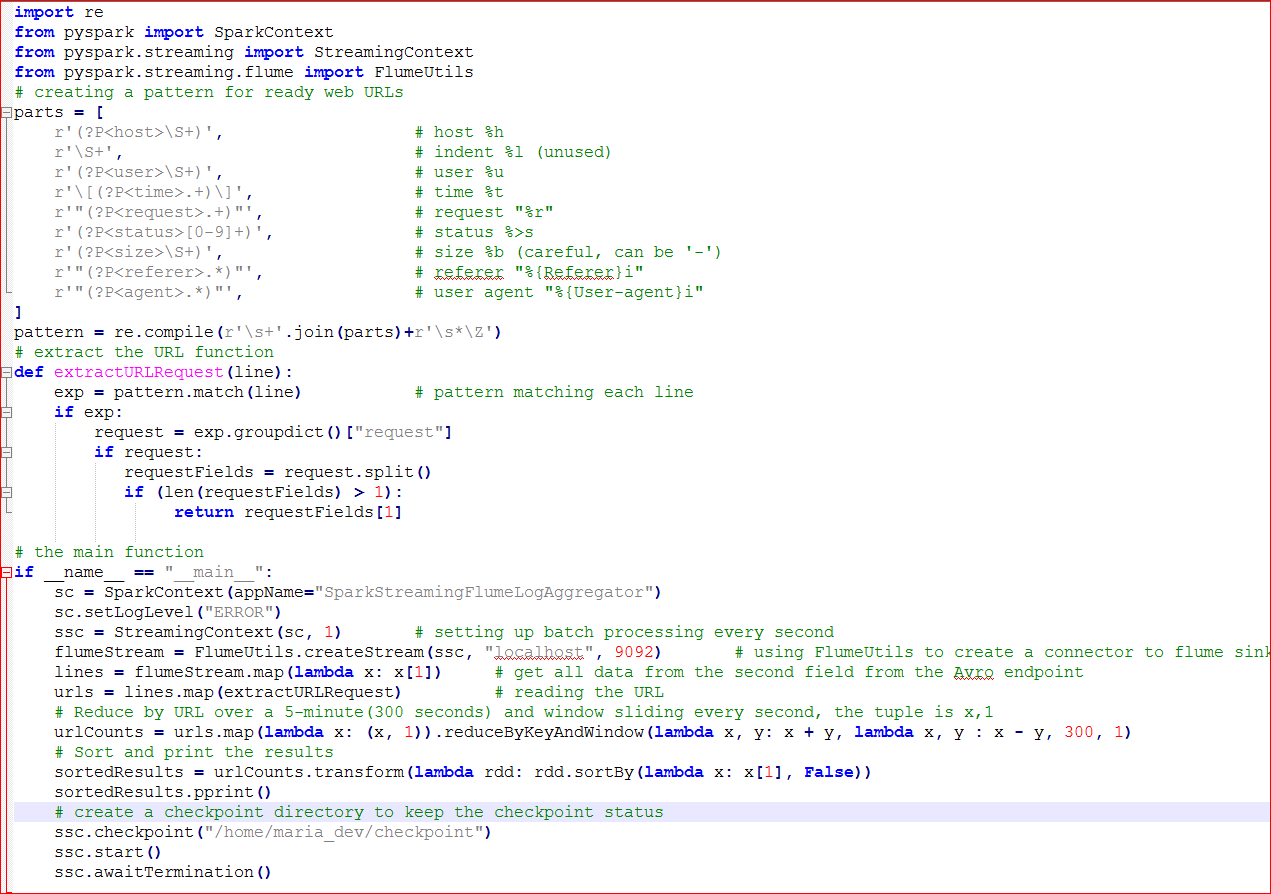
- Download this file – wget https://testbucket786786.s3.amazonaws.com/SparkFlumeStreaming.py
- Explanation of the python script(see green comments):
- Also download this file to later copy/drop to the spool folder – wget https://testbucket786786.s3.amazonaws.com/streaming_log.txt
- create a checkpoint folder under maria_dev – mkdir checkpoint
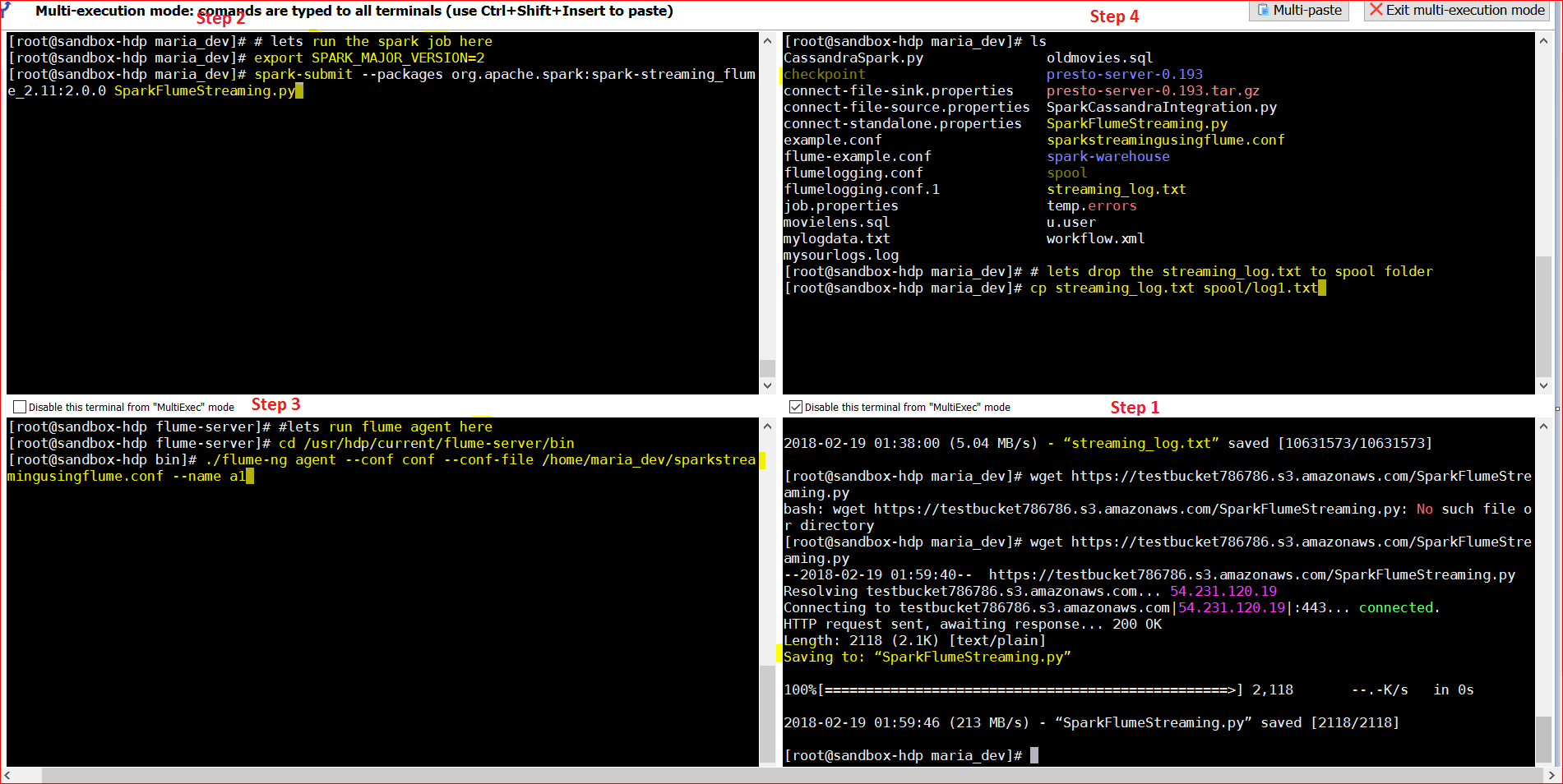
- Open 3 more windows to run the flume and Spark jobs and one more window to copy the log file to spool folder
- to run spark job – export SPARK_MAJOR_VERSION=2
spark-submit –packages org.apache.spark:spark-streaming-flume_2.11:2.0.0 SparkFlumeStreaming.py - to run flume job – cd /usr/hdp/current/flume-server/bin
./flume-ng agent –conf conf –conf-file /home/maria_dev/sparkstreamingusingflume.conf –name a1 - To copy files into the spool folder – cp streaming_log.txt spool/log1.txt
- to run spark job – export SPARK_MAJOR_VERSION=2
- See the snapshot below ( enlarge in another tab to see details)
- Case Study :
 Now lets see the output : See first window . it tread the count of the URLs as soon as we dropped the file in window 2 in the spool folder.
 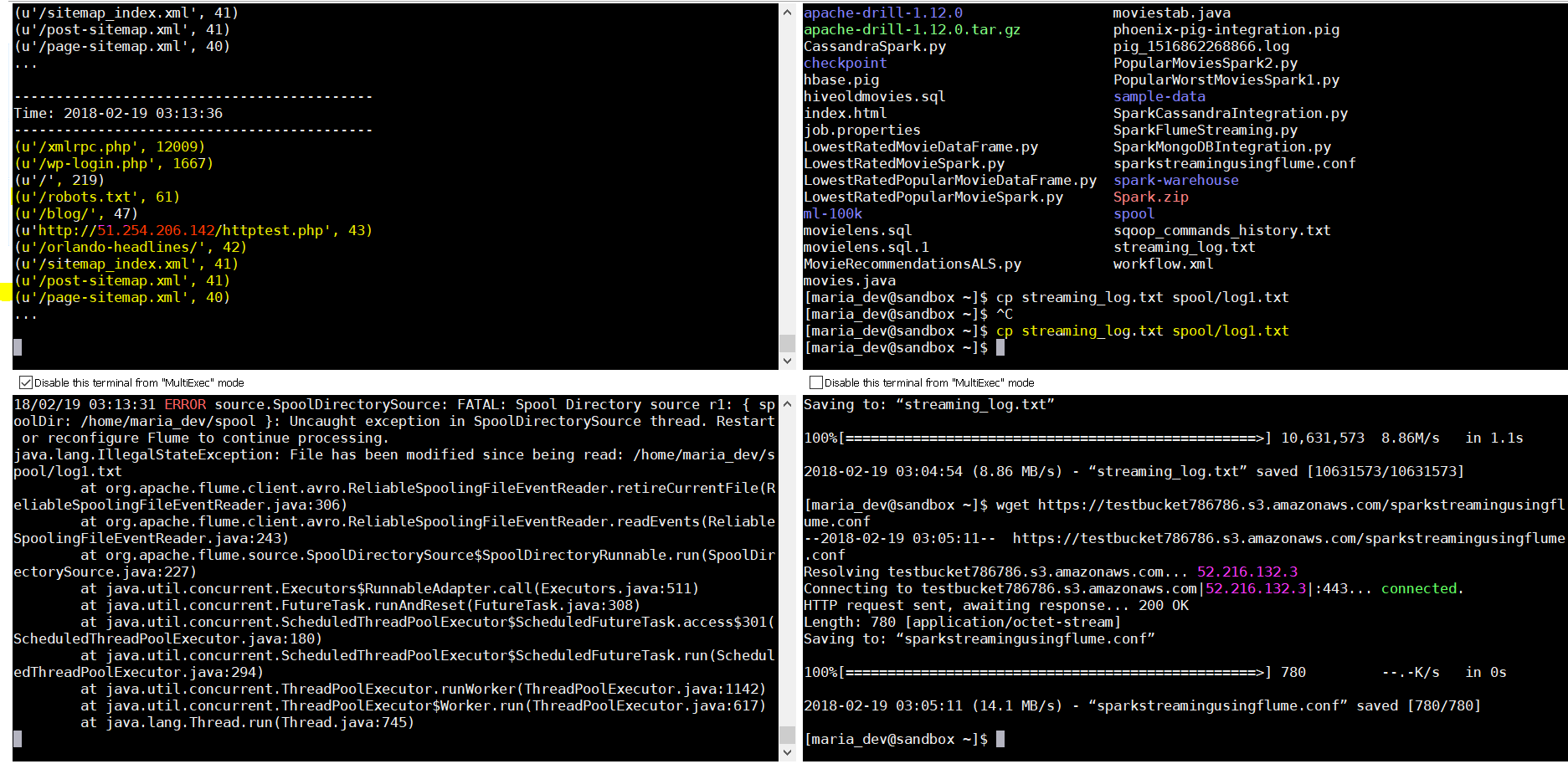 lets drop the file few more times and see if the values(count) doubles, triples etc. Yes, it does.
 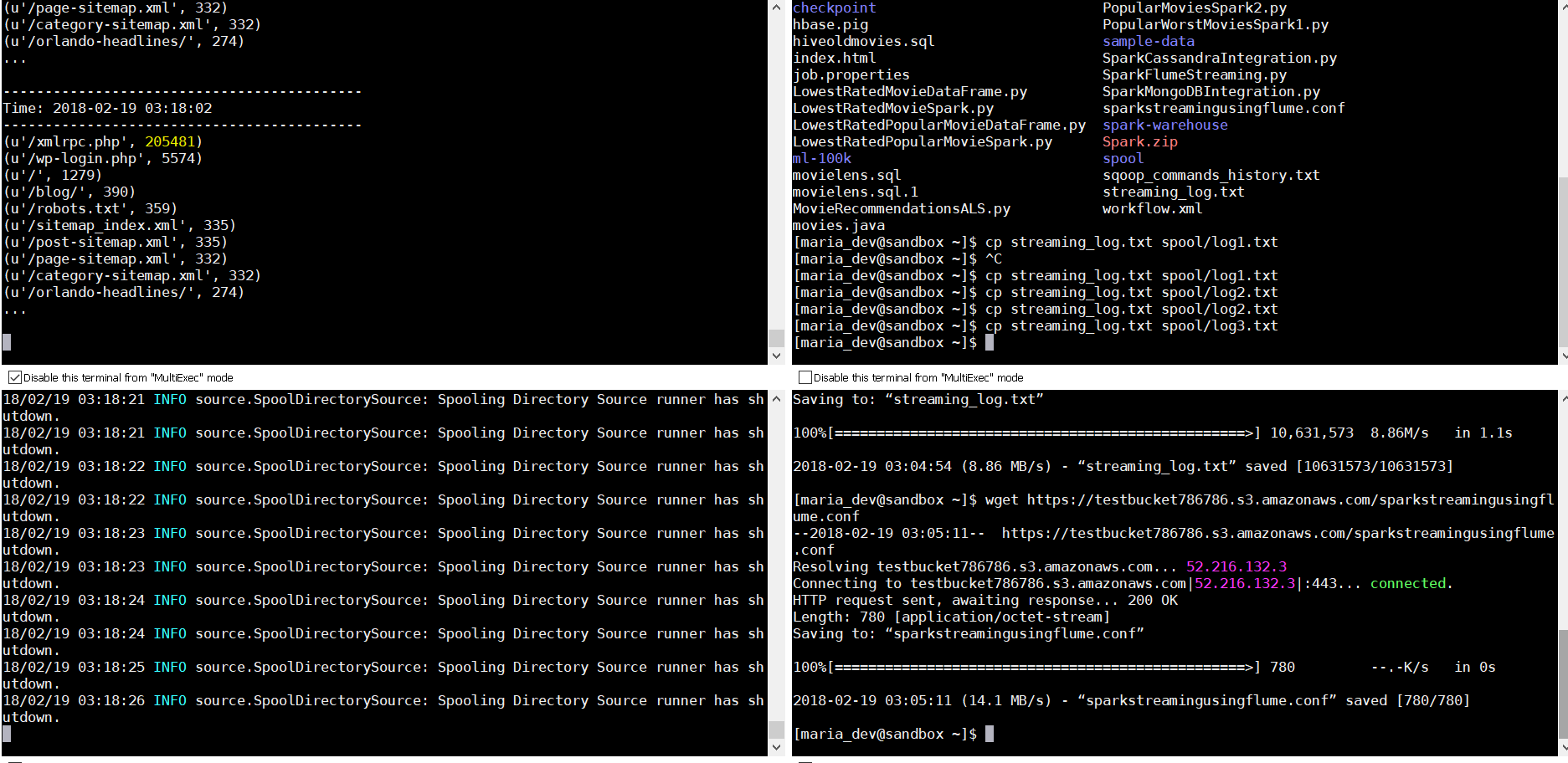 So we are seeing the live streaming of data into a spool folder where the a Flume agent picks up the files and dumps to an Avro endpoint ….and then Spark Streaming listens to this stream to process data in a windowed transformation style and shows you the data on the console. You can even push the data to HDFS, or some othe rconsumer or a SQL or NoSQL database.