
Python – Part 1 of 5
- What is Python and Why:
- open source programming language
- interpreted at run-time(unlike compiled Java, C#, like PHP, Perl)
- Object oriented( like Java and C#)
- precise and interactive( very short and precise commands, thus easy to learn)
- Yet it is one of the most powerful languages in Big Data ( roughly 55-60% Big data scripts and programs are written in Python followed by Java and others
- It is portable (can be run on lot of hardware and software platforms)
- support a very broad standard library, modules
- dynamic data types, garbage collection, interfaces to all major databases
- comes in 2 major versions – Python 2.x (e.g. Python 2.7) and Python 3 – till date most of the Python programs are written in Python 2.x so it is better to learn Python 2.7 first.)
- One more big thing about Python 2.x is that it can import the features of Python 3 by using ( from __future__ import <import_module> syntax, e.g from __future__ import division imports division from Python 3. In Python 2.x if you divide 3/2 you will get answer as 1 as Python 2 performs basic division. In Python 3, it performs true division , if you divide 3/2 you get 1.5) :
- Python Setup:
- Since supported by multiple hardware and software platforms, it can be installed in multiples ways
- Lets focus Installation on Linux
- Method one – Install Python on Linuc and use Python Shell(command line)
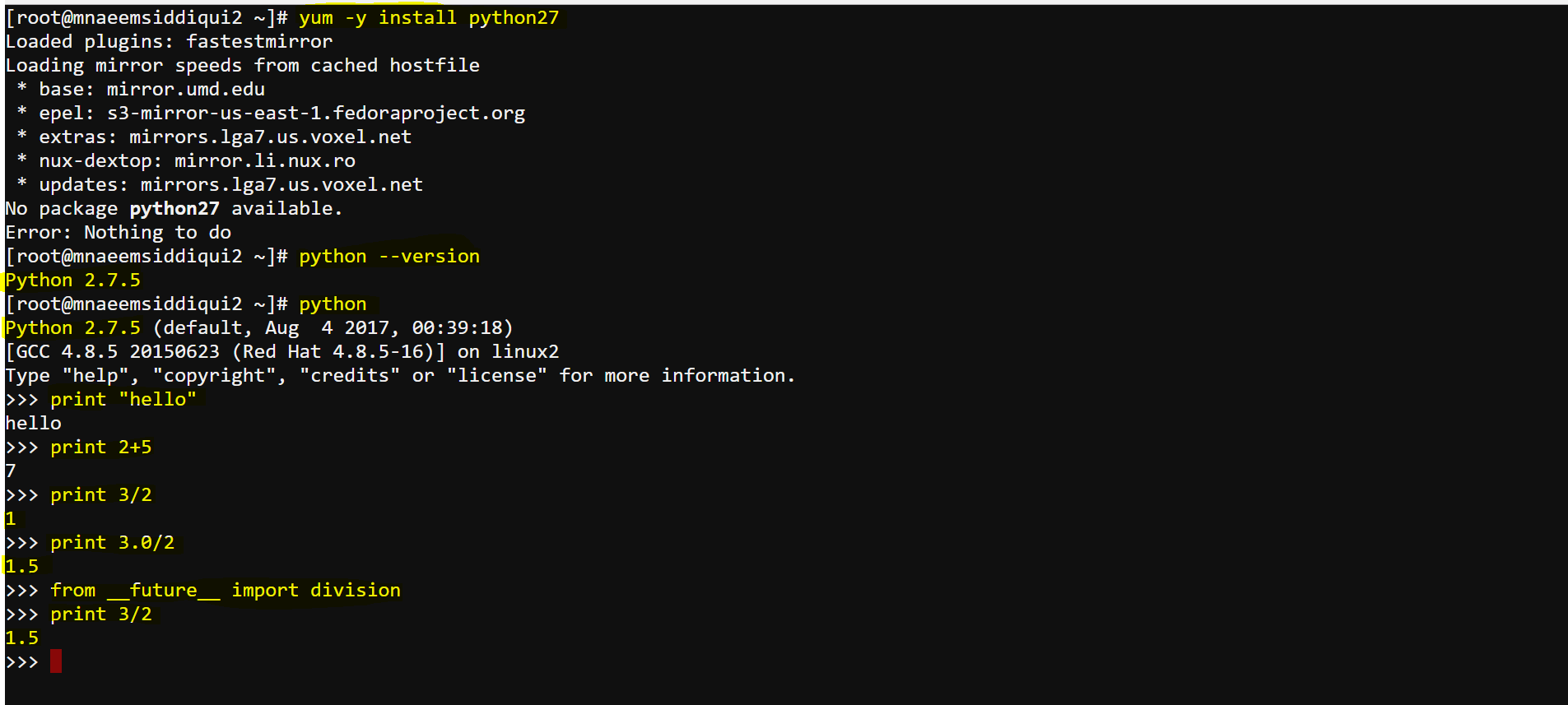
- Install Python – yum -y install python27
- Create a python script file – echo “print ‘hello'” > hello.py
- Execute the python script in Python shell – python hello.py
- Directly execute commands on Python shell –
- get python version – python –version
- print a statement – print “hello”
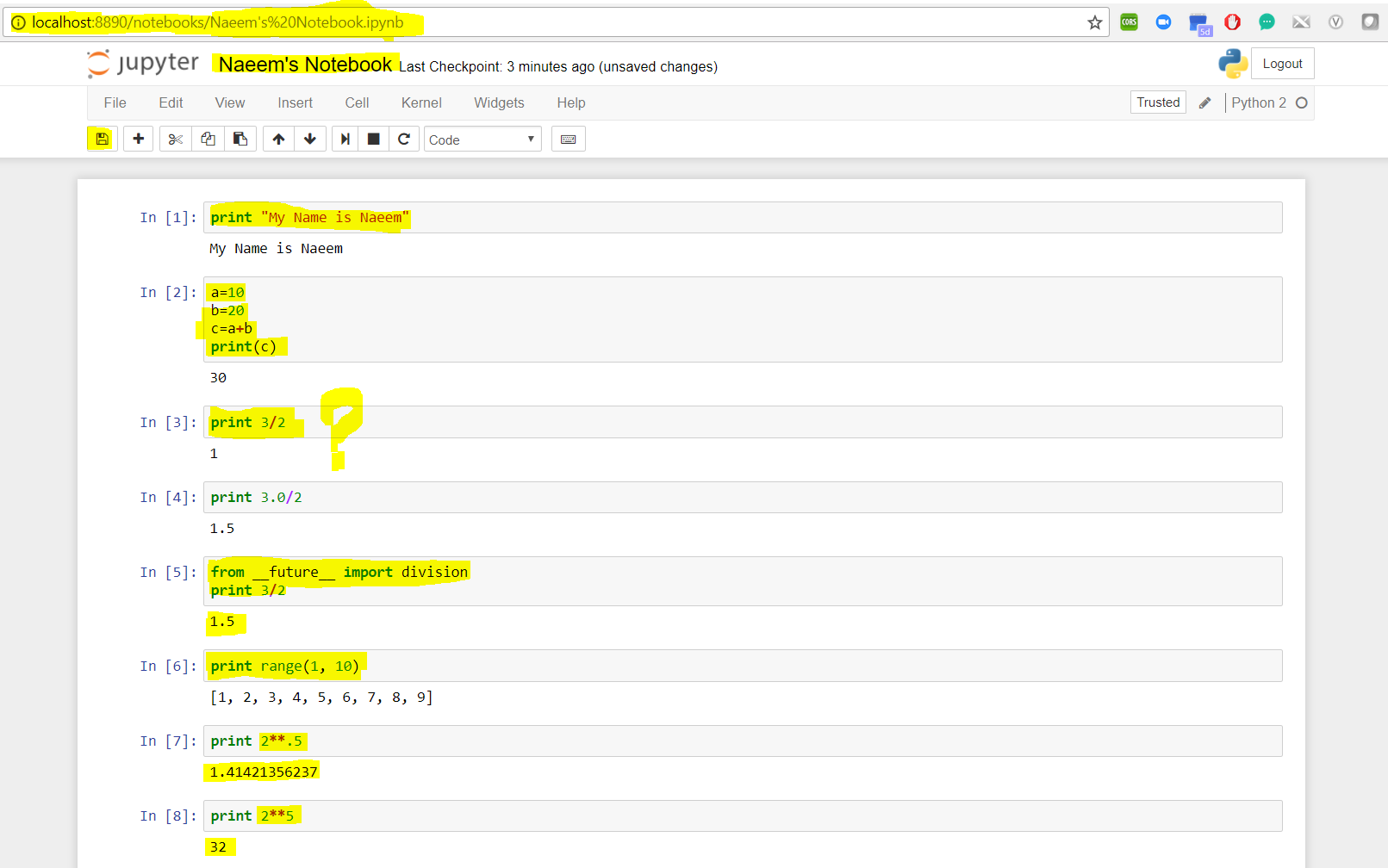
- print 3/2 – returns 1 (because Python 2.x does not perform true division, you have to use something like 3.0/2 to get correct answer. One of the rare language which is kind of forward compatible.)
- print 3.0/2 – returns 1.5
- To import true division from Python 3.0 – from __future_ import division
- Now print 3/2 – returns 1.5
- to quit Python shell – quit()
- Method two– setup – Jupyter Notebooks – on your local system
- Install Anaconda(Anaconda installs Python, Jupyter notebooka dn required dependencies as a package) from https://www.anaconda.com/download/
- It has links for Windows, Linux or Mac installations for Python 2.7 as well as 3.6
- Lets install Python 2.7 using Windows Installer from https://repo.continuum.io/archive/Anaconda2-5.0.1-Windows-x86_64.exe. Download and install Anaconda.
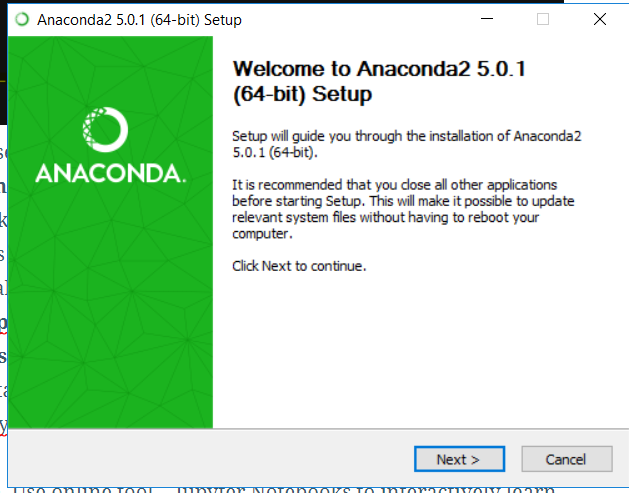
- Anaconda is installed now, verify it by opening Anaconda Navigator, from your Windows Start menu.
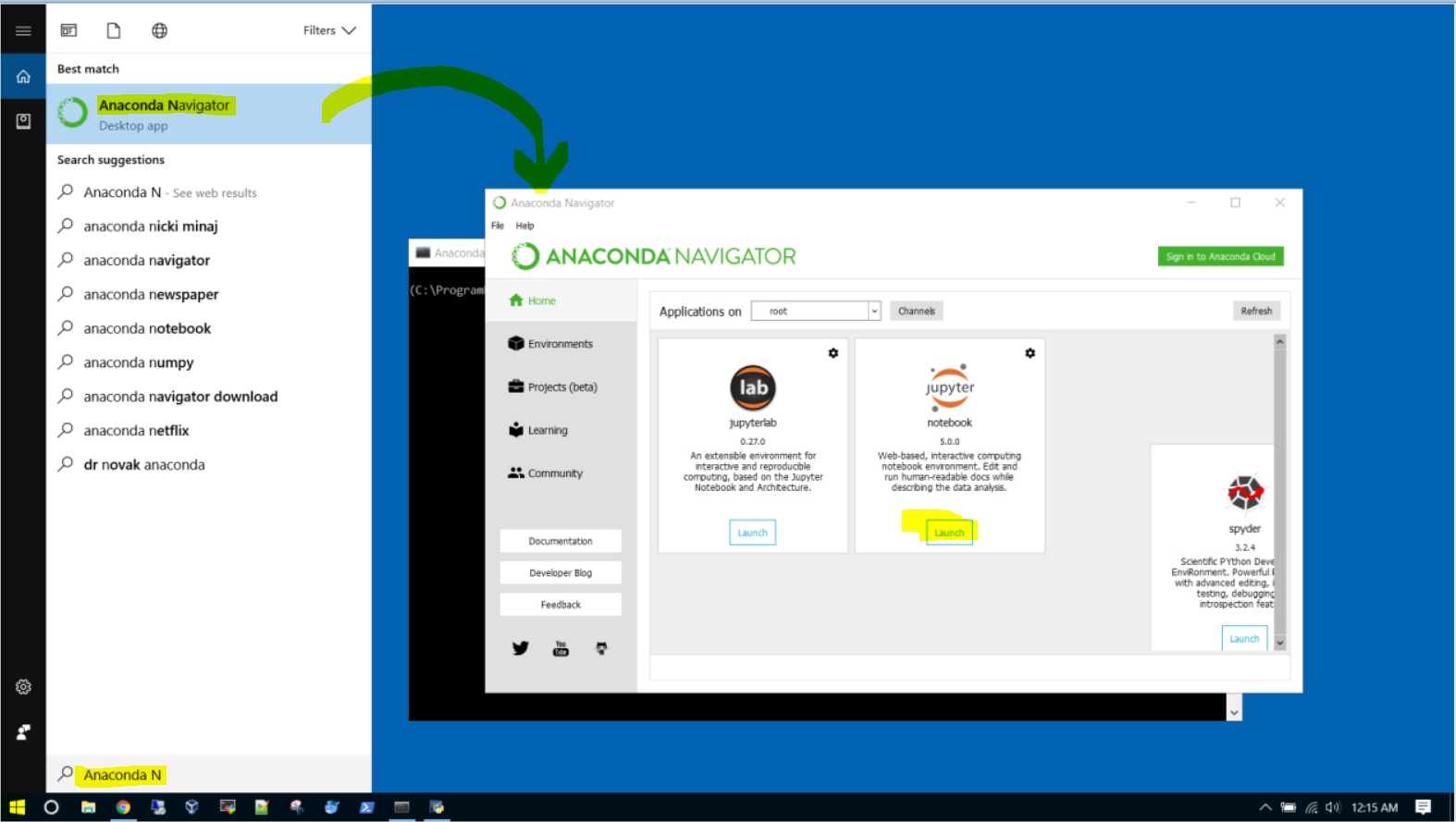
- Click open the “Jupyter notebook“. It will open in the browser locally:
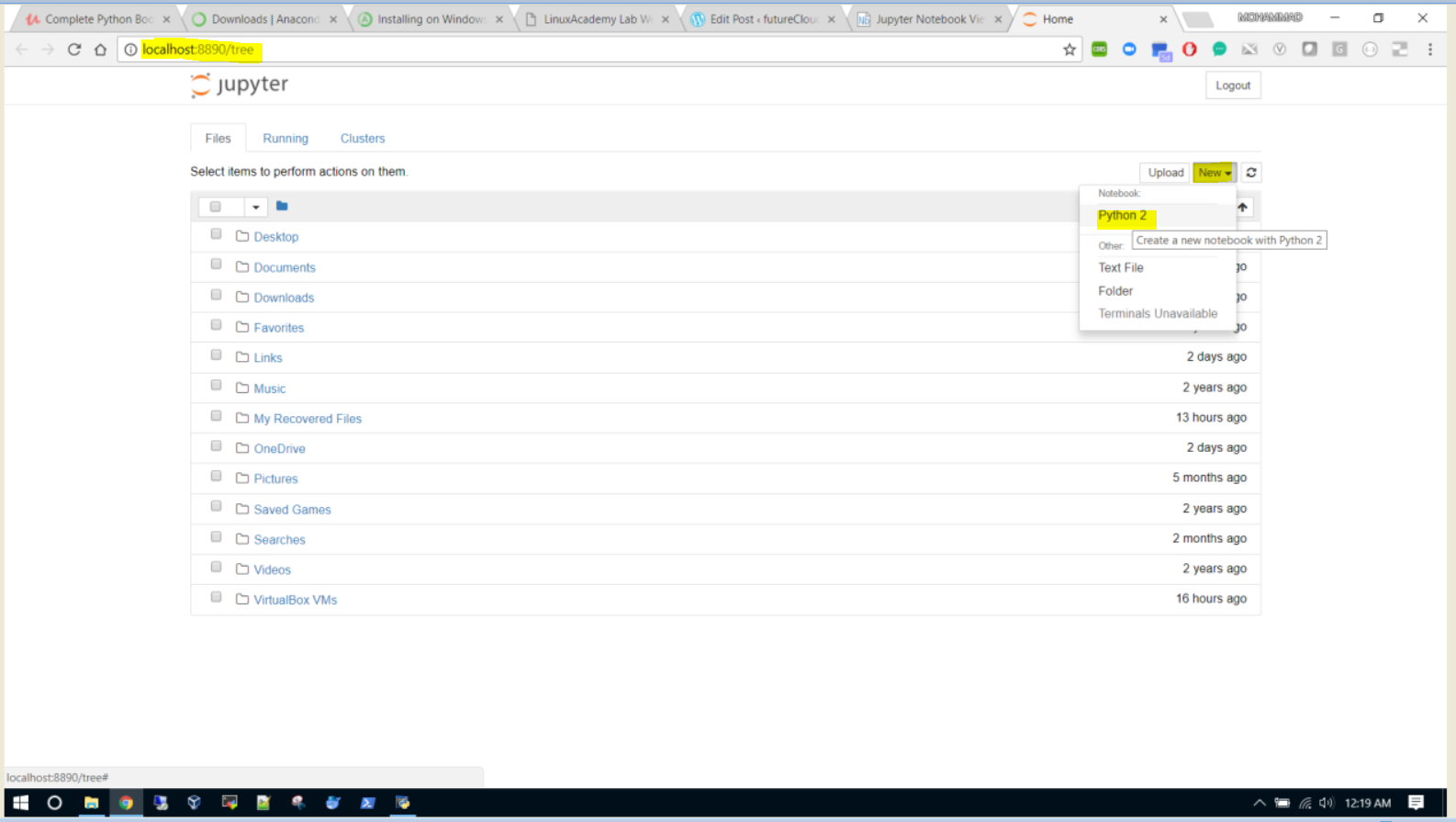
- Now run a few commands on the local instance of your Jupyter notebook.
- Method three– Use online tool – Jupyter Notebooks to interactively learn Python ( https://try.jupyter.org/)
-
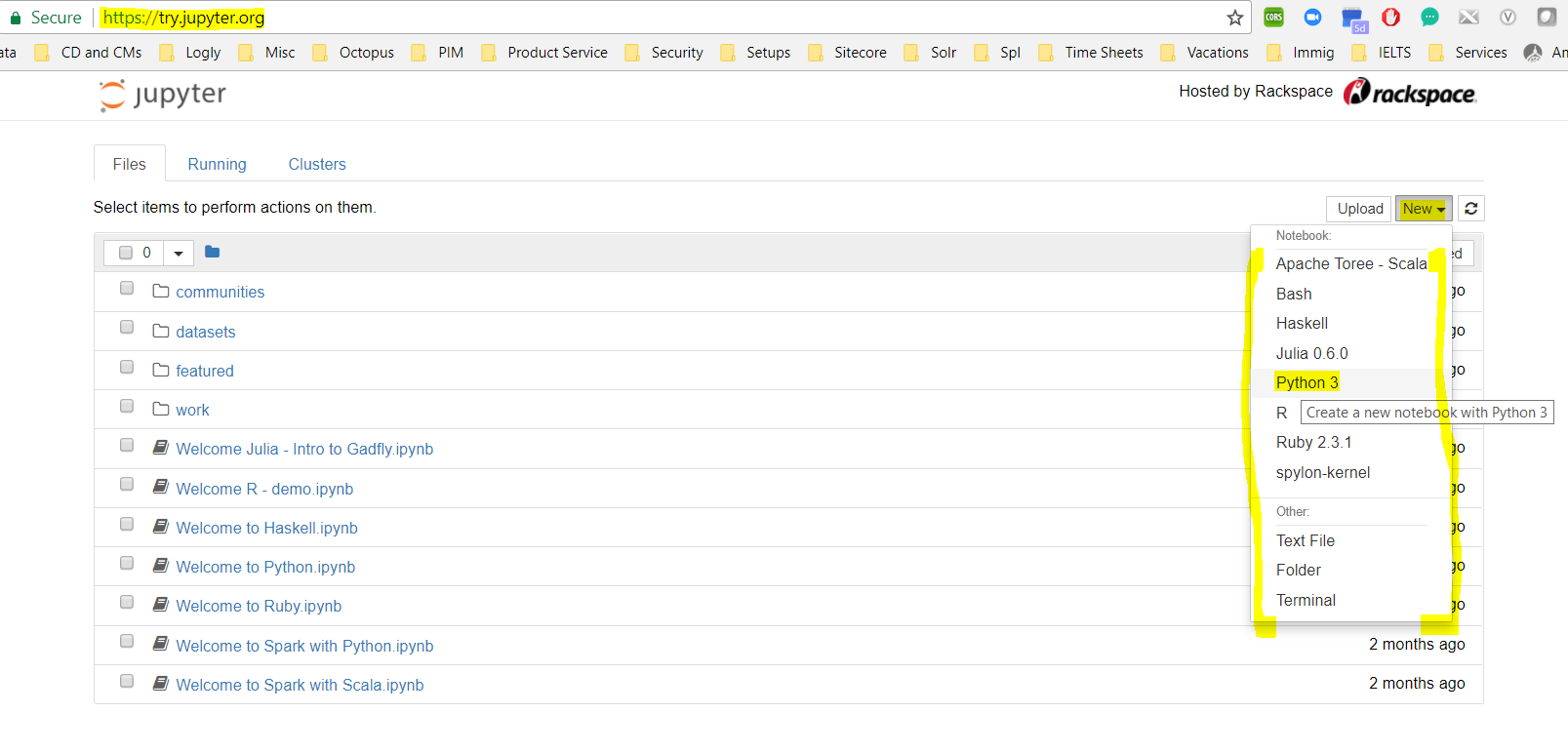
Click on “New” button and then on “Python 3” to create a new Python Notebook - The Jupyter notebook is a very interactive Python interpreter tool.
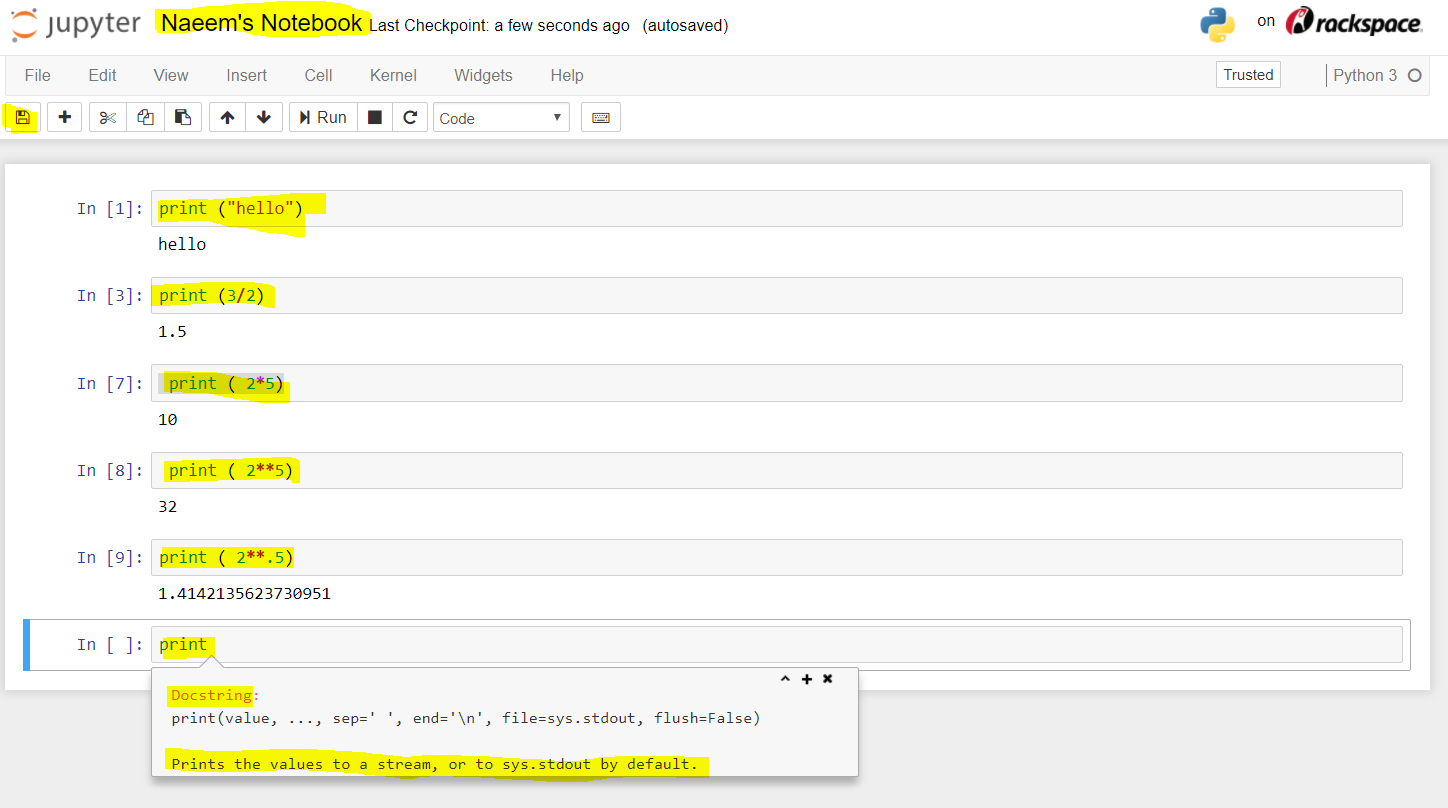
- Type the command in the cell and press “Shift+Enter” to view results.
- To see help about a command, first type the command and then press (Shift+Tab)
-
- Method one – Install Python on Linuc and use Python Shell(command line)
Python – Part 2 of 5
- Numbers and Strings:
- Python supports dynamic datatypes i.e. the type of a variable is decided by the values it holds .
- if we assign a variable a=”Naeem”, then a is a string, if a = “9” then its a number and if a=3.0 then its a float
- Number Operations:
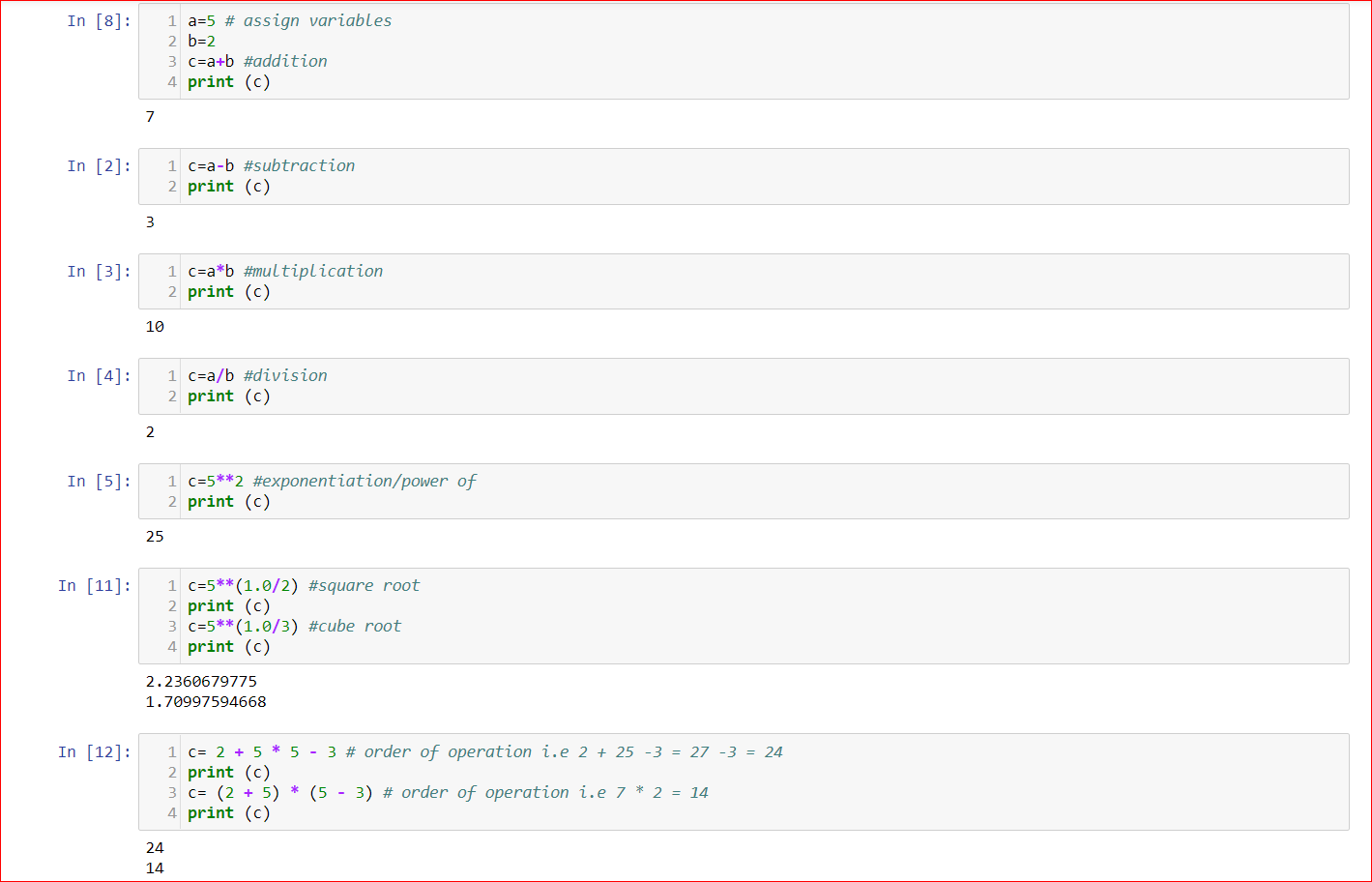
- a=5 # assign variables
b=2
c=a+b #addition
print (c)
7c=a-b #subtraction
print (c)
3c=a*b #multiplication
print (c)
10c=a/b #division
print (c)
2c=5**2 #exponentiation/power of
print (c)
25c=5**(1.0/2) #square root
print (c)
c=5**(1.0/3) #cube root
print (c)
2.2360679775
1.70997594668c= 2 + 5 * 5 – 3 # order of operation i.e 2 + 25 -3 = 27 -3 = 24
print (c)
c= (2 + 5) * (5 – 3) # order of operation i.e 7 * 2 = 14
print (c)
c= 2 + 5 * 5 – 3 # order of operation i.e 2 + 25 -3 = 27 -3 = 24
print (c)
c= (2 + 5) * (5 – 3) # order of operation i.e 7 * 2 = 14
print (c)
24
14
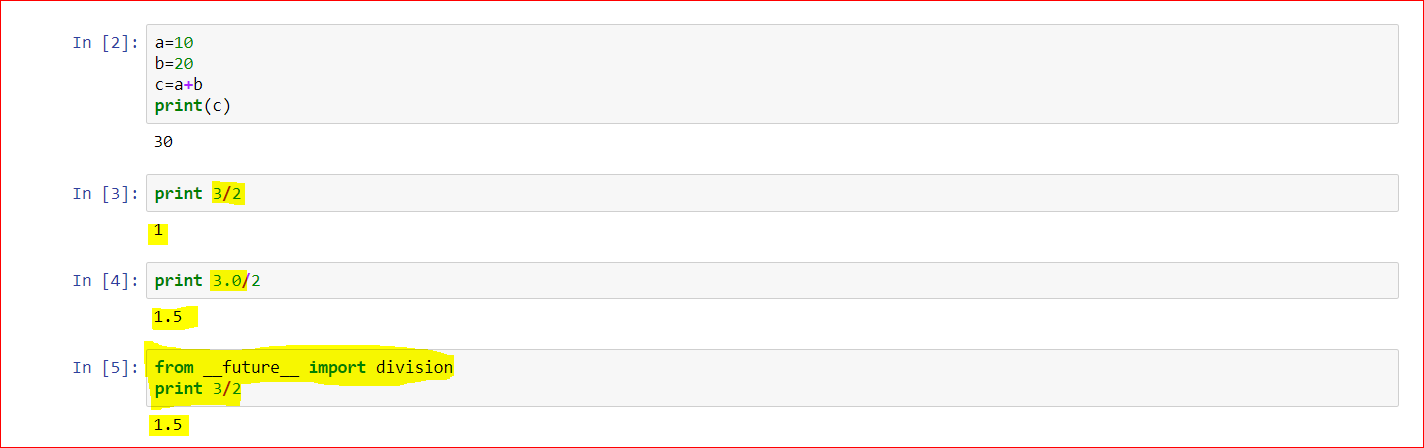
- True(Python 3.x) vs Basic Division(Python 2.x):
print 3/2
1
print 3.0/2
1.5
from __future__ import division
print 3/2
1.5
- String Operations:
# string assignments
str = “Naeem” # single word
print str
Naeem
str = “Mohd Naeem”
str = “Mohd Naeem” # multiple words
print str
Mohd Naeem
str = “Mohd’s Profile” # single quote is a string
print str
str = ‘Mohd Naeem said and I quote “Big Data is going to revotionalize everything”.’ # double quote in a string
print str
Mohd’s Profile
Mohd Naeem said and I quote “Big Data is going to revotionalize everything”.
# len method
str = “Mohd Naeem”
strlen = len(str)
print (“My Name is %s characters long.” %(strlen))
My Name is 10 characters long.
# In Python strings are sequences, so we can apply index to it ( index begins at 0)
print(str[0]) # M
print(str[5]) # N
M
N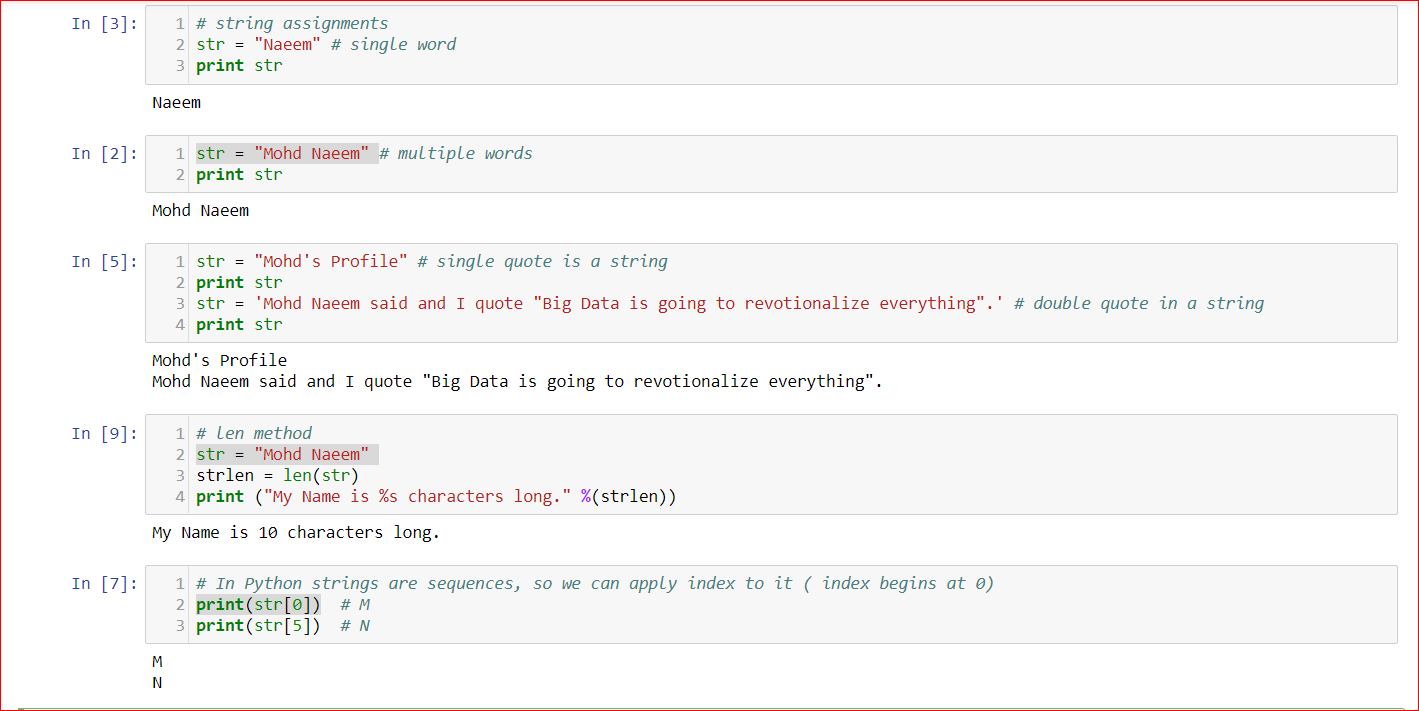
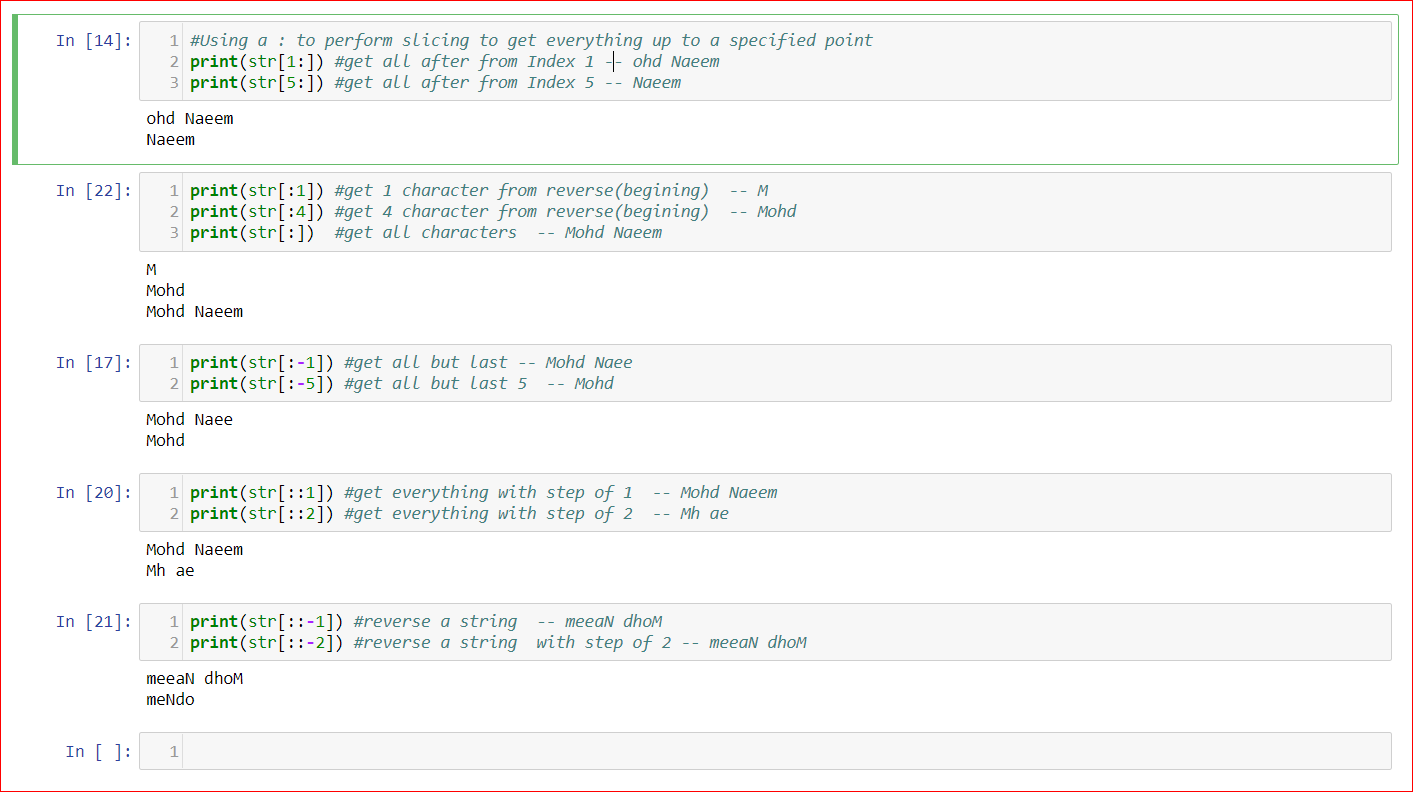
#Using a : to perform slicing to get everything up to a specified point
print(str[1:]) #get all after from Index 1 — ohd Naeem
print(str[5:]) #get all after from Index 5 — Naeem
ohd Naeem
Naeem
print(str[:1]) #get 1 character from reverse(begining) — M
print(str[:4]) #get 4 character from reverse(begining) — Mohd
print(str[:]) #get all characters — Mohd Naeem
M
Mohd
Mohd Naeem
print(str[:-1]) #get all but last — Mohd Naee
print(str[:-5]) #get all but last 5 — Mohd
Mohd Naee
Mohd
print(str[::1]) #get everything with step of 1 — Mohd Naeem
print(str[::2]) #get everything with step of 2 — Mh ae
Mohd Naeem
Mh ae
print(str[::-1]) #reverse a string — meeaN dhoM
print(str[::-2]) #reverse a string with step of 2 — meeaN dhoM
meeaN dhoM
meNdo
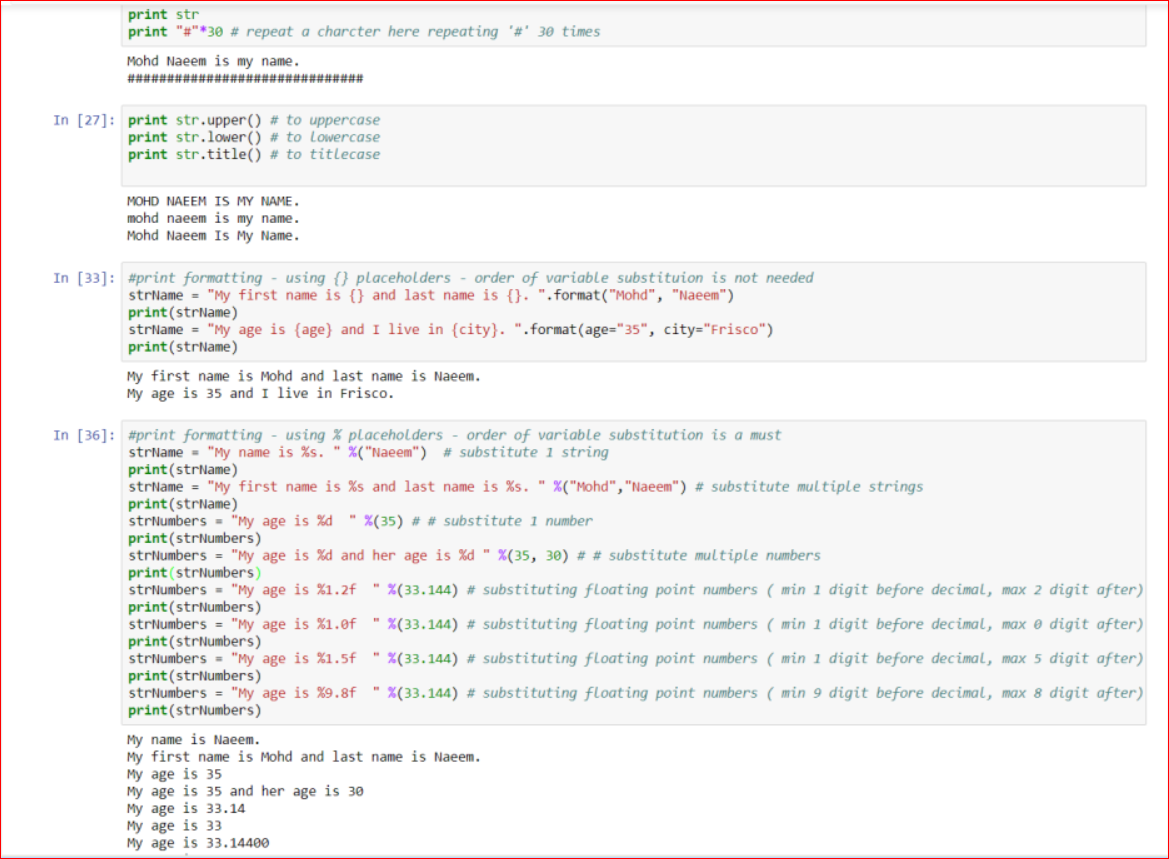
str = str + ” is my name.” #concatevate strings
print str
print “#”*30 # repeat a charcter here repeating ‘#’ 30 times
Mohd Naeem is my name.
##############################
print str.upper() # to uppercase
print str.lower() # to lowercase
print str.title() # to titlecase
MOHD NAEEM IS MY NAME.
mohd naeem is my name.
Mohd Naeem Is My Name.
substituion is not needed
#print formatting – using {} placeholders – order of variable substituion is not needed
strName = “My first name is {} and last name is {}. “.format(“Mohd”, “Naeem”)
print(strName)
strName = “My age is {age} and I live in {city}. “.format(age=”35″, city=”Frisco”)
print(strName)
My first name is Mohd and last name is Naeem.
My age is 35 and I live in Frisco.
#print formatting – using % placeholders – order of variable substitution is a must
strName = “My name is %s. ” %(“Naeem”) # substitute 1 string
print(strName)
strName = “My first name is %s and last name is %s. ” %(“Mohd”,”Naeem”) # substitute multiple strings
print(strName)
strNumbers = “My age is %d ” %(35) # # substitute 1 number
print(strNumbers)
strNumbers = “My age is %d and her age is %d ” %(35, 30) # # substitute multiple numbers
print(strNumbers)
strNumbers = “My age is %1.2f ” %(33.144) # substituting floating point numbers ( min 1 digit before decimal, max 2 digit after)
print(strNumbers)
strNumbers = “My age is %1.0f ” %(33.144) # substituting floating point numbers ( min 1 digit before decimal, max 0 digit after)
print(strNumbers)
strNumbers = “My age is %1.5f ” %(33.144) # substituting floating point numbers ( min 1 digit before decimal, max 5 digit after)
print(strNumbers)
strNumbers = “My age is %9.8f ” %(33.144) # substituting floating point numbers ( min 9 digit before decimal, max 8 digit after)
print(strNumbers)
My name is Naeem.
My first name is Mohd and last name is Naeem.
My age is 35
My age is 35 and her age is 30
My age is 33.14
My age is 33
My age is 33.14400
My age is 33.14400000
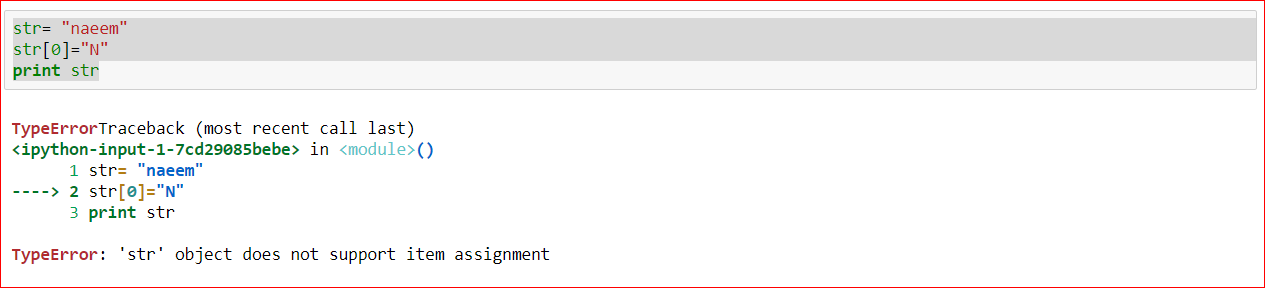
- The strings are immutable(can’t be changed by index)
- E.g. str= “naeem” and try s[0]=”N”, you will get error.
- This means that one created you can’t update a string by it’s index and thus string are immutable.
- Lists : they are mutable sequence
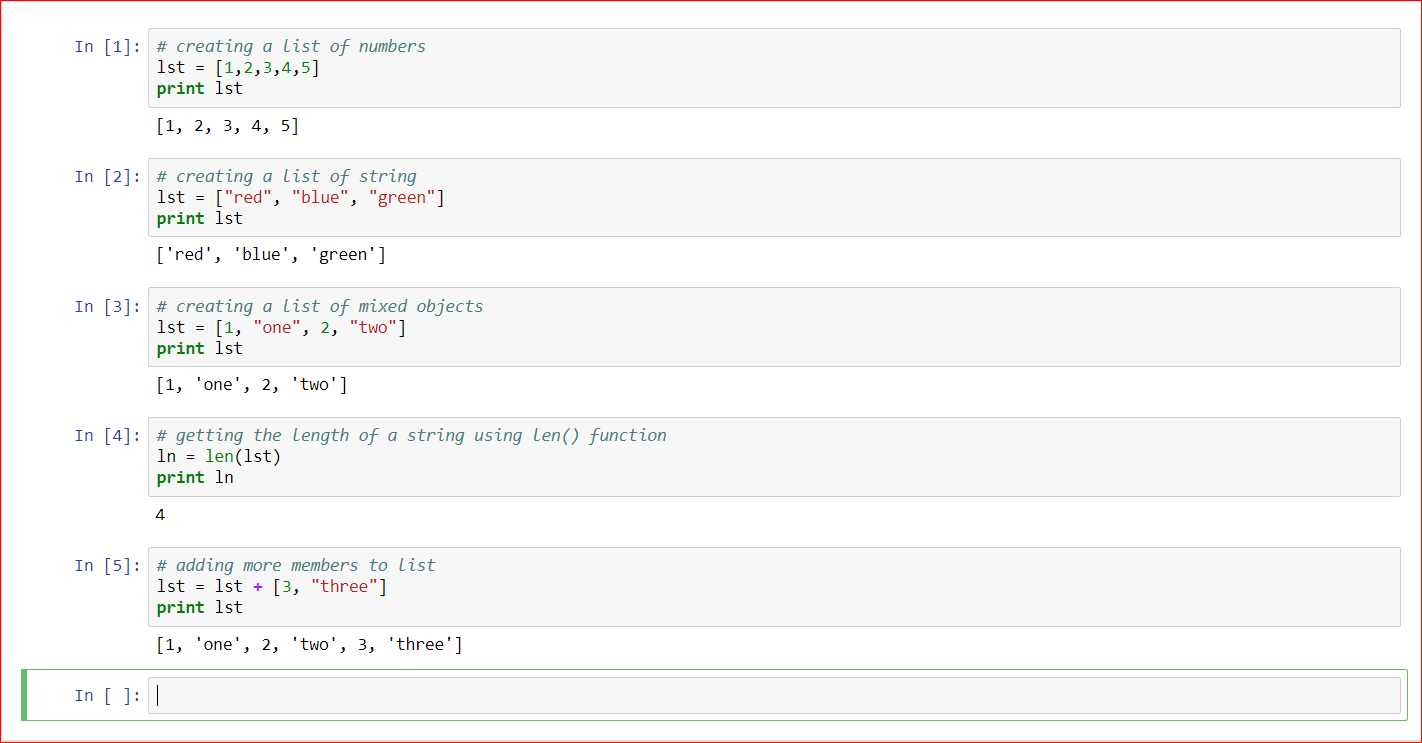
- # creating a list of numbers
lst = [1,2,3,4,5]
print lst
[1, 2, 3, 4, 5]# creating a list of string
lst = [“red”, “blue”, “green”]
print lst
[‘red’, ‘blue’, ‘green’]# creating a list of mixed objects
lst = [1, “one”, 2, “two”]
print lst
[1, ‘one’, 2, ‘two’]# getting the length of a string using len() function
ln = len(lst)
print ln
4print lst
# adding more members to list, thus lists are mutable
lst = lst + [3, “three”]
print lst
[1, ‘one’, 2, ‘two’, 3, ‘three’]
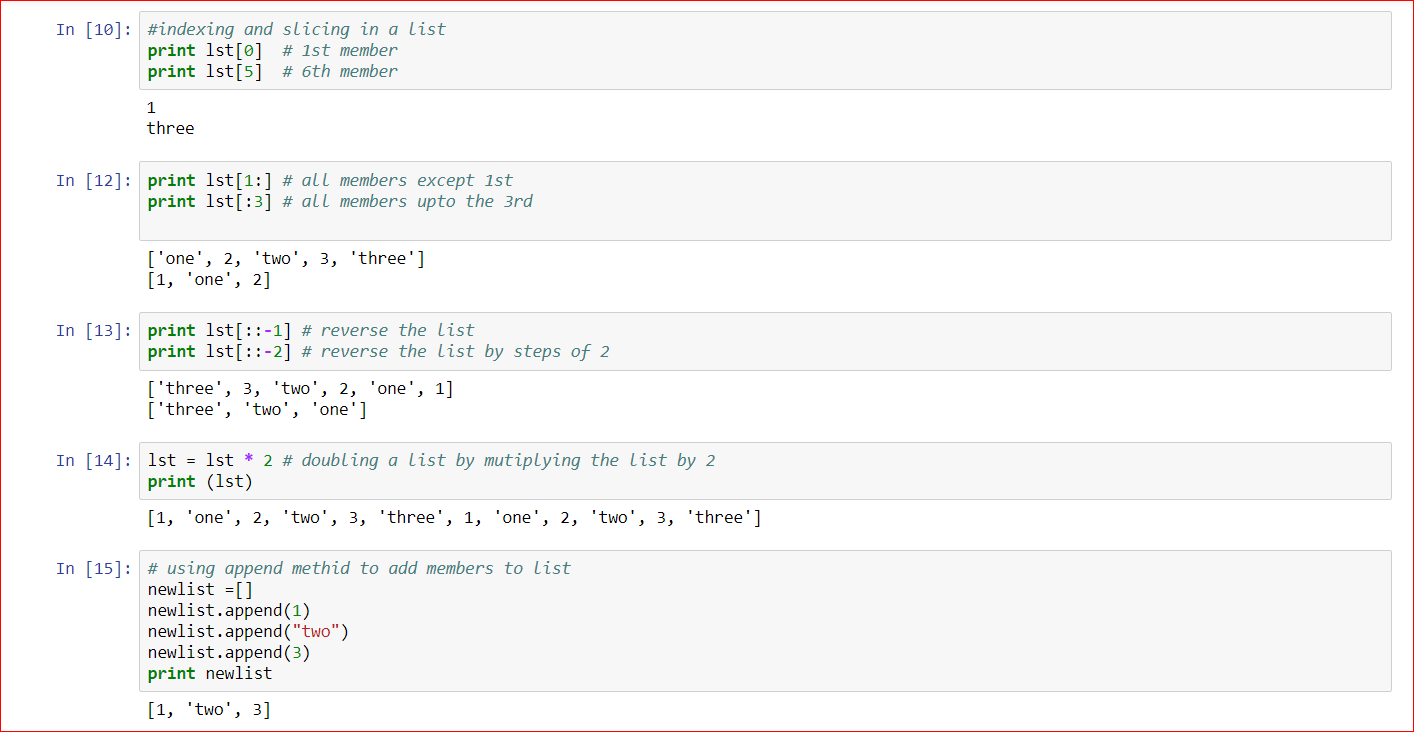
#indexing and slicing in a list
print lst[0] # 1st member
print lst[5] # 6th member
1
three
print lst[1:] # all members except 1st
print lst[:3] # all members up to the 3rd
[‘one’, 2, ‘two’, 3, ‘three’]
[1, ‘one’, 2]
print lst[::-1] # reverse the list
print lst[::-2] # reverse the list by steps of 2
[‘three’, 3, ‘two’, 2, ‘one’, 1]
[‘three’, ‘two’, ‘one’]
# doubling a list by mutiplying the list by 2
lst = lst * 2 # doubling a list by mutiplying the list by 2
print (lst)
[1, ‘one’, 2, ‘two’, 3, ‘three’, 1, ‘one’, 2, ‘two’, 3, ‘three’]
# using append methid to add members to list
newlist =[]
newlist.append(1)
newlist.append(“two”)
newlist.append(3)
print newlist
[1, ‘two’, 3]
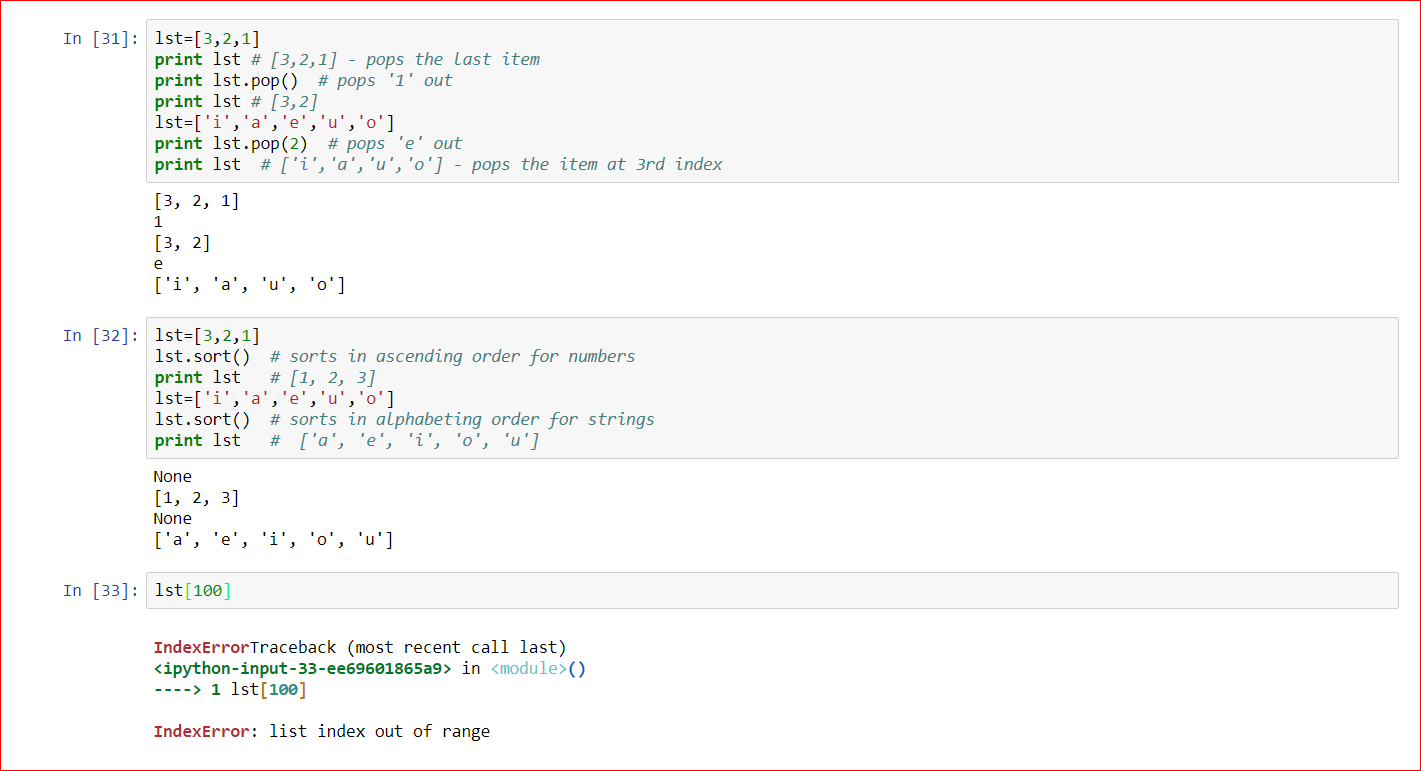
lst=[3,2,1]
print lst # [3,2,1] – pops the last item
print lst.pop() # pops ‘1’ out
print lst # [3,2]
lst=[‘i’,’a’,’e’,’u’,’o’]
print lst.pop(2) # pops ‘e’ out
print lst # [‘i’,’a’,’u’,’o’] – pops the item at 3rd index
[3, 2, 1]
1
[3, 2]
e
[‘i’, ‘a’, ‘u’, ‘o’]
lst=[3,2,1]
lst.sort() # sorts in ascending order for numbers
print lst # [1, 2, 3]
lst=[‘i’,’a’,’e’,’u’,’o’]
lst.sort() # sorts in alphabeting order for strings
print lst # [‘a’, ‘e’, ‘i’, ‘o’, ‘u’]
[1, 2, 3]
[‘a’, ‘e’, ‘i’, ‘o’, ‘u’]
lst[100] # trying to access an index not existing
IndexErrorTraceback (most recent call last)
<ipython-input-33-ee69601865a9> in <module>()
—-> 1 lst[100]
IndexError: list index out of range
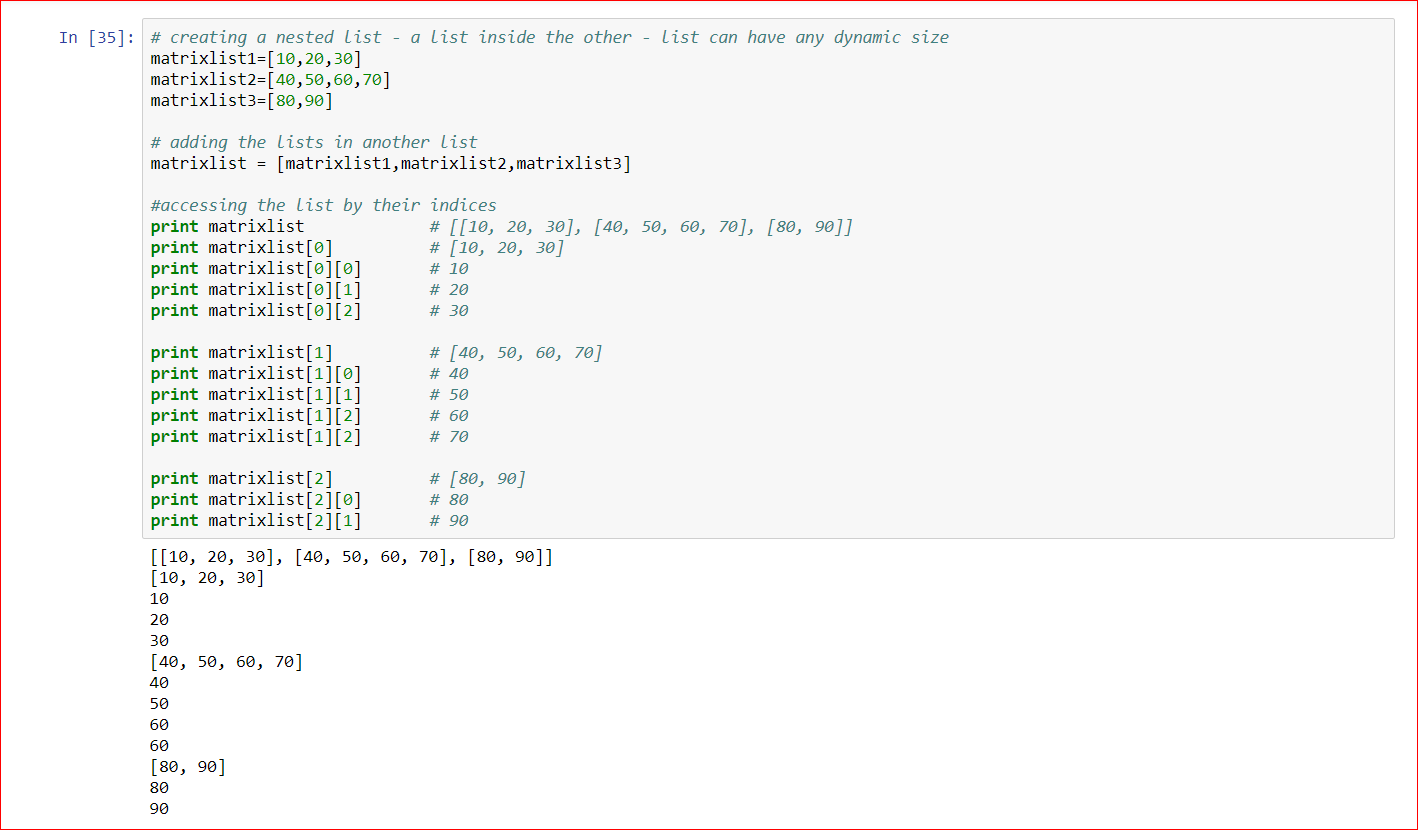
# creating a nested list – a list inside the other – list can have any dynamic size
matrixlist1=[10,20,30]
matrixlist2=[40,50,60,70]
matrixlist3=[80,90]
# adding the lists in another list
matrixlist = [matrixlist1,matrixlist2,matrixlist3]
#accessing the list by their indices
print matrixlist # [[10, 20, 30], [40, 50, 60, 70], [80, 90]]
print matrixlist[0] # [10, 20, 30]
print matrixlist[0][0] # 10
print matrixlist[0][1] # 20
print matrixlist[0][2] # 30
[[10, 20, 30], [40, 50, 60, 70], [80, 90]]
[10, 20, 30]
10
20
30
print matrixlist[1] # [40, 50, 60, 70]
print matrixlist[1][0] # 40
print matrixlist[1][1] # 50
print matrixlist[1][2] # 60
print matrixlist[1][2] # 70
[40, 50, 60, 70]
40
50
60
60
print matrixlist[2] # [80, 90]
print matrixlist[2][0] # 80
print matrixlist[2][1] # 90
[80, 90]
80
90
What are Dictionaries?
- While String is an immutable sequences and lists are mutable sequences,
- Dictionaries are actually mutable mappings,
- Mappings are collection of objects stored as key value pairs.
In [64]:# create an empty dictionary dict = {} print dictIn [18]:# create a dictionary with key value pairs dict = {'Name': 'Naeem', 'Age': 37 } print dictIn [17]:# access dictionary by key print dict['Name']In [19]:# access dictionary by key print dict['Age']In [20]:# create a dictionary with key value pairs dict = {'Name': 'Naeem', 'Age': 37, 'Address': {'Address1': '1 Austin St','City': 'Austin','State': 'TX', 'Zip': '78610',} } print dictIn [21]:# access dictionary by key print dict['Address']In [22]:# access dictionary by nested keys print dict['Address']['City']In [24]:# apply methods on the dictionary value print dict['Address']['City'].upper()In [32]:# creating dictionaries by assignment dict = {} dict['Age'] = 37 dict['Name'] = 'Naeem' dict['Address'] = {'Address1': '1 Austin St', 'State': 'TX', 'Zip': '78610', 'City': 'Austin'} print dictIn [26]:# View the keys of the dictionary dict.keys()Out[26]:In [27]:# View the values of the dictionary dict.values()Out[27]:In [28]:# View the items of the dictionary dict.items()Out[28]:In [29]:# clear a dictionary dict.clear()In [37]:# View dictionary by methid dictionary.get(keyname) print dict.get('Name')In [39]:# pop items by key from dictionary testpop ={"key1": "value1","key2": "value2","key3": "value3"} print testpop testpop.pop("key2") print testpopIn [43]:# update items by key in the dictionary testupdate ={"key1": "value1","key2": "value2","key3": "value3"} print testupdate testupdate.update({"key2":"doublevalue2"}) print testupdateIn [53]:# looping through a dictionary for k,v in dict.items(): print 'Key: {0} Value: {1}'.format(k, v)In [58]:# looping through a dictionary for item in dict.items(): print itemIn [61]:# looping through a dictionary keys, values, items for item in dict.iterkeys(): print itemIn [62]:# looping through a dictionary keys, values, items for item in dict.itervalues(): print itemIn [63]:# looping through a dictionary keys, values, items for item in dict.iteritems(): print item
What are tuples
- Tuples are also like lists except that they are immutable
- Once created can’t be updated
- We use tuples very extensivly to ensure where the number of elements should be fixed and should not change.
- E.g. Lets assume that we have a file storing movie name details – movieid, moviename, releasedate, netincome . If we want to export or import data to and fro from the file we would like to read or write to the file line by line. We can store each line info in a tuple.
# creating a tuple testTuple = (1,2,3) print testTuple print testTuple[0]# creating another tuple ( assuming that the fields are the lines of the movies file) testTuple = (1001, "The Titanic", 1995, 7897967) print testTuple print testTuple[1]# tuples are immutable ( can't update an element) testTuple[0] = 9001 print testTuple# tuples are immutable ( can't add/insert an element) print testTuple.append("Supe Hit")# only 2 methods supported - count and index - e.g. if you want to find the count of movies released in 1995 print testTuple.count(1995)1# only 2 methods supported - count and index - e.g. the index of the release date 1995 is at index 2 print testTuple.index(1995)2
Files
- Python support all file types.
- For some basic files types the support is in-built for the others we need to install related modules
- You can write files to the file system, read them, overrite them, delete them
Creating a File%%writefile myfile.txt This is line 1. This is line 2. This is line 3.# opening a file myfile = open("myfile.txt")# reading a file myfile.read()# reading a file - but errrrrrrrrrrrrrr - why ??? because you reached end of file myfile.read()# reading a file - seek to the begining - as you raeached end of file file.read() returned blank so seek to begining of file myfile.seek(0) myfile.read() # read()returns the lines a string# reading a file - seek to the begining - as you raeached end of file file.read() returned blank so seek to begining of file myfile.seek(0) myfile.readlines() # readlines() returns the lines a string# reading a file - using for loop for line in open("myfile.txt"): print line
Sets and Booleans
- Sets are unordered collection of unique objects.
- Booleans are objects which return values True or False when an expression is evaluated.
# Creating a set - use set() method and .add(object) functions to add memebers to set myset = set() myset.add(3) myset.add(1) myset.add(2) myset.add(3) print myset#converting a list into a set - use set(list) to convert a list into a set mylist = [3,2,2,1,3,5,4,5,6,5] myset = set(mylist) print myset# Booleans booldata= True print booldata# Booleans booldata= 5>7 print booldata
Comparision Operators
- Python supports all basic comparison operators as well as chained operators
- Here is the list below:
- == – equal to. e.g. 4 == 4 returns True, 4 == 5 returns False
i=4
j=4
k=5
l=3
print i==j
print i==k
- != – not equal to. e.g. 4 != 4 returns False, 4 != 5 returns True
print i!=j
print i!=k
- <> – not equal to. e.g. 4 <> 4 returns False, 4 <> 5 returns True
print i<>j
print i<>k
- greater than. e.g. 4 > 4 or 4 > 5 returns False, 4 > 3 returns True
print i>j
print i>k
print i>l
= – greater than equal to . e.g. 4 >= 5 returns False, 4 >= 4, 4 >= 3 returns True
print i>=j
print i>=k
print i>=l
- < – less than. e.g. 4 < 4 or 4 > 5 returns False, 4 < 3 returns True
print i<j
print i<k
print i<l
- <= – less than equal to . e.g. 4 <= 3 returns False, 4 <= 4, 4 <= 5 returns True
print i<=j
print i<=k
print i<=l
- chained comparision operator – operator applied one after the other
i=4
j=4
k=5
l=3
print i<k>l
print i<k and k>l
If statements
- Scenario 1 : evaluates the if condition only
# evaluates a simple if condition and if true perform the actions under if
i=10
j=10
if i==j: print "Equal"
- Scenario 2 : evaluates the if and then else conditions
# evaluates if condition and if true perform the actions
# else performs actions under else.
if i>j: print "Greater" else: print "Equal"
- Scenario 3 : evaluates the if, elsif and else conditions
# evaluates if condition and if true perform the actions # other wise evaluates all the else ifs and performs actions under those # else ifs else performs actions under else. if i>j: print "Greater" else if i<j: print "Less" else: print "Equal"For loops
# iterates through the list lst = range(1,11) # the range function is used to generate a range of values for num in lst: print num# iterates through the list lst = range(1,11,2) # the range function is used to generate a range of values but see the step ...Syntax range(start, end, step) for num in lst: print num# iterates through the list also evaluates the numbers in the loop using if lst = range(1,11) for num in lst: if(num%2 == 0): print num# iterates through the multi dimensional tuple mutilst = ((1,2,3),(4,5,6)) for x in mutilst: for y in x: print y# iterates a dictionary dict={'decimaldigits': {0,1,2,3,4,5,6,7,8,9}, 'binarydigits': {0,1}, 'hexadecimaldigits': {0,1,2,3,4,5,6,7,8,9,'a','b','c','d','e','f'}} for item in dict.items(): print item for key in dict.keys(): print key for value in dict.values(): print value for key, value in dict.items(): print key, valueWhile Loops
# while loop evaluates and condition and continues till condition fails ctr = 0 while ctr <=10: print ctr ctr+=1# while loop evaluates and condition and continues till condition fails # you can break at a condition ( says if ctr>==5) ctr = 0 while ctr <=10: print ctr ctr+=1 if ctr>=6: break# while loop evaluates and condition and continues till condition fails # you can continue at a condition ( says if ctr is odd dont print) ctr = 0 while ctr < 10: ctr+=1 if ctr==5: print 'Counter is 5 breaking' break if ctr%2!=0: print 'Counter is odd continuing' continue else: print ctrList Comprehensions
# list comprehensions are used to build objects mylst = [x for x in "Mohd Naeem"] print mylst# list comprehensions are used to build objects # we are doing an action x*2 so the new set is 2,4,6 mylst = [x*2 for x in [1,2,3]] print mylst# list comprehensions are used to build objects # we are doing an action x**.5 to get square root of the numbers mylst = [x**.5 for x in [1,2,3]] print mylst# list comprehensions are used to build objects # we are doing an action x**2 to get square of the numbers mylst = [x**2 for x in [1,2,3]] print mylst# list comprehensions are used to build objects # we are doing an action only print even mylst = [x for x in range(1,21) if x%2==0] print mylst
My Own Tic Tac Toe: 1- Its prompts for how many matches you want to play in a series e.g. 3,5,7,9 2- Keeps a count on how many matches who won and who won the series 3- If a player wins the series before series ends e.g if you won first 2 matches of a series of 3 matches, then 3rd game is not played.
#!/usr/bin/python from __future__ import print_function
from IPython.display import clear_output
import random
import os def playagain(): return raw_input('Do you want to play again? Enter Yes or No:').lower().startswith('y') def howmanymatches(): countofmatches = 0 while countofmatches not in '3 5 7 9'.split(): countofmatches = raw_input('How many matches for the series, please enter your choice (3,5,7,9): ') return int(countofmatches) def tictactoe_board(board): clear_output() os.system('clear') print(' | |') print(' ' + board[7] + ' | ' + board[8] + ' | ' + board[9]) print(' | |') print('-----------') print(' | |') print(' ' + board[4] + ' | ' + board[5] + ' | ' + board[6]) print(' | |') print('-----------') print(' | |') print(' ' + board[1] + ' | ' + board[2] + ' | ' + board[3]) print(' | |') def whoplaysfirst(): if random.randint(0, 1) == 0: return 'Player 1' else: return 'Player 2' def playersmove(board): position = ' ' while position not in '1 2 3 4 5 6 7 8 9'.split() or not checkforSpace(board, int(position)): position = raw_input('Please enter your choice (1-9): ') return int(position) def checkforwin(board, mark): return ((board[7] == mark and board[8] == mark and board[9] == mark) or # across the top (board[4] == mark and board[5] == mark and board[6] == mark) or # across the middle (board[1] == mark and board[2] == mark and board[3] == mark) or # across the bottom (board[7] == mark and board[4] == mark and board[1] == mark) or # down the middle (board[8] == mark and board[5] == mark and board[2] == mark) or # down the middle (board[9] == mark and board[6] == mark and board[3] == mark) or # down the right side (board[7] == mark and board[5] == mark and board[3] == mark) or # diagonal (board[9] == mark and board[5] == mark and board[1] == mark)) # diagonal def checkforSpace(board, position): return board[position] == ' ' def checkforboardfull(board): for i in range(1,10): if checkforSpace(board, i): return False return True
def playerXor0(): marker = '' while not (marker == 'X' or marker == '0'): marker = raw_input('Player 1, Please enter if you want to be X or 0 : ').upper() if marker == 'X': return ('X', 'O') else: return ('O', 'X') def placemarker(board, marker, position): board[position] = marker seriesmatches = howmanymatches()
onwinvalue = 10
player1WinCount = 0
player2WinCount = 0
startseries = 0
print('Welcome to my Tic Tac Toe!!!')
startseries = 0
while True: startseries = startseries + 1 print ("Match %d of %d" %(startseries, seriesmatches)) myboard = [' '] * 10 player1marker, player2marker = playerXor0() game_on = True turn = whoplaysfirst() while game_on: if turn == 'Player 1': tictactoe_board(myboard) pos= playersmove(myboard) placemarker(myboard, player1marker, pos) if checkforwin(myboard, player1marker): tictactoe_board(myboard) print('Player 1 wins...') player1WinCount = player1WinCount + 1 game_on = False else: if checkforboardfull(myboard): tictactoe_board(myboard) print('It is a draw...') break else: turn = 'Player 2' else: tictactoe_board(myboard) pos= playersmove(myboard) print(player1marker) print(pos) placemarker(myboard, player2marker, pos) if checkforwin(myboard, player2marker): tictactoe_board(myboard) print('Player 2 wins...') player2WinCount = player2WinCount + 1 game_on = False else: if(checkforboardfull(myboard)): tictactoe_board(myboard) print('It is a draw...') break else: turn = 'Player 1' if startseries == seriesmatches or (float(player1WinCount)/seriesmatches > .5) or (float(player2WinCount)/seriesmatches > .5): break; print ("Player 1 win count - %d and score - %d" %(player1WinCount, player1WinCount*onwinvalue))
print ("Player 2 win count - %d and score - %d" %(player2WinCount, player2WinCount*onwinvalue)) if (float(player1WinCount)/seriesmatches > .5): print ("Player 1 wins the series %d - %d" %(player1WinCount, player2WinCount))
elif (float(player2WinCount)/seriesmatches > .5): print ("Player 2 wins the series %d - %d" %(player2WinCount, player1WinCount))
else: print ("The series was drawn")
Python Part 3 of 5:
Exception/Error handling in Python
- When ever there is an error situation in the code.
- It throws an exception and the execution of the script stops there.
- Which means if error and exception scenarios are not handled properly our code will never execute completely.
- Puthon provides the following way to handle such situations
- try – its the block where you will put yr error prone code
- except – its the block where you will handle the error, you can have as many except blocks based on the Error Types
- else – its the block where you will handle what to do if exception does not occur
- finally – its the block where you will handle any stuff whih must always be executed no matter exception occurs or not
# a try, except, else and finally block handling any kind of error situation def divideme(num1, num2): try: result = num1/num2 except ZeroDivisionError: print "You cant divide by zero" except: print "You got an error but you handled it." else: print result finally: print "I always execute" divideme(6,2) print "------------" divideme(6,0) print "------------" divideme(6,"1")# a try, except, else and finally block handling any kind of error situation with looping till correct values past def divideme(num1): while True: try: num2= int(input("Please input a number: ")) result = num1/num2 except ZeroDivisionError: print "You cant divide by zero" continue except: print "You got an error but you handled it." continue else: print result break finally: print "I always execute" divideme(6)# handling TypeError for i in ['x','y','z']: try: print(i**(1.0/2)) except: print "Please ensure its a number"
Code Review and Unit Testing in Python for better code
- It is not only a good practise to use exception hadling but also use tool for analysing your code and unit test your code
- Python supports many tools for code review and analaysis – pylint, piflakes etc
- Python also supports tools for Unit testing your code – unittest, doctest etc.
pylint – for code review
# in Jupyter Notebook use ! pip install pylint, # in windows command prompt, mac/Linux terminal use - pip install pylint ! pip install pylint%%writefile test.py x = 10 y = 20 z = 30 print x print y print Z # in Jupyter Notebook, you can add line to a file as above # in windows command prompt, mac/Linux terminal use nano test.py# in Jupyter Notebook use ! pylint test.py, # in windows command prompt, mac/Linux terminal use - pylint test.py ! pylint test.py%%writefile test.py """ script to add numbers """ def myadd(): """ add function. """ firstnumber = 10 secondnumber = 20 print firstnumber print secondnumber myadd()# lets test again ! pylint test.pyunittest for unit testing code
%%writefile myCaps.py def makeCaps(word): return word.capitalize() # lets create a function in a file testCaps.py --- Take 1%%writefile testMyCaps.py import unittest import myCaps class TestCap(unittest.TestCase): def test_one_word(self): word = 'naeem' result = myCaps.makeCaps(word) self.assertEqual(result, 'Naeem') def test_multiple_words(self): word = 'mohd naeem' result = myCaps.makeCaps(word) self.assertEqual(result, 'Mohd Naeem') if __name__ == '__main__': unittest.main() # The test class testing again 2 test cases# Now lets run the unit test # the test failed because capitalize function cant only capitalize the first word of a sentance ! python testMyCaps.py%%writefile myCaps.py def makeCaps(word): return word.title() # lets modify a function in a file testCaps.py --- Take 2# lets test again # Hurray the results passed ! python testMyCaps.py%%writefile testMyCaps.py import unittest import myCaps class TestCap(unittest.TestCase): def test_one_word(self): word = 'naeem' result = myCaps.makeCaps(word) self.assertEqual(result, 'Naeem') self.assertNotEqual(result, word) def test_multiple_words(self): word = 'mohd naeem' result = myCaps.makeCaps(word) self.assertEqual(result, 'Mohd Naeem') self.assertNotEqual(result, word) def test_apos_words(self): word = "mohd naeem's blogs" result = myCaps.makeCaps(word) self.assertEqual(result, "Mohd Naeem's Blogs") self.assertNotEqual(result, word) if __name__ == '__main__': unittest.main() # Now adding one more test case to test apostrophes# lets test again # Ohhh!!! 3rd testcase failed as its capitalized 'S ! python testMyCaps.py%%writefile myCaps.py from string import capwords def makeCaps(word): return capwords(word.title()) # lets modify a function in a file testCaps.py --- Take 3# lets test again # Hurray all the 3 testcases passed ! python testMyCaps.py
Modules and Packages in Python
- Modules are .py files consisting of functions, statements whihc can be imported into another file using import statement
- Packages are third party python packages which can be installed using pip install
Modules:
Predefined modules:#importing a pre-defined module import math#using the module methods/functions print math.floor(6.9)#using the module methods/functions print math.ceil(6.56)#using the module methods/functions print math.factorial(4)Custom created modules:%%writefile NaeemUtils.py def mysqr(num): return num**2 def mysqrt(num): return num**(1.0/2) def mycube(num): return num**3 def mycubert(num): return num**(1.0/3) # NaeemUtils become a module # creating your own modules# importing NaeemUtils import NaeemUtils # calling NaeemUtils mysqr function print NaeemUtils.mysqr(5)# calling NaeemUtils mysqrt function print NaeemUtils.mysqrt(5)Packages
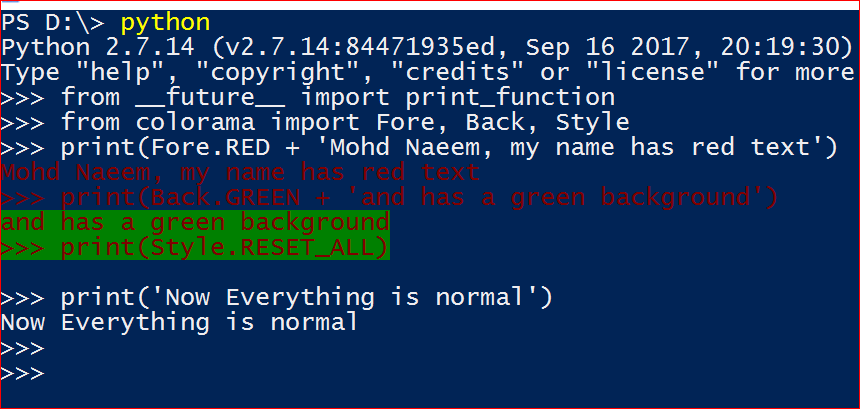
Predefined packages:#to install packages, use pip install !pip install colorama# to import packages, use from packagename import modulename # here we are importing init module from colorama import init # here we are initializing init module init()# from colorama importing Fore, Back modules from __future__ import print_function from colorama import Fore, Back, Style print(Fore.RED + 'Mohd Naeem, my name has red text') print(Back.GREEN + 'and has a green background') print(Style.RESET_ALL) print('Now Everything is normal')Custom created packages:!mkdir NaeemRootPackage !mkdir NaeemRootPackage\NaeemMathPackage # create a folder NaeemRootPackage and another subfolder NaeemMathPackage under it%%writefile NaeemRootPackage\__init__.py #create a file NaeemRootPackage\__init__.py . Python will treat NaeemRootPackage as a package due to the file __init__.py%%writefile NaeemRootPackage\Rootfunctions.py def mycapitalize(text): return text.capitalize() def mytitle(text): return text.title() #create a file NaeemRootPackage\Rootfunctions.py%%writefile NaeemRootPackage\NaeemMathPackage\__init__.py #create a file NaeemRootPackage\NaeemMathPackage\__init__.py . #Python will treat NaeemMathPackage as a package due to the file __init__.py%%writefile NaeemRootPackage\NaeemMathPackage\Mathfunctions.py def mysqr(num): return num**2 def mysqrt(num): return num**(1.0/2) def mycube(num): return num**3 def mycubert(num): return num**(1.0/3) #create a file NaeemRootPackage\NaeemMathPackage\Rootfunctions.py#Lets import from NaeemRootPackage from NaeemRootPackage import Rootfunctions print(Rootfunctions.mycapitalize("mohd naeem")) print(Rootfunctions.mytitle("mohd naeem")) #Lets import from NaeemRootPackage.NaeemMathPackage from NaeemRootPackage.NaeemMathPackage import Mathfunctions print(Mathfunctions.mycube(3)) print(Mathfunctions.mycubert(27))
The Black Jack game
Download from here and run as python BlackJack.py
#!/usr/bin/Python # My Blackjack Game - Simple version # import statements from __future__ import print_function from IPython.display import clear_output import random import os #global variables suits = ('Hearts','Diamonds','Spades','Clubs') ranks = ('Two','Three','Four','Five','Six','Seven','Eight','Nine','Ten','Jack','Queen','King','Ace') values = {'Two':2,'Three':3,'Four':4,'Five':5,'Six':6,'Seven':7,'Eight':8,'Nine':9,'Ten':10,'Jack':10,'Queen':10,'King':10,'Ace':11} playing = True # card classs class Card: def __init__(self, suit, rank): self.suit=suit self.rank=rank def __str__(self): return ("%s of %s" %(self.rank, self.suit)) # deck class class Deck: def __init__(self): self.deck=[] for suit in suits: for rank in ranks: self.deck.append(Card(suit,rank)) def __str__(self): deck_comp = '' for card in self.deck: deck_comp += "\n " + card.__str__() return deck_comp def shuffle(self): random.shuffle(self.deck) def deal(self): single_card = self.deck.pop() return single_card # Hand Class class Hand: def __init__(self): self.cards=[] self.value=0 self.aces=0 def addCard(self, card): self.cards.append(card) self.value += values[card.rank] def adjustForAce(self): while self.value > 21 and self.aces: self.value -= 10 self.aces -= 1 # Chips Class class Chips: def __init__(self): self.total=150 self.bet=0 def winBet(self): self.total += self.bet def looseBet(self): self.total -= self.bet # utility functions def startbet(chips): while True: try: chips.bet = int(input("How many chips do you want to bet?")) except ValueError: print("Sorry!!!!, Please enter a number for bet.") else: if(chips.bet> chips.total): print("Sorry!!!, Please enter the bet value less than your total.") else: break; def hit(deck, hand): hand.addCard(deck.deal()) hand.adjustForAce() def hitorStand(deck,hand): global playing while True: x = int(input("Would you like to Hit or Stand? Enter '0' for hit, '1' for stand ")) if x == 0: hit(deck,hand) elif x == 1: print("Player stands. Dealer is playing.") playing = False else: print("Sorry, please try again.") continue break def ShowCardsNow(player, dealer): print("\nDealer's Hand:") print(" <card hidden>") print('',dealer.cards[1]) print("\nPlayer's Hand:", *player.cards, sep='\n ') def ShowCardsFinally(player, dealer): print("\nDealer's Hand:", *dealer.cards, sep='\n ') print("Dealer's Hand =",dealer.value) print("\nPlayer's Hand:", *player.cards, sep='\n ') print("Player's Hand =",player.value) def playerBusts(player,dealer,chips): print("Player busts!") chips.looseBet() def playerWins(player,dealer,chips): print("Player wins!") chips.winBet() def dealerBusts(player,dealer,chips): print("Dealer busts!") chips.winBet() def dealerWins(player,dealer,chips): print("Dealer wins!") chips.looseBet() def push(player,dealer,chips): print("It's a push!, player and dealer tie.") # game logic while True: # Print an opening statement print('This is a simple version of BlackJack Game! Get as close to 21 as you can without going over!\n\ Dealer hits until she reaches 17. Aces count as 1 or 11.') # Create & shuffle the deck, deal two cards to each player deck = Deck() deck.shuffle() playerHand = Hand() playerHand.addCard(deck.deal()) playerHand.addCard(deck.deal()) dealerHand = Hand() dealerHand.addCard(deck.deal()) dealerHand.addCard(deck.deal()) # Set up the Player's chips playerChips = Chips() # default value 100 # Prompt the Player for their bet startbet(playerChips) # Show cards (but keep one dealer card hidden) ShowCardsNow(playerHand, dealerHand) while playing: # Prompt for Player to Hit or Stand hitorStand(deck, playerHand) # Show cards (but keep one dealer card hidden) ShowCardsNow(playerHand, dealerHand) # If player's hand exceeds 21, run playerBusts() and break out of loop if playerHand.value > 21: playerBusts(playerHand, dealerHand, playerChips) break; # If Player hasn't busted, play Dealer's hand until Dealer reaches 17 if playerHand.value <= 21: while dealerHand.value < 17: hit(deck, dealerHand) # Show all cards ShowCardsFinally(playerHand, dealerHand) # Run different winning scenarios if dealerHand.value > 21: dealerBusts(playerHand,dealerHand,playerChips) elif dealerHand.value > playerHand.value: dealerWins(playerHand,dealerHand,playerChips) elif dealerHand.value < playerHand.value: playerWins(playerHand,dealerHand,playerChips) else: push(playerHand,dealerHand,playerChips) # Inform Player of their chips total print("\nPlayer's winnings stand at",playerChips.total) # Ask to play again new_game = int(input("Would you like to play another hand? Enter '0' for yes '1' for no.")) if new_game == 0: playing=True continue else: print("Thanks for playing!") break
Python – Part 4 of 5 – Under construction
Decorators
- They are used to “decorate” another function
- “Decorate” means modify the bahavior of a function
- The concept of decorators works on the following things:
- calling one fucntion from inside another function
- returning a function from inside another function
- The swtich @ to handle decoration
- How to call one function from inside another fuction
- Here is the inner_func() defined inside outer_func()
- since the scope of this function is within the outer_func()
- we can call inner_func() from within outer_func()
# lets test how to call one function from inside another def outer_func(): print "I am outer function" # here is the inner_func() defined inside outer_func() # since the scope of this function is within the outer_func() # we can call inner_func() from within outer_func() def inner_func(): print "I am inner function" # call inner_func() from within outer_func() inner_func()# Lets call outer_func(), you can see that the inner_func got called from outer_func() outer_func()
- How to call one function from outside another
- To make any inner function to be called from outside the outer function,
- the outer fucntion MUST return the inner function
- and then you can assign this function to a new function
# what if we want to call inner_func() from outside outer_func() def outer_func(): print "I am outer function" # To make any inner function to be called from outside the outer function # the outer fucntion MUST return the inner function # and then you can assign this function to a new function def inner_func(): print "I am inner function" # call inner_func() from within outer_func() return inner_func# We are assigning one function to the other test_inner_func = outer_func() test_inner_func()
- How to call a function as an urgument to the other function
def func1(): print "I am func1." # func_as_argument is an function as argument def func2(func_as_argument): print "I am calling another function" func_as_argument() # func_as_argument called # now pass a function as an argument to another function func2(func1)
- How to create a decorator
# first lets have a function which we need to decorate/modify def old_func(): print "I am old_func." old_func()# now lets create our new function which will call old function as an argument def new_func(func_argument): def wrapper_func(): print "I am new_func and here is some code executed before calling the other function as argument" func_argument() print "I am new_func and here is some code executed after calling the other function as argument" return wrapper_func# now lets try old-func as an argument to new_func # you can see that we are not only able to execute # - the new functionality of new_func but also the old_func too # first lets call old_func() old_func() # now lets call decorator test_wrapper_func = new_func(old_func) test_wrapper_func()# Now lets use the @ on off switchswitch # If this @new_func switch is on , then it will call new as well as old functionality both @new_func def old_func(): print "I am old_func." old_func()# If this @new_func switch is off/commented , then it will call new as well as old functionality both #@new_func def old_func(): print "I am old_func." old_func()
Generators
- Generators are used to generate a sequence to be consumed as and when needed
- instead of ‘return’ we use ‘yield’
- Example without a generator
- list is holding the data in memory
- imagine if we needed to generate a big sequence
# Example without a generator def my_squares(n): # list is holding the data in memory, # imagine if we needed to generate a big sequence result =[] for num in range(n): sqr = num **2 result.append(sqr) return result my_squares(5)
- Example with a generator
- no list is holding the data in memory
- value is consumed as needed
- more efficient
# Example with a generator def generate_squares(n): # no list is holding the data in memory, # value is consumed as needed # more efficient for num in range(n): yield num **2# Now lets see what happens when we execute the function # its does not print the list of numbers squared # it justtells that it is a genarator object generate_squares(5)#Now lets consume it # you can see that the geenator generates the next number as needed for num in generate_squares(5): print(num)# you can cast a generator into a list # it now genrates the list if e need a list list(generate_squares(5))
- Built-in Genarator functions
- range()
- filter()
- map()
#Example of range genarator function for num in range(5): print(num)
- iter and next functions
- They help to generate the next number in sequence
# using next() gen_num =generate_squares(5)# next function generates the next in the sequence number print(next(gen_num))# next function generates the next in the sequence number print(next(gen_num))# next function generates the next in the sequence number print(next(gen_num))# using Iter, we are creating an iterator for the list l = range(11) iter_vals = iter(l)print(next(iter_vals)) print(next(iter_vals)) print(next(iter_vals)) print(next(iter_vals))
Python – Part 5 of 5
Advanced Collection modules
* Python supports the following collection modules - Counter - defaultdict - OrderedDict - namedTuple
- Counter
- it is a dict sublass to count hashtable objects
# lets import Counter disct subclass from collections module from collections import Counter from __future__ import print_function# Counter with alphabets - create a Counter for a string to count the number of occurance of alphabets in a sentance/word ctrAlphabets =Counter("the quick brown fox jumps over the lazy dog.") print(ctrAlphabets)# Counter with words - create a Counter for a string to count the number of occurance of words in a sentance/word ctrWords =Counter("the quick brown fox jumps over the lazy dog.".split(' ')) print(ctrWords)# Counter with list of numbers - create a Counter with list of numbers ctrLists =Counter([1,2,3,4,2,3,1,4,5,1,7,3,6,8,2,9,8,4,7,1,9,2,8,3,7,3,7,4, 5,6]) print(ctrLists)# convert a Counter to list or set ctrLists =Counter([1,2,3,4,2,3,1,4,5,1,7,3,6,8,2,9,8,4,7,1,9,2,8,3,7,3,7,4,5,6]) print(list(ctrLists)) print(set(ctrLists))
- defaultdict
- dictionary like object
- never gives a ‘KeyError’ if a key is not found
# Example without a defaultdict myDict = [] print(myDict['first'])# Example with a defaultdict from collections import defaultdict myDict = defaultdict(object) myDict['first'] for dictItem in myDict: print(dictItem)myDict = defaultdict(lambda: 0) myDict['first']
- OrderedDict
- a dictionary subclass that remembers the order in which its data is added.
from collections import OrderedDict myDict = OrderedDict() myDict['one'] = '1' myDict['two'] = '2' myDict['three'] = '3' myDict['four'] = '4' myDict['five'] = '5' for ky, vl in myDict.items(): print(ky, vl)
- namedtuple
- instead of an index based references it can use index as well as name.
from collections import namedtupleStudent = namedtuple('Student','name age gender') naeem = Student(name='Naeem', age=39, gender="Male" ) print(naeem) print(naeem.name) print(naeem.gender) maria = Student(name='Maria', age=37, gender="Female" ) print(maria) print(maria.name) print(maria.gender)
datetime module
- supports date function
- supports time function
- time function
In [1]:# Import the datetime module import datetimetm = datetime.time(10,29,55) print tmprint('Hour :', tm.hour) print('Minute:', tm.minute) print('Second:', tm.second) print('MicroSecond:', tm.microsecond) print('tzinfo:', tm.tzinfo) print('Min Value:', datetime.time.min) print('Max Value:', datetime.time.max) print('Resolution:', datetime.time.resolution)
- date function
todaysDate = datetime.date.today() print(todaysDate) print('CTime:', todaysDate.ctime()) print('Year :', todaysDate.year) print('Month:', todaysDate.month) print('Day :', todaysDate.day) print('tuple:', todaysDate.timetuple()) print('ordinal:', todaysDate.toordinal()) print('Min Date:', datetime.date.min) print('Max Date:', datetime.date.max) print('Resolution:', datetime.date.resolution)print('Current Local Time', datetime.datetime.now()) print('Current UTC Time', datetime.datetime.utcnow())dt1 = datetime.datetime.now() dt2 = datetime.datetime.utcnow() dt= dt2-dt1 print(dt) print('Delta(days) :', dt.days) print('Delta(seconds) :', dt.seconds)
Python Debugging
- Python supprts a module – pdb and a method set_trace() to debug a code
import pdb a=10 b="naeem" pdb.set_trace() c= a+b print(c)
timeit module
import timeit # lets compare the time to execute 3 types of ways of generating a line # For loop - see lopps is slowest timeit.timeit('"-".join(str(n) for n in range(1000))', number=10000)# List comprehension timeit.timeit('"-".join([str(n) for n in range(1000)])', number=10000)# Map() ---- see map is fastest timeit.timeit('"-".join(map(str, range(1000)))', number=10000)
Regular Expressions
- are used to text matching or parsing
- used effectively in lot of tasks like data clean up, parsing data, pattern matching
- Python uses a module ‘re’ for regular expressions
- How to search : match = re.match(searchword, searchsource) returns a boolean
- How to find location of search : match.start() and match.end() return the start and end locations of the search
- How to find all instances of a search word : all = re.findall(searchword, searchsource)
from __future__ import print_function import re searchwords =['Redis', 'port', 'server'] logdata = 'Redis version=4.0.9, bits=64, pid=1, just started, Redis Running mode=standalone, port=6379.' for searchword in searchwords: print('Searching word: "%s" in log: "%s".' %(searchword, logdata)) match = re.search(searchword, logdata) if(match): print('Successfully searched word: "%s", match start: %d, match end: %d' %(searchword, match.start(), match.end())) else: print('Could not search word: "%s"' %(searchword))searchword ='Redis' logdata = 'Redis version=4.0.9, bits=64, pid=1, just started, Redis Running mode=standalone, port=6379.' match = re.findall(searchword, logdata) print(match) if(match): print('Successfully searched word: "%s"' %(searchword)) else: print('Could not search word: "%s"' %(searchword))#using a function for search def myfindall(searchwords,searchsource): ''' This function searches the searcwords in search source and returns all the matches ''' for searchword in searchwords: print('Searching searchword: %r' %(searchword)) print(re.findall(searchword,searchsource)) print('\n') myfindall(searchwords, logdata)
- Using Meta Characters
- meta-character * means pattern must appear zero or more times.
- meta-character + means pattern must appear at least once.
- meta-character ? means pattern must appears zero or one time.
- meta-character {x} means pattern must appears x number of times
- meta-character {x, y } means pattern must appears x to y number of times in a range
searchsource = 'Za?..pqrs..pppqqq...stttsttt...efef!...Xpxxxx baaaa 123' searchpatterns = [ 'sd*', # s followed by zero or more d's 'sd+', # s followed by one or more d's 'sd?', # s followed by zero or one d's 'sd{3}', # s followed by three d's 'sd{2,3}', # s followed by two to three d's 's[sd]+', # s followed by one or more s or d '[sd]', # either s or d '[^!.? ]' # check for matches that are not a !,.,?, or space '[a-z]+', # sequences of lower case letters '[A-Z]+', # sequences of upper case letters '[a-zA-Z]+', # sequences of lower or upper case letters '[A-Z][a-z]+' # one upper case letter followed by lower case letters r'\d+', # sequence of digits r'\D+', # sequence of non-digits r'\s+', # sequence of whitespace r'\S+', # sequence of non-whitespace r'\w+', # alphanumeric characters r'\W+', # non-alphanumeric ] myfindall(searchpatterns, searchsource)# splitting using regular expressions print(re.split(',',"name,age,gender")) print(re.split(',',"naeem,21,M")) print(re.split('\t',"name\tage\tgender")) print(re.split('\t',"naeem\t21\tM")) print(re.split(',',"name,age,gender")) print(re.split(',',"naeem,21,M")) print(re.split('\|',"name|age|gender")) print(re.split('\|',"naeem|21|M"))
Advanced Objects and Data structures
- Pythons supports lots of advanced objects as well as data structures
- Advanced Numbers
# Hexadecimals print(hex(255)) print(hex(1000))# Binary print(bin(255)) print(bin(1024)) print(bin(512))# Power print(pow(5,3)) # means 5**3 print(5**3) # means 5**3 print(pow(2,8)) # means 2**8 print(2**8) # means 2**8 print(pow(2,8,4)) # means (2**8)%4 print((2**8)%4) # means (2**8)%4 print(pow(2,8,5)) # means (2**8)%5 print((2**8)%5) # means (2**8)%5# Absolute print(abs(-1234)) print(abs(+1234))# Rounding myPI = float(22)/7 print(myPI) print(round(myPI,2)) print(round(myPI,5))
- Advanced Strings
# capitalize, upper, lower functions myName = "mohd naeem" print(myName.capitalize()) # capitalizes only 1st character print(myName.title()) # capitalizes 1st character of each word print(myName.upper()) # capitalizes only 1st character print(myName.lower()) # capitalizes only 1st character# count, find, center functions myName = "mohd naeem" print(myName.count('e')) # counts number of occurances of a character print(myName.find('o')) # finds the position or location of 1st instance of a character print(myName.upper().center(50,'#')) # counts number of occurrences of a character# Is checker functions print("naeem123".isalnum()) # checks alphanumeric print("naeem".isalnum()) # checks alphanumeric print("naeem".isalpha()) # checks alphabetic print("naeem".islower()) # checks is lower print("Naeem".islower()) # checks is lower print("Mohd Naeem".istitle()) # checks is title print("mohd naeem".istitle()) # checks is title print(" ".isspace()) # checks is space print("M".isspace()) # checks is space print("Mohd Naeem".endswith('m')) # checks endswith print("Mohd Naeem".startswith('M')) # checks endswith print("Mohd Naeem".endswith('t')) # checks endswith print("Mohd Naeem".startswith('l')) # checks endswith print("Mohd Naeem".split(' ')) # splits the word on split character and returns the tuple print("Mohd Naeem".split('N')) # splits the word on split character and returns the tuple print("Mohd Naeem".partition('N')) # partitions the word on partition character and returns the tuple print("Mohd Naeem".partition('d')) # partitions the word on partition character and returns the tuple
- Sets
myset =set() # defines a blank set myset.add(1) # add an element to a set myset.add(2) myset.add(1) myset.add(3) myset.add(4) newset=myset.copy() # copies a set ointo another newset.add(5) print(myset) print(newset) print(newset.difference(myset)) # checks the difference between 2 sets print(newset.intersection(myset)) # checks the intersection between 2 sets print(newset.union(myset)) # does a union print(myset.issubset(newset)) # checks the 1 set is a subset of the other print(myset.isdisjoint(newset)) # checks if 2 sets don't have anything common print(newset.issuperset(myset)) # checks the 1 set is a superset of the other newset.discard(5) # discards an element in a set myset.clear() # cleans up a set newset.clear() print(myset) print(newset)
- Dictionaries
# dictionary comprehensions -not so common but is possible {a:a**2 for a in range(10)}mydict ={0: 0, 1: 1, 2: 4, 3: 9, 4: 16, 5: 25, 6: 36, 7: 49, 8: 64, 9: 81} for key in mydict.keys(): print(key) for value in mydict.values(): print(value) for item in mydict.items(): print(item)
- Lists
mylist = [1,2,3,3,5] mylist.append(4) # appends an element/elements to list as an element or as a set within the set print(mylist) mylist.extend([9]) # extends a set as an element print(mylist) mylist.append([6,7]) # appends an element to a list as an element or a set to an list as set print(mylist) mylist.extend([8,10]) # extends an element to list print(mylist) print(mylist.count(3)) # find the number of occurances of an items print(mylist.index(9)) # find index of an element mylist.pop() # pops 1st element mylist.pop(7) # pops nth index print(mylist) mylist.insert(0,99) # inserts at element at nth index print(mylist) mylist.remove(99) # removes an element print(mylist) mylist.reverse() # reverses a list print(mylist) mylist.sort() # sorts a list print(mylist)
Multi-threading and Multiprocessing
- In the normal Python programs we tried till date we used only 1 process and 1 thread(by default)
- but its not efeective use of the resouces like CPU, Network bandwidth when it comes to I/O and CPU intesive applications.
- I/O Intensive applications – they would consume more and more I/O bandwidth available
- Reading and Writing files
- Downloading content(image, media etc)
- Sharing files over the network
- Webscraping
- CPU Intensive applications – they would consume more and more CPU available
- Parallel processing e.g Big data
- Data formatting, scrubbing, cleanups
- computing
- Image processing
- Python is a very advanced language supporting lot of features to support Mutlithreading and Multiprocessing.4
- Process Vs Thread
- Process – it’s the running instance of a program. When we run any python program, its the process.
- You can see the process using ps -a - This process also has atleast 1 thread - called Main(__main__) thread - You can configure and design to run a program which spwans into multiple processes- Thread – It is the path of execution of a program.
- E.g. the Main Thread defines the path of execution of a program - You can configure and design to run a process which can spawn multiple threads.- We will be using the Monte Carlo algorithm of evaluating PI using
- single process with single thread
- single process with multiple threads
- multiple processes with mutiple threads
- Example one – Single process with single thread
- we will see that we get a value of PI but not very accurate
import random as myr import math as mym def getmyPI(num): # count of all darts which land inside. inside = 0 # total count of darts to throw. total = num # Iteratition for each dart thrown for i in range(0, total): # Generate random x, y x2 = myr.random()**2 y2 = myr.random()**2 # Increment inside, if inside the circle. if mym.sqrt(x2 + y2) < 1.0: inside += 1 # pi = (inside / total) * 4 mypi = (float(inside) / total) * 4 return mypi # Value of mypi print(getmyPI(10))
- Example one – Single process with multiple thread
- we will see that we get a better value of PI
%%writefile calcPI.py from __future__ import print_function import random as myr import math as mym from multiprocessing import Pool import timeit def getmyPI(num): # count of all darts which land inside. inside = 0 # total count of darts to throw. total = num # Iteratition for each dart thrown for i in range(0, total): # Generate random x, y x2 = myr.random()**2 y2 = myr.random()**2 # Increment inside, if inside the circle. if mym.sqrt(x2 + y2) < 1.0: inside += 1 # pi = (inside / total) * 4 mypi = (float(inside) / total) * 4 return mypi # Value of mypi if __name__ == '__main__': N = 10**5 # total iterations P = 1 # number of processes p = Pool(P) print(timeit.timeit(lambda: print(f'{sum(p.map(getmyPI, [N//P]*P))/P:0.5f}'), number=10)) p.close() p.join() print(f'{N} total iterations with {P} processes')! python calcPI.py
- Example one – Multiple process with multiple thread
- we will see that we get an even better value of PI
%%writefile calcPI.py from __future__ import print_function import random as myr import math as mym from multiprocessing import Pool import timeit def getmyPI(num): # count of all darts which land inside. inside = 0 # total count of darts to throw. total = num # Iteratition for each dart thrown for i in range(0, total): # Generate random x, y x2 = myr.random()**2 y2 = myr.random()**2 # Increment inside, if inside the circle. if mym.sqrt(x2 + y2) < 1.0: inside += 1 # pi = (inside / total) * 4 mypi = (float(inside) / total) * 4 return mypi # Value of mypi if __name__ == '__main__': N = 10**5 # total iterations P = 5 # number of processes p = Pool(P) print(timeit.timeit(lambda: print(f'{sum(p.map(getmyPI, [N//P]*P))/P:0.5f}'), number=10)) p.close() p.join() print(f'{N} total iterations with {P} processes')! python calcPI.py
This is the end of this article.