
Idempotent keys stop clone storms. Field ownership and retry windows stop the quieter failure: a delayed Connect job that wins against a content editor who already fixed the record by hand.
Executive Thesis
Most Connect postmortems I join already know about soft external ids. Teams learned that the hard way. What still surprises them is field ownership. A recipe can be perfectly idempotent on the item id and still trash the wrong fields when a retry lands after a human edit.
This Field Note assumes you can open Sitecore Connect, authenticate connections, and ship a starter recipe. If you need the click path, use the W38 recipes guide first. Here we lock three contracts: who owns each field, how long a job may legally write, and what happens when the source-of-truth clock disagrees with the CMS clock.
I treat ownership as a named matrix, not a hallway agreement. Retry windows are time plus version rules, not 'Workato will figure it out.' When those two exist, Connect becomes boring again.
Basics: Systems, Fields, and Clocks
Sitecore Connect (Workato under the Sitecore Cloud Portal) moves data between Content Hub, XM/XM Cloud, CRM, ticketing, and HTTP endpoints. Each hop has fields. Each field needs one writer in steady state. Secondary systems may propose values. Only the owner may commit them.
Content Hub entities and XM items both carry timestamps, workflow states, and often a custom last-synced or external-id field. Those clocks are how you decide whether a late job is still allowed to write. Without clocks, every retry looks as valid as the first attempt.
Basics checklist before you design ownership: split UAT and prod projects, name connections with env + system + purpose, and never mix write connections across environments in one recipe.
- One system-of-record per field family (for example CRM owns Email, Hub owns AssetTitle, XM owns PresentationTitle).
- Every write recipe stores durable external id plus source updated-at.
- Human edits in XM or Hub bump a content clock the recipe must respect.
What Field Ownership Means in Practice
Ownership is not 'the integration team owns everything connected.' Ownership is per field or per field group. Marketing may own short description in Content Hub. Localization may own XM language versions. CRM may own email and account id. The recipe is a courier with a badge, not a new author.
When two systems both think they own Title, you will see ping-pong updates: Hub publish job writes Title, editor fixes casing in XM, overnight reconcile overwrites the fix, editor files a ticket, someone disables the recipe, sync debt grows.
Write the matrix in a shared doc the recipe owner can link from the Workato description. Columns I use: Field path, System of record, Allowed writers, Read-only mirrors, Conflict policy, Retry allowed after human edit (yes/no).
Designing Retry Windows
A retry window answers: if this job runs again at time T2, is it still allowed to write the values captured at T0? If a human edited the item at T1, and T0 < T1 < T2, a naive retry is a stale write.
I encode that as three gates before any update action. Gate 1: durable key lookup still returns one item. Gate 2: source updated-at is newer than the last successfully applied source updated-at stored on the item (or newer than the content clock you chose). Gate 3: if a human-edit flag or workflow state says In Review / Locked, stop and alert instead of writing.
Retry windows are not only time boxes like 'within 15 minutes.' Time boxes help with duplicate webhook delivery. Version windows handle editor races. You usually need both.
- Capture source updated-at (or etag / version) in the trigger step output.
- On update, compare against last-applied source version on the Sitecore item.
- If source is older or equal, Stop and log 'stale retry ignored'.
- If human lock is present, Stop and Slack the content owner.
- Only then map datapills into owned fields and commit.
Ownership Matrix and Stale-Write Guards
Build the matrix before the pretty recipe. Start with ten fields that actually hurt when wrong: title, slug or name, primary asset link, workflow state, locale fields, CRM email, external id, last synced at, taxonomy, and one free-text body field. Expand later.
Stale-write guards live in the recipe as IF conditions, not in tribal knowledge. Example: IF XM __Updated by is in the content-author role group AND __Updated > job.enqueued_at THEN stop. Exact field names vary by template. The pattern does not.
For Content Hub, prefer entity version or modified-on from the Hub connector. For XM, prefer a dedicated LastAppliedSourceVersion field your recipe controls, because Sitecore system timestamps move for unrelated saves.

Last-Writer Versus System-of-Record Rules
Last-writer-wins is easy to code and usually wrong for regulated content. System-of-record-wins is harder and usually correct. Hybrid rules are common: CRM wins Email forever; Hub wins Asset metadata; XM wins presentation fields; last-writer wins only for a narrow scratch field used in pilots.
Encode the rule in the step name so job history reads like an audit. Prefer Upsert XM Email from CRM (SoR) over Update item. Prefer Skip Title write (Hub SoR; XM mirror read-only) when the matrix says XM must not author Title.
If business leaders insist on last-writer for a field, force a visible conflict channel: Slack when overwriting a human edit within N hours. Silent last-writer is how trust dies.
Recipe Pattern: Hub Asset Approved to XM Mirror
Concrete flow I use for teaching ownership without boiling the ocean. Trigger: Content Hub asset enters Approved. Actions: look up XM item by ExternalAssetId; if missing create with required fields only; if present compare Hub ModifiedOn to LastAppliedHubModifiedOn; write only Hub-owned fields; leave XM presentation fields untouched; set LastAppliedHubModifiedOn; on error Slack #content-ops.
Notice what the recipe refuses to do. It does not rewrite MetaTitle if localization owns that field in XM. It does not clear a lock. It does not create a second item when lookup returns two matches; it stops and alerts because that is data corruption, not a sync miss.
Clone the recipe for UAT first. Swap connections for prod only after one real asset survives approve, edit-in-XM, and a forced retry without clobbering the edit.
- Owned writes: Hub title, Hub description, primary asset URL, taxonomy ids.
- Never writes: XM presentation title, layout fields, workflow comments.
- Stops: zero or many lookup hits, stale ModifiedOn, locked workflow state.
Workato Steps That Enforce the Window
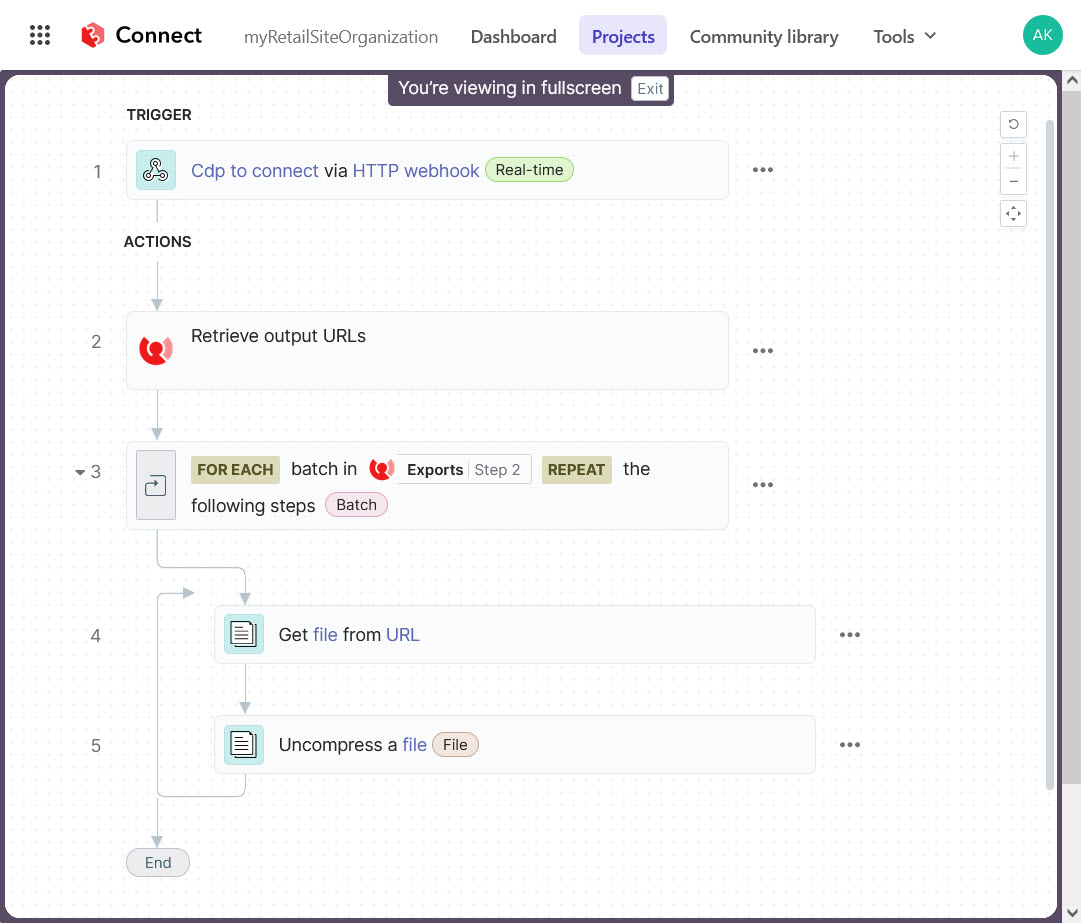
In the Connect canvas, put Handle errors around the write block and route failures to Slack with recipe name, job id, external id, and the gate that failed. Name every step. Default names hide the ownership story at 2 a.m.
Use formula mode when comparing timestamps. Do not paste string dates into text fields and hope. If the connector returns nested JSON, expand datapills carefully; wrong path comparisons fail open and look like 'sync works' until the first late retry.
Callable recipe functions help when multiple triggers share the same upsert guard. Parent recipes stay readable: trigger, enrich, call Upsert XM by ExternalAssetId with ownership gates inside the function.

Monday Morning Review for Ownership Drift
Once a week, scan failed jobs, then jobs that stopped on stale retry, then recipes with zero runs. Stale stops are healthy if volume is small. A spike means someone changed field ownership in the CMS without updating the matrix.
Also sample five successful jobs and open the item history. Confirm only owned fields moved. If presentation fields flipped, your map drifted even though the job is green.
Keep a short runbook: stop recipe, fix matrix, replay only if source version is still newer than last applied, verify no duplicate item, notify the content owner who was mid-edit.
How This Differs from Soft-Key Idempotency Posts
Earlier Field Notes covered soft keys that clone items on retry, Content Hub sync blame games, and reliable sync patterns across Hub, XM, and Commerce. W38 walked recipe construction step by step. Those remain required reading.
This note adds the layer that shows up after keys are hard: editors and integrations fighting over the same fields on a timeline. If you only ship durable ids, you still lose quiet wars on Title and metadata. Ownership and retry windows close that gap.
Further Reading Habits
Prefer official Connect and Workato docs for canvas behavior. Prefer your own matrix doc for field law. Prefer item history over job success badges when you audit. Link the matrix URL in the recipe description so the next owner does not invent policy at midnight.
Ops Hardening Before You Call It Done
Capacity and projects still matter while you chase ownership. Non-prod Connect capacity is capped. A retry loop that ignores stop conditions can burn the month and still corrupt fields. Pair ownership gates with task-budget awareness.
Connection naming remains part of ownership. A prod CRM write connection used from a UAT recipe is an ownership bug with teeth. Keep least-privilege accounts and rotate them on the same calendar as other production secrets.
Document the durable external id format in the matrix footer. If Salesforce Lead Id is the key today and Marketing changes to Hub entity id tomorrow without a migration plan, every retry window you built will compare the wrong clocks.
When legal or brand needs an evidence pack, export job ids for a sample of overwrites prevented by stale stops. That log line is the proof that the recipe respected a human edit. Green job counts alone do not prove respect.
If you inherit a recipe farm with no matrix, do not rewrite everything in one sprint. Pick the five fields that caused the last two incidents. Put ownership and retry gates on those paths first. Expand the matrix as templates stabilize.
Training rule I use with new integration owners: ship Hub-to-Slack alerts before Hub-to-XM writes, then ship owned-field writes with stops, then and only then add fan-out. Ownership discipline scales poorly when the first recipe already writes twelve systems.
Conflict Scenarios Worth Rehearsing
Scenario A: webhook retries three times in two minutes with identical payload. Time box alone might allow all three. Version window should allow the first apply and ignore the rest once last-applied matches source version.
Scenario B: editor changes Title in XM while Hub still owns Title. Matrix says Hub wins. Recipe may overwrite on next Hub change, but should Slack if it overwrites within an hour of a human XM save so editors learn the rule instead of fighting ghosts.
Scenario C: lookup returns two XM items for one ExternalAssetId. Stop. Never pick the first. Merge is a human task. Retries must keep stopping until the duplicate is gone.
Scenario D: CRM patch arrives with empty optional fields. Ownership map must say whether empty means clear or means skip. Silent clears are a common 'retry' surprise when connectors serialize nulls differently between Test and Start.
Scenario E: Content Hub Approve fires, XM item is locked in workflow. Stop and alert. Writing through a lock teaches authors that integrations ignore process. They will bypass workflow next time.
Rehearse A through E in UAT with screenshots in the runbook. Ten minutes of rehearsal beats a week of production archaeology.
Further reading
- Sitecore Connect introduction
- Workato datapills and mapping
- Workato handle errors
- Content Hub documentation hub
- XM Cloud documentation
Actionable checklist
- Publish a per-field ownership matrix linked from each write recipe
- Store durable external id + last-applied source version on every synced item
- Add stale-retry stop before every update action
- Respect human locks / In Review states with alert, not overwrite
- Split Hub-owned vs XM-owned fields in the datapill map
- Name steps with SoR intent for audit-readable job history
- Handle errors to Slack with gate reason and job id
- UAT force-retry test after a human edit before prod clone
- Monday review: failed jobs, stale stops, five successful item histories
- Update matrix when templates or roles change; never only in chat